mirror of
https://github.com/sipeed/NanoKVM.git
synced 2026-11-10 09:59:15 -06:00
Compare commits
80 Commits
| Author | SHA1 | Date | |
|---|---|---|---|

|
c77981cc0c | ||
|
|
34746afea3 | ||
|
|
a4978d93d6 | ||
|
|
01e28f10ae | ||
|
|
ea9068fd0d | ||
|
|
d85823abcf | ||
|
|
4c0027ffd3 | ||
|
|
afb868af30 | ||
|
|
66b1d5dc30 | ||
|
|
7d8cdc74c6 | ||
|
|
809581df49 | ||
|
|
5d47a8d48d | ||
|
|
6242f1931e | ||
|
|
b768219c18 | ||
|
|
6935923bd1 | ||
|
|
559e6e2556 | ||
|
|
f354fdfbf4 | ||
|
|
f242b5a378 | ||
|
|
e18ec2219d | ||
|
|
d075ae58d9 | ||
|
|
e8ccac8e61 | ||
|
|
7c8f9f3cd8 | ||
|
|
66e434db24 | ||
|
|
0be553c4c8 | ||
|
|
1dda0f29be | ||
|
|
fbdedc7d8a | ||
|
|
e325352309 | ||
|
|
bf51b50346 | ||
|
|
96b52f3ac0 | ||
|
|
ad44db254b | ||
|
|
736b89d7d1 | ||
|
|
3122531cae | ||
|
|
cbb47ab735 | ||
|
|
fa8d4fd5ca | ||
|
|
423d05a087 | ||
|
|
7036e94dab | ||
|
|
3a19180a51 | ||
|
|
f8f8920fc5 | ||
|
|
507b53c10e | ||
|
|
6aafb78680 | ||
|
|
c83dc5565c | ||
|
|
59a03cacef | ||
|
|
c6af287b11 | ||
|
|
bc636bd9fd | ||
|
|
1f2b6c5d44 | ||
|
|
b42ffe8e0b | ||
|
|
f9244b36df | ||
|
|
87f697622c | ||
|
|
52dbc0fe40 | ||
|
|
4a69bdcd12 | ||
|
|
e9e47d797c | ||
|
|
66cdb5e376 | ||
|
|
c7575393c9 | ||
|
|
3b9005e9a8 | ||
|
|
e3fd5876d2 | ||
|
|
f71c2d3f8d | ||
|
|
7163854185 | ||
|
|
8037081e0c | ||
|
|
642a00051e | ||
|
|
7f9bd1c457 | ||
|
|
477f7dfa03 | ||
|
|
d45aaf6cb2 | ||
|
|
4650da8373 | ||
|
|
13128a8a90 | ||
|
|
23b19015f4 | ||
|
|
843a1f97ce | ||
|
|
43d6002542 | ||
|
|
f9d9677bc0 | ||
|
|
49220d8024 | ||
|
|
013d76b006 | ||
|
|
c7d3755149 | ||
|
|
8d67ecd6a0 | ||
|
|
6005bb1b8d | ||
|
|
c4e8d19649 | ||
|
|
82be18c469 | ||
|
|
e6565fbe4b | ||
|
|
087dbaded9 | ||
|
|
6c42c57e59 | ||
|
|
d098a5ef09 | ||
|
|
040335ace0 |
50
CHANGELOG.md
50
CHANGELOG.md
@@ -1,3 +1,53 @@
|
||||
## 2.2.8 [01e28f1](https://github.com/sipeed/NanoKVM/commit/01e28f10ae8b581d484bb6077ddfe7bbe4e57919) (2025-05-22)
|
||||
|
||||
* feat: add AZERTY virtual keyboard Layout (thanks to [@felix068](https://github.com/felix068))
|
||||
* feat: add support for enabling/disabling HDMI output (PCIe version only) (thanks to [@tpretz](https://github.com/tpretz))
|
||||
* feat: add support for custom mouse wheel speed
|
||||
* fix: prevent direct H.264 stream buffer overflow and replay issues
|
||||
* perf: improve keyboard paste performance (thanks to [@ethanperrine](https://github.com/ethanperrine))
|
||||
* Localization
|
||||
* update Korean translation (thanks to [@kmw0410](https://github.com/kmw0410))
|
||||
* update Ukrainian translation (thanks to [@arbdevml](https://github.com/arbdevml))
|
||||
* update Russian translation (thanks to [@arbdevml](https://github.com/arbdevml))
|
||||
|
||||
## 2.2.7 [e18ec22](https://github.com/sipeed/NanoKVM/commit/e18ec2219d22886529575d1fdaad5c320e05f5b2) (2025-05-08)
|
||||
|
||||
* feat: add HTTPS support
|
||||
* feat: support direct H.264 streaming over HTTP
|
||||
* Localization
|
||||
* update Russian translation (thanks to [polyzium](https://github.com/polyzium))
|
||||
* update Dutch translation (thanks to [LeonStraathof](https://github.com/LeonStraathof))
|
||||
* update Ukrainian translation (thanks to [click0](https://github.com/click0))
|
||||
* update German translation (thanks to [3limin4tor](https://github.com/3limin4tor))
|
||||
|
||||
## 2.2.6 [c83dc55](https://github.com/sipeed/NanoKVM/commit/c83dc5565c9dbed22336661a8832edbd93a06d11) (2025-04-17)
|
||||
|
||||
* feat: add mouse jiggler to prevent system sleep
|
||||
* feat: add support for swap memory
|
||||
* feat: add support for customizing the device hostname
|
||||
* feat: add support for customizing the web page title
|
||||
* feat: add support for assigning custom names to Wake-on-LAN MAC addresses
|
||||
* feat: add confirmation prompts for power operations
|
||||
* feat: add logo to the login page (thanks to [S33G](https://github.com/S33G))
|
||||
* fix: fix possible privacy issues with MIC drivers. [Repair Record](https://github.com/sipeed/NanoKVM/commit/f9244b36df090a05cd59ba11ea4fd01e9b638995)
|
||||
* fix: fix iptables rule that could interfere with SSH connections (thanks to [scpcom](https://github.com/scpcom))
|
||||
* fix: fix the static IP gateway configuration might not apply correctly (thanks to [xitation](https://github.com/xitation))
|
||||
* perf: optimized OLED display handling and sleep logic
|
||||
* perf: improve H.264 streaming reliability by adding a heartbeat mechanism
|
||||
* perf: set the minimum screen size to 640x480
|
||||
* perf: add display of both wired and wireless IPv4 addresses in the settings page
|
||||
* perf: update the Thai language translations (thanks to [ChokunPlayZ](https://github.com/ChokunPlayZ))
|
||||
* chore: bump axios to 1.8.4
|
||||
* chore: bump golang.org/x/net to v0.39.0
|
||||
* chore: bump github.com/golang-jwt/jwt/v5 to to v5.2.2
|
||||
|
||||
## 2.2.5 [3286cc2](https://github.com/sipeed/NanoKVM/commit/3286cc2f85a14133d65935cb476c833dcf151459) (2025-03-26)
|
||||
|
||||
* fix: server crash caused by MJPEG frame detection error
|
||||
* feat: add HID-Only mode
|
||||
* feat: support preview updates
|
||||
* perf: improve image reading performance by optimizing screen parameters
|
||||
|
||||
## 2.2.4 [1bf986d](https://github.com/sipeed/NanoKVM/commit/1bf986d41b34d568c1ffee5df90ce61b6b08456b) (2025-03-21)
|
||||
|
||||
* fix: resolve USB initialization issue
|
||||
|
||||
184
README.md
184
README.md
@@ -6,22 +6,77 @@ NanoKVM
|
||||
|
||||
|
||||
<h3>
|
||||
<a href="https://wiki.sipeed.com/hardware/en/kvm/NanoKVM/introduction.html"> Quick Start </a>
|
||||
|
|
||||
<a href="https://cn.dl.sipeed.com/shareURL/KVM/nanoKVM"> Hardware </a>
|
||||
<a href="https://wiki.sipeed.com/hardware/en/kvm/NanoKVM/introduction.html">🚀 Quick Start</a>
|
||||
|
|
||||
<a href="https://cn.dl.sipeed.com/shareURL/KVM/nanoKVM">🛠️ Hardware Details</a>
|
||||
|
|
||||
<a href="https://github.com/sipeed/NanoKVM/releases/latest">💾 Firmware Releases</a>
|
||||
</h3>
|
||||
|
||||
English | [中文](./README_ZH.md) | [日本語](./README_JA.md)
|
||||
|
||||
</div>
|
||||
|
||||
> Your NanoKVM is powered by [RISC-V](https://en.wikipedia.org/wiki/RISC-V)!
|
||||
> If you have any issues or suggestions, creating issue here, or tell us with [MaixHub Discussion](https://maixhub.com/discussion/nanokvm).
|
||||
## 🌟 What is NanoKVM?
|
||||
|
||||
## Opensource & Contribution
|
||||
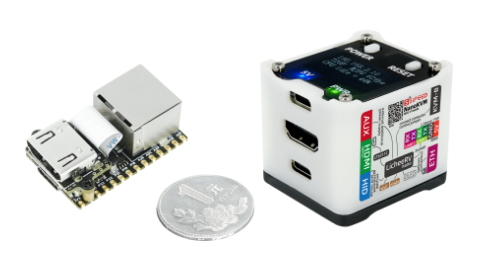
NanoKVM is a series of compact, open-source IP-KVM devices. Built upon the LicheeRV Nano (RISC-V), NanoKVM allows you to remotely access and control computers as if you were sitting right in front of them – perfect for managing servers, embedded systems, or any headless machine.
|
||||
|
||||
### 2025.03.04 Update Content
|
||||
+ Updated directory structure
|
||||
## 📦 Product Family
|
||||
|
||||
We offer several NanoKVM versions to suit your needs:
|
||||
|
||||
* **NanoKVM-Cube Lite:** A barebones kit for DIY enthusiasts and enterprise users needing bulk deployment.
|
||||
* **NanoKVM-Cube Full:** A complete package with a sleek case, accessories, and a pre-flashed system SD card. Ready to use out-of-the-box, ideal for individual users.
|
||||
* **NanoKVM-PCIe:** A unique form factor with a PCIe bracket for internal chassis mounting, drawing power directly from a PCIe slot. And add optional WiFi and PoE functions.
|
||||
|
||||
### 🚀 NanoKVM-Pro: The 4K Powerhouse
|
||||
|
||||
Based on popular demand, we've upgraded NanoKVM to the **NanoKVM-Pro**:
|
||||
|
||||
* **Resolution Upgrade:** From 1080P to stunning **4K@30fps / 2K@60fps**.
|
||||
* **Network Upgrade:** Blazing fast **GbE + PoE + WiFi 6** (up from 100M Ethernet).
|
||||
* **Latency Upgrade:** Encoder accelerated latency reduced from 100-150ms to **50-100ms**.
|
||||
|
||||
> The NanoKVM-Pro is now available for pre-sale! [Click here for product details](https://sipeed.com/nanokvm/pro).
|
||||
|
||||
<div align="center">
|
||||
|
||||

|
||||
|
||||
</div>
|
||||
|
||||
## 🛠️ Technical Specifications
|
||||
|
||||
| Product | NanoKVM-Pro | NanoKVM (Cube/PCIe) | GxxKVM | JxxKVM |
|
||||
|------------------- |-------------------------------------- |---------------------------------- |----------------------------------- |------------------------------------ |
|
||||
| Core | AX631 2xA53 1.5G | SG2002 1xC906 1.0G | RV1126 4xA7 1.5G | RV1106 1xA7 1.2G |
|
||||
| Memory & Storage | 1G LPDDR4X + 32G eMMC | 256M DDR3 + 32G microSD | 1G DDR3 + 8G eMMc | 256M DDR3 + 16G eMMC |
|
||||
| System | NanoKVM / PiKVM | NanoKVM | GxxKVM | JxxKVM |
|
||||
| Resolution | 4K@30fps / 2K@60fps | 1080P@60fps | 4K@30fps / 2K@60fps | 1080P@60fps |
|
||||
| HDMI Loopout | 4K loopout | x | x | x |
|
||||
| Video Encoding | MJPEG / H.264 / H.265 | MJPEG / H264 | MJPEG / H264 | MJPEG / H264 |
|
||||
| Audio Transmit | ✓ | x | ✓ | x |
|
||||
| UEFI / BIOS | ✓ | ✓ | ✓ | ✓ |
|
||||
| Emulated USB Keyboard & Mouse | ✓ | ✓ | ✓ | ✓ |
|
||||
| Emulated USB ISO | ✓ | ✓ | ✓ | ✓ |
|
||||
| IPMI | ✓ | ✓ | ✓ | x |
|
||||
| Wake-on-LAN | ✓ | ✓ | ✓ | ✓ |
|
||||
| Web Terminal | ✓ | ✓ | ✓ | ✓ |
|
||||
| Serial Terminal | 3 channels | 2 channels | x | 1 channel |
|
||||
| Custom Scripts | ✓ | ✓ | x | x |
|
||||
| Storage | 32G eMMC 300MB/s | 32G MicroSD 12MB/s | 8G eMMC 120MB/s | 8G eMMC 60MB/s |
|
||||
| Ethernet | 1000M | 100M | 1000M | 100M |
|
||||
| PoE | Optional | Optional | x | x |
|
||||
| WiFi | Optional WiFi6 | Optional WiFi6 | x | x |
|
||||
| ATX Power Control | ✓ | ✓ | Extra $15 | Extra $10 |
|
||||
| Display | 1.47" 320x172 LCD / 0.96" 128x64 OLED | 0.96" 128x64 OLED | - | 1.68" 280x240 |
|
||||
| More Features | Sync LED Strip / Smart Assistant | - | - | - |
|
||||
| Power Consumption | 0.4A@5V | 0.2A@5V | 0.4A@5V | 0.2A@5V |
|
||||
| Power Input | USB-C or PoE | USB-C | USB-C | USB-C |
|
||||
| Dimensions | 65x65x26mm | 40x36x36mm | 80x60x17.5mm | 60x43x(24~31)mm |
|
||||
| Price | ~~$79~~ $69 ATX / ~~$89~~ $79 Desk | $25 Lite / $50 Full(with ATX) | $89 no ATX / $102 with ATX | $69 no ATX / $79 with ATX |
|
||||
|
||||
## 📂 Project Structure
|
||||
|
||||
``` shell
|
||||
├── kvmapp # APP update package
|
||||
@@ -30,73 +85,15 @@ English | [中文](./README_ZH.md) | [日本語](./README_JA.md)
|
||||
│ ├── kvm_system # kvm_system application
|
||||
│ ├── server # NanoKVM front-end and back-end applications
|
||||
│ └── system # Necessary system components
|
||||
├── web # NanoKVM front-end
|
||||
├── server # NanoKVM back-end
|
||||
├── support # Auxiliary functions (image subsystem, system status, system updates, screen, keys, etc.)
|
||||
│ ├── sg2002 # NanoKVM-Lite/Full/PCIe
|
||||
│ └── h618 # NanoKVM-Pro
|
||||
├── web # NanoKVM front-end
|
||||
├── LICENSE
|
||||
├── README_JA.md
|
||||
├── README.md
|
||||
├── README_ZH.md
|
||||
└── CHANGELOG.md
|
||||
├── ...
|
||||
```
|
||||
|
||||
+ Add NanoKVM app installation package `kvmapp`
|
||||
+ Add compilation scripts and compilation instructions
|
||||
|
||||
### Update 2025.02.19
|
||||
All components of NanoKVM were open-sourced, including the [front-end](https://github.com/sipeed/NanoKVM/tree/main/web), [back-end](https://github.com/sipeed/NanoKVM/tree/main/server), [kvm_vision](https://github.com/sipeed/NanoKVM/tree/main/vision/components/kvm), [kvm_mmf](https://github.com/sipeed/NanoKVM/tree/main/vision/components/kvm_mmf), [kvm_system](https://github.com/sipeed/NanoKVM/tree/main/support), the [kvmapp update package](https://github.com/sipeed/NanoKVM-System/tree/main/kvmapp), [system sdk](https://github.com/sipeed/LicheeRV-Nano-Build/tree/NanoKVM), and [packaging methods](https://github.com/sipeed/LicheeRV-Nano-Build/blob/NanoKVM/kvm/NanoKVM_img.sh).
|
||||
|
||||
### Update 2025.02.14
|
||||
Newest APP v2.1.6 add most security enhancements&bug fix, recommend regular users upgrade to this version or newer.
|
||||
|
||||
### Update 2025.02.05
|
||||
For users concerned about security, you can read this issue: https://github.com/sipeed/NanoKVM/issues/301 , you will find explanations addressing all security concerns.
|
||||
GitHub, as an open and transparent platform, provides a space for discussing so-called "backdoor" concerns. Open-source makes products more secure!
|
||||
|
||||
### Update 2024.10.18
|
||||
|
||||
We have open-sourced the backend code in 10.8, and thank you for civil PR it immediately, we will give you newest NanoKVM-PCIe as a reward!
|
||||
The mid-Oct batch is starting testing and packaging, most orders before 10.1 will ship out next and next next week.
|
||||
The aliexpress shipping date is change to Dec since 10.1, it is a conservative delivery time. the order in Oct. should send out during 11.15~12.15.
|
||||
|
||||
## Introduction
|
||||
|
||||
Lichee NanoKVM is an IP-KVM product based on LicheeRV Nano, inheriting the extreme size and powerful features of LicheeRV Nano.
|
||||
The Lichee NanoKVM is available in two versions:
|
||||
NanoKVM Lite is a basic configuration that is suitable for individual users with certain DIY capabilities and enterprise users with bulk requirements.
|
||||
The NanoKVM Full is a full version with a sophisticated case and complete accessories, as well as a built-in system mirror card that is ready to use at boot, and is recommended for individual users.
|
||||
|
||||

|
||||
|
||||
## Tech Specs
|
||||
|
||||
| Products | NanoKVM (Lite) | NanoKVM (Full) | PiKVM V4 |
|
||||
|------------------- |-------------------------------------- |---------------------------------- |----------------------------------- |
|
||||
| Compute Units | LicheeRV Nano(RISCV) | LicheeRV Nano(RISCV) | CM4 (ARM) |
|
||||
| Resolution | 1080P @ 60fps | 1080P @ 60fps | 1080P @ 60fps |
|
||||
| Video encoding | MJPEG, H264 | MJPEG, H264 | MJPEG, H264 |
|
||||
| Video delay | 90~230ms | 90~230ms | 100~230ms |
|
||||
| UEFI/BIOS | ✓ | ✓ | ✓ |
|
||||
| Virtual HID | ✓ | ✓ | ✓ |
|
||||
| Virtual CD-ROM | ✓ | ✓ | ✓ |
|
||||
| IPMI | ✓ | ✓ | ✓ |
|
||||
| Wake-on-LAN | ✓ | ✓ | ✓ |
|
||||
| ETH | 100M/10M | 100M/10M | 1000M/100M/10M |
|
||||
| ATX power control | None,Users can connect by their own | USB interface IO control board | RJ-45 interface IO control board |
|
||||
| OLED | None,Users can connect by their own | 128x64 0.96" white | 128x32 0.91" white |
|
||||
| UART | 2 | 2 | 1 |
|
||||
| TF Card | None | ✓ | ✓ |
|
||||
| Expansion | None | PoE | WiFi/LTE |
|
||||
| Power consumption | 0.2A@5V | 0.2A@5V | Peak 2.6A@5V |
|
||||
| Power input | PC USB can be powered | PC USB or auxiliary power supply | DC 5V 3A power supply is required |
|
||||
| Cooling | Silent fanless | Silent fanless | Fan cooling |
|
||||
| Size | 23x37x15mm ~1/30 PiKVM V4 size | 40x36x36mm ~1/7 PiKVM V4 size | 120x68x44mm |
|
||||
|
||||
|
||||
|
||||
## Hardware platform NanoKVM
|
||||
## 🔩 Hardware Platform (NanoKVM Cube/PCIe)
|
||||
|
||||
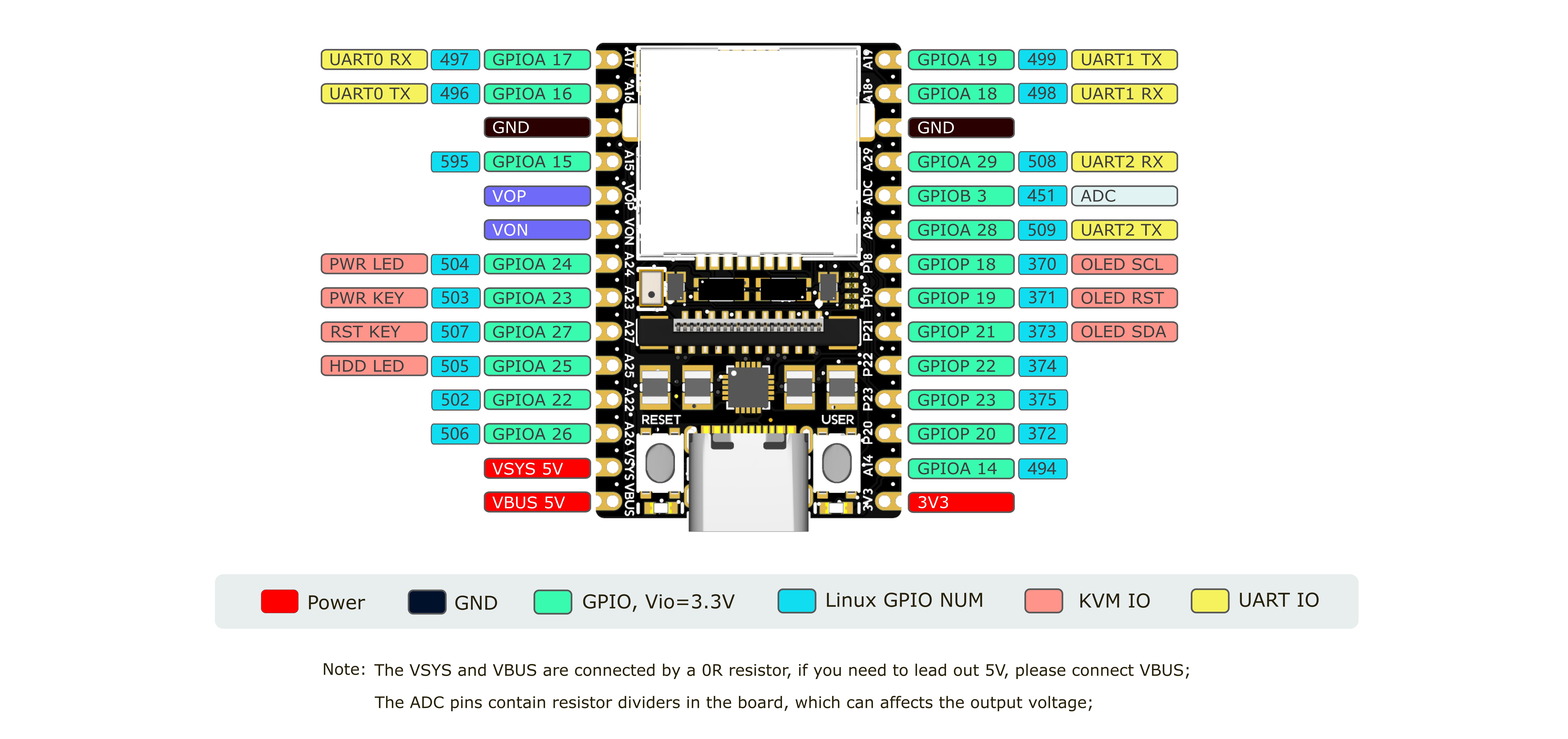
NanoKVM is based on Sipeed [LicheeRV Nano](https://wiki.sipeed.com/hardware/zh/lichee/RV_Nano/1_intro.html),you can find specifications, schematics, and dimensional drawings [here](http://cn.dl.sipeed.com/shareURL/LICHEE/LicheeRV_Nano).
|
||||
|
||||
@@ -106,46 +103,37 @@ The NanoKVM image is built on LicheeRV Nano SDK and MaixCDK, and is compatible w
|
||||
|
||||
Note: Out of the 256MB memory in SG2002, 158MB is currently allocated for the multimedia subsystem, which NanoKVM will use for video image acquisition and processing.
|
||||
|
||||
+ [NanoKVM-A Schematic](https://cn.dl.sipeed.com/fileList/KVM/nanoKVM/HDK/02_Schematic/SCH_RV_Nano_KVM_A_30111.pdf)
|
||||
+ [NanoKVM-B Schematic](https://cn.dl.sipeed.com/fileList/KVM/nanoKVM/HDK/02_Schematic/SCH_RV_Nano_KVM_B_30131.pdf)
|
||||
+ [NanoKVM img](https://github.com/sipeed/NanoKVM/releases/tag/NanoKVM)
|
||||
* [NanoKVM-A Schematic](https://cn.dl.sipeed.com/fileList/KVM/nanoKVM/HDK/02_Schematic/SCH_RV_Nano_KVM_A_30111.pdf)
|
||||
* [NanoKVM-B Schematic](https://cn.dl.sipeed.com/fileList/KVM/nanoKVM/HDK/02_Schematic/SCH_RV_Nano_KVM_B_30131.pdf)
|
||||
* [NanoKVM img](https://github.com/sipeed/NanoKVM/releases/tag/NanoKVM)
|
||||
|
||||
## Roadmap
|
||||

|
||||
|
||||
### Q1 2025
|
||||
## 🤝 Contributing
|
||||
|
||||
**Enhancements:**
|
||||
We welcome contributions! Here's how you can help:
|
||||
|
||||
- [x] Refactor the HDMI module and remove the libmaixcam_lib.so dependency
|
||||
- [x] Disable SSH by default and add an enable/disable toggle in the web UI
|
||||
- [x] Disable Tailscale by default and add an enable/disable toggle in the web UI
|
||||
- [x] Add JWT configuration options to the configuration file
|
||||
- [x] Secure password storage with bcrypt
|
||||
1. Fork the repository.
|
||||
2. Create a feature branch.
|
||||
3. Commit your changes.
|
||||
4. Push to the branch.
|
||||
5. Open a Pull Request.
|
||||
|
||||
**Distribution:**
|
||||
Please keep your pull requests small and focused to facilitate easier review and merging.
|
||||
|
||||
- [x] Distribute applications via GitHub
|
||||
- [x] Implement integrity checks for online updates
|
||||
- [ ] Support offline updates
|
||||
> 🎁 **Contributors who submit high-quality Pull Requests may receive a NanoKVM Cube, PCIe, or Pro as a token of our appreciation!**
|
||||
|
||||
**Bug Fixes:**
|
||||
|
||||
- [x] Fix the DNS issue
|
||||
- [x] Fix the CSRF vulnerability
|
||||
|
||||
**Features**
|
||||
|
||||
- [ ] [79](https://github.com/sipeed/NanoKVM/issues/79) Support Zerotier
|
||||
- [ ] [99](https://github.com/sipeed/NanoKVM/issues/99) Support WireGuard
|
||||
- [ ] [249](https://github.com/sipeed/NanoKVM/issues/249) Add Mouse Jiggler
|
||||
|
||||
## Where to buy
|
||||
## 🛒 Where to Buy
|
||||
|
||||
* [Aliexpress(global except USA&Russia)](https://www.aliexpress.com/item/1005007369816019.html)
|
||||
* [淘宝](https://item.taobao.com/item.htm?id=811206560480)
|
||||
* [Preorder (anyother country that not support in Aliexpress or Taobao)](https://sipeed.com/nanokvm)
|
||||
* [Preorder (any other country that not support in Aliexpress or Taobao)](https://sipeed.com/nanokvm)
|
||||
|
||||
## Community
|
||||
## 💬 Community & Support
|
||||
|
||||
* [MaixHub Discussion](https://maixhub.com/discussion/nanokvm)
|
||||
* QQ group: 703230713
|
||||
|
||||
## 📜 License
|
||||
|
||||
This project is licensed under the GPL-3.0 License - see the LICENSE file for details.
|
||||
|
||||
151
README_ZH.md
151
README_ZH.md
@@ -6,22 +6,77 @@ NanoKVM
|
||||

|
||||
|
||||
<h3>
|
||||
<a href="https://wiki.sipeed.com/hardware/en/kvm/NanoKVM/introduction.html"> Quick Start </a>
|
||||
|
|
||||
<a href="https://cn.dl.sipeed.com/shareURL/KVM/nanoKVM"> Hardware </a>
|
||||
<a href="https://wiki.sipeed.com/hardware/en/kvm/NanoKVM/introduction.html">🚀 快速开始</a>
|
||||
|
|
||||
<a href="https://cn.dl.sipeed.com/shareURL/KVM/nanoKVM">🛠️ 硬件信息</a>
|
||||
|
|
||||
<a href="https://github.com/sipeed/NanoKVM/releases/latest">💾 固件发布</a>
|
||||
</h3>
|
||||
|
||||
[English](./README.md) | 中文 | [日本語](./README_JA.md)
|
||||
|
||||
</div>
|
||||
|
||||
> Your NanoKVM Power by RISC-V !
|
||||
> 如果您在使用过程中有任何问题或建议,请在这里提交 issue, 或在 [MaixHub Discussion](https://maixhub.com/discussion/nanokvm)告诉我们.
|
||||
## 🌟 NanoKVM 是什么?
|
||||
|
||||
## 开源与贡献
|
||||
NanoKVM 是一系列紧凑型开源 IP-KVM 设备。NanoKVM 基于 LicheeRV Nano (RISC-V) 构建,让您能够身临其境般的远程访问和控制计算机,是管理服务器、嵌入式系统或任何无头设备的理想之选。
|
||||
|
||||
### 2025.03.04 更新内容
|
||||
+ 更新目录结构
|
||||
## 📦 产品系列
|
||||
|
||||
我们提供多种 NanoKVM 版本以满足您的需求:
|
||||
|
||||
* **NanoKVM-Cube Lite**:为 DIY 爱好者和需要批量部署的企业用户提供的准系统套件。
|
||||
* **NanoKVM-Cube Full**:包含外壳、配件以及预装系统 SD 卡的完整套装。开箱即用,非常适合个人用户。
|
||||
* **NanoKVM-PCIe**:独特的外形设计,配备 PCIe 支架,可安装在机箱内部,并直接从 PCIe 插槽供电。可选配 WiFi 和 PoE 功能。
|
||||
|
||||
### 🚀 NanoKVM-Pro
|
||||
|
||||
根据大众的需求,我们将 NanoKVM 升级到了 **NanoKVM-Pro**:
|
||||
|
||||
* **分辨率升级**:从 1080P 升级到 **4K@30fps / 2K@60fps**。
|
||||
* **网络升级**:从百兆网口升级到超快的 **GbE + WiFi 6**。
|
||||
* **延迟升级**:编码器加速延迟从 100-150 毫秒减少到 **50-100 毫秒**。
|
||||
|
||||
> NanoKVM-Pro 现已开启预售。
|
||||
|
||||
<div align="center">
|
||||
|
||||

|
||||
|
||||
</div>
|
||||
|
||||
## 🛠️ 技术规格
|
||||
|
||||
| 产品 | NanoKVM-Pro | NanoKVM (Cube/PCIe) | GxxKVM | JxxKVM |
|
||||
|------------------- |-------------------------------------- |---------------------------------- |----------------------------------- |------------------------------------ |
|
||||
| 核心 | AX631 2xA53 1.5G | SG2002 1xC906 1.0G | RV1126 4xA7 1.5G | RV1106 1xA7 1.2G |
|
||||
| 内存&存储 | 1G LPDDR4X + 32G eMMC | 256M DDR3 + 32G microSD | 1G DDR3 + 8G eMMc | 256M DDR3 + 16G eMMC |
|
||||
| 系统 | NanoKVM / PiKVM | NanoKVM | GxxKVM | JxxKVM |
|
||||
| 分辨率 | 4K@30fps / 2K@60fps | 1080P@60fps | 4K@30fps / 2K@60fps | 1080P@60fps |
|
||||
| HDMI 环出 | 4K 环出 | x | x | x |
|
||||
| 视频编码 | MJPEG / H.264 / H.265 | MJPEG / H264 | MJPEG / H264 | MJPEG / H264 |
|
||||
| 音频输出 | ✓ | x | ✓ | x |
|
||||
| UEFI / BIOS | ✓ | ✓ | ✓ | ✓ |
|
||||
| 模拟 USB 键鼠 | ✓ | ✓ | ✓ | ✓ |
|
||||
| 模拟 USB ISO | ✓ | ✓ | ✓ | ✓ |
|
||||
| IPMI | ✓ | ✓ | ✓ | x |
|
||||
| 局域网唤醒 | ✓ | ✓ | ✓ | ✓ |
|
||||
| 网页终端 | ✓ | ✓ | ✓ | ✓ |
|
||||
| 串口终端 | 3 channels | 2 channels | x | 1 channel |
|
||||
| 用户脚本 | ✓ | ✓ | x | x |
|
||||
| 存储 | 32G eMMC 300MB/s | 32G MicroSD 12MB/s | 8G eMMC 120MB/s | 8G eMMC 60MB/s |
|
||||
| 网口 | 1000M | 100M | 1000M | 100M |
|
||||
| PoE | 可选 | 可选 | x | x |
|
||||
| WiFi | 可选 WiFi6 | 可选 WiFi6 | x | x |
|
||||
| ATX 电源控制 | ✓ | ✓ | ✓ | ✓ |
|
||||
| 显示屏 | 1.47" 320x172 LCD / 0.96" 128x64 OLED | 0.96" 128x64 OLED | - | 1.68" 280x240 |
|
||||
| 特色功能 | LED 同步灯带 / 智能助手 | - | - | - |
|
||||
| 功耗 | 0.4A@5V | 0.2A@5V | 0.4A@5V | 0.2A@5V |
|
||||
| 电源输入 | USB-C or PoE | USB-C | USB-C | USB-C |
|
||||
| 尺寸 | 65x65x26mm | 40x36x36mm | 80x60x17.5mm | 60x43x(24~31)mm |
|
||||
| 价格 | ~~$79~~ $69 ATX / ~~$89~~ $79 Desk | $25 Lite / $50 Full(带ATX) | $89 无ATX / $102 带ATX | $69 无ATX / $79 带ATX |
|
||||
|
||||
## 📂 项目结构
|
||||
|
||||
``` shell
|
||||
├── kvmapp # APP更新包
|
||||
@@ -42,60 +97,7 @@ NanoKVM
|
||||
└── CHANGELOG.md
|
||||
```
|
||||
|
||||
+ 添加 NanoKVM app安装包`kvmapp`
|
||||
+ 添加编译脚本和编译说明
|
||||
|
||||
### 2025.02.19 更新内容
|
||||
所有 NanoKVM 组件已开源,包括
|
||||
[前端](https://github.com/sipeed/NanoKVM/tree/main/web)、[后端](https://github.com/sipeed/NanoKVM/tree/main/server)、[kvm_vision](https://github.com/sipeed/NanoKVM/tree/main/vision/components/kvm)、[kvm_mmf](https://github.com/sipeed/NanoKVM/tree/main/vision/components/kvm_mmf)、[kvm_system](https://github.com/sipeed/NanoKVM/tree/main/support)、[kvmapp 更新包](https://github.com/sipeed/NanoKVM-System/tree/main/kvmapp)、[系统 SDK](https://github.com/sipeed/LicheeRV-Nano-Build/tree/NanoKVM) 和 [固件打包方法](https://github.com/sipeed/LicheeRV-Nano-Build/blob/NanoKVM/kvm/NanoKVM_img.sh)。
|
||||
|
||||
### 2025.02.14 更新内容
|
||||
最新的 APP v2.1.6 添加了大多数安全增强和 bug 修复,建议普通用户升级到此版本或更新版本。
|
||||
|
||||
### 2025.02.05 更新内容
|
||||
对于关注安全的用户,可以阅读此问题:https://github.com/sipeed/NanoKVM/issues/301,您会找到有关所有安全问题的解释。GitHub 作为一个开放和透明的平台,为讨论所谓的“后门”担忧提供了空间。开源使产品更加安全!
|
||||
|
||||
### 2024.10.18 更新内容
|
||||
我们在 10.8 中开源了后端代码,感谢您立即提交的文明 PR,我们将赠送您最新的 NanoKVM-PCIe 作为奖励!
|
||||
十月中旬的批次正在开始测试和打包,大多数在 10.1 之前的订单将在下周和下下周发货。
|
||||
自 10.1 起,AliExpress 的发货日期已更改为 12 月,这是一个保守的交货时间。十月的订单应在 11.15~12.15 期间发出。
|
||||
|
||||
## 简介
|
||||
|
||||
Lichee NanoKVM 是基于 LicheeRV Nano 的 IP-KVM 产品,继承了 LicheeRV Nano的极致体积 和 强大功能。
|
||||
Lichee NanoKVM分为两个版本:
|
||||
NanoKVM Lite 为基础版配置,适合 具有一定DIY能力的个人用户 和 有批量需求的企业用户。
|
||||
NanoKVM Full 为完整版配置,带精致外壳和完整配件,内置开机即用的系统镜像卡,推荐个人用户购买。
|
||||
|
||||

|
||||
|
||||
## 参数
|
||||
|
||||
| 产品 | NanoKVM (Lite) | NanoKVM (Full) | PiKVM V4 |
|
||||
| --- | --- | --- | --- |
|
||||
| 计算单元 | LicheeRV Nano(RISCV) | LicheeRV Nano(RISCV) | CM4 (ARM) |
|
||||
| 分辨率 | 1080P @ 60fps | 1080P @ 60fps | 1080P @ 60fps |
|
||||
| 视频编码 | MJPEG, H264 | MJPEG, H264 | MJPEG, H264 |
|
||||
| 视频延迟 | 90~230ms | 90~230ms | 100~230ms |
|
||||
| UEFI/BIOS | ✓ | ✓ | ✓ |
|
||||
| 模拟USB键鼠 | ✓ | ✓ | ✓ |
|
||||
| 模拟USB存储 | ✓ | ✓ | ✓ |
|
||||
| IPMI | ✓ | ✓ | ✓ |
|
||||
| Wake-on-LAN | ✓ | ✓ | ✓ |
|
||||
| ETH | 100M/10M | 100M/10M | 1000M/100M/10M |
|
||||
| ATX电源控制 | 无,用户可自行连接 | USB接口IO控制板 | RJ45接口IO控制板 |
|
||||
| OLED显示 | 无,用户可自行扩展 | 128x64 0.96" white | 128x32 0.91" white |
|
||||
| 外接串口 | 2路 | 2路 | 1路 |
|
||||
| TF卡 | 无,用户自备 | 有,开机即用 | 有 |
|
||||
| 扩展配件 | 无 | PoE | WiFi/LTE |
|
||||
| 功耗 | 0.2A@5V | 0.2A@5V | Peak 2.6A@5V |
|
||||
| 电源输入 | PC USB即可供电 | PC USB即可供电 <br> 也支持额外辅助供电 | 需要DC 5V 3A供电 |
|
||||
| 散热 | 静音无风扇 | 静音无风扇 | 需要风扇主动散热 |
|
||||
| 尺寸 | 23x37x15mm <br> ~1/30 PiKVM V4 体积 | 40x36x36mm <br/> ~1/7 PiKVM V4 体积 | 120x68x44mm |
|
||||
|
||||

|
||||
|
||||
## NanoKVM 硬件平台
|
||||
## 🔩 硬件平台(NanoKVM Cube/PCIe)
|
||||
|
||||
NanoKVM 基于 Sipeed [LicheeRV Nano](https://wiki.sipeed.com/hardware/zh/lichee/RV_Nano/1_intro.html) 核心板搭建,这部分硬件的规格书、原理图、尺寸图等均可在这里找到:[点击这里](http://cn.dl.sipeed.com/shareURL/LICHEE/LicheeRV_Nano)
|
||||
|
||||
@@ -105,18 +107,33 @@ NanoKVM 镜像在LicheeRV Nano SDK 和 MaixCDK 基础上构建,可以兼容使
|
||||
|
||||
注: SG2002的256MB内存中, 目前划分105MB用于多媒体子系统, NanoKVM会在视频图像采集和处理中使用这部分内存.
|
||||
|
||||
+ [NanoKVM-A 原理图](https://cn.dl.sipeed.com/fileList/KVM/nanoKVM/HDK/02_Schematic/SCH_RV_Nano_KVM_A_30111.pdf)
|
||||
+ [NanoKVM-B 原理图](https://cn.dl.sipeed.com/fileList/KVM/nanoKVM/HDK/02_Schematic/SCH_HDMI_MIPI_31011.pdf)
|
||||
+ [NanoKVM 镜像下载](https://github.com/sipeed/NanoKVM/releases/tag/NanoKVM)
|
||||
* [NanoKVM-A 原理图](https://cn.dl.sipeed.com/fileList/KVM/nanoKVM/HDK/02_Schematic/SCH_RV_Nano_KVM_A_30111.pdf)
|
||||
* [NanoKVM-B 原理图](https://cn.dl.sipeed.com/fileList/KVM/nanoKVM/HDK/02_Schematic/SCH_HDMI_MIPI_31011.pdf)
|
||||
* [NanoKVM 镜像下载](https://github.com/sipeed/NanoKVM/releases/tag/NanoKVM)
|
||||
|
||||

|
||||
|
||||
## 购买渠道
|
||||
## 🤝 贡献代码
|
||||
|
||||
我们十分欢迎任何人来贡献代码!您可以通过以下方式提供帮助:
|
||||
|
||||
1. Fork 本仓库.
|
||||
2. 创建一个分支.
|
||||
3. 提交你的代码.
|
||||
4. 推送代码到分支.
|
||||
5. 创建一个PR.
|
||||
|
||||
请保持你的 PR 尽量简单且集中,以便于更轻松地审查和合并。
|
||||
|
||||
> 🎁 **提交高质量 PR 的贡献者可能会收到 NanoKVM Cube、PCIe 或 Pro 作为感谢礼物!**
|
||||
|
||||
## 🛒 购买渠道
|
||||
|
||||
* [Aliexpress(全球,除了美国和俄罗斯)](https://www.aliexpress.com/item/1005007369816019.html)
|
||||
* [淘宝](https://item.taobao.com/item.htm?id=811206560480)
|
||||
* [Preorder (其它不支持淘宝和速卖通的国家)](https://sipeed.com/nanokvm)
|
||||
|
||||
## 社区
|
||||
## 💬 社区
|
||||
|
||||
* [MaixHub Discussion](https://maixhub.com/discussion/nanokvm)
|
||||
* QQ group: 703230713
|
||||
|
||||
32
kvmapp/system/init.d/S00kmod
Executable file
32
kvmapp/system/init.d/S00kmod
Executable file
@@ -0,0 +1,32 @@
|
||||
#!/bin/sh
|
||||
|
||||
if [ "$1" = "start" ]
|
||||
then
|
||||
. /etc/profile
|
||||
printf "load kernel module: "
|
||||
cd /mnt/system/ko/
|
||||
insmod soph_sys.ko
|
||||
insmod soph_base.ko
|
||||
insmod soph_rtos_cmdqu.ko
|
||||
insmod soph_fast_image.ko
|
||||
insmod soph_mipi_rx.ko
|
||||
insmod soph_snsr_i2c.ko
|
||||
insmod soph_vi.ko
|
||||
insmod soph_vpss.ko
|
||||
insmod soph_dwa.ko
|
||||
insmod soph_vo.ko
|
||||
insmod soph_rgn.ko
|
||||
insmod soph_wdt.ko
|
||||
insmod soph_clock_cooling.ko
|
||||
insmod soph_tpu.ko
|
||||
insmod soph_vcodec.ko
|
||||
insmod soph_jpeg.ko
|
||||
insmod soph_vc_driver.ko MaxVencChnNum=9 MaxVdecChnNum=9
|
||||
insmod soph_rtc.ko
|
||||
insmod soph_ive.ko
|
||||
insmod soph_mon.ko
|
||||
insmod soph_pwm.ko
|
||||
insmod soph_wiegand.ko
|
||||
echo "OK"
|
||||
exit 0
|
||||
fi
|
||||
@@ -1,5 +1,5 @@
|
||||
#!/bin/sh
|
||||
# kvmhwd Rev2.0
|
||||
# kvmhwd Rev2.1
|
||||
|
||||
start_usb_dev(){
|
||||
. /etc/profile
|
||||
@@ -47,7 +47,7 @@ start_usb_dev(){
|
||||
echo 1 > functions/hid.GS0/wakeup_on_write
|
||||
fi
|
||||
echo 1 > functions/hid.GS0/protocol
|
||||
echo 6 > functions/hid.GS0/report_length
|
||||
echo 8 > functions/hid.GS0/report_length
|
||||
echo -ne \\x05\\x01\\x09\\x06\\xa1\\x01\\x05\\x07\\x19\\xe0\\x29\\xe7\\x15\\x00\\x25\\x01\\x75\\x01\\x95\\x08\\x81\\x02\\x95\\x01\\x75\\x08\\x81\\x03\\x95\\x05\\x75\\x01\\x05\\x08\\x19\\x01\\x29\\x05\\x91\\x02\\x95\\x01\\x75\\x03\\x91\\x03\\x95\\x06\\x75\\x08\\x15\\x00\\x25\\x65\\x05\\x07\\x19\\x00\\x29\\x65\\x81\\x00\\xc0 > functions/hid.GS0/report_desc
|
||||
ln -s functions/hid.GS0 configs/c.1
|
||||
|
||||
@@ -62,7 +62,7 @@ start_usb_dev(){
|
||||
echo 1 > functions/hid.GS1/wakeup_on_write
|
||||
fi
|
||||
echo 2 > functions/hid.GS1/protocol
|
||||
echo -ne \\x34 > functions/hid.GS1/report_length
|
||||
echo 4 > functions/hid.GS1/report_length
|
||||
echo -ne \\x5\\x1\\x9\\x2\\xa1\\x1\\x9\\x1\\xa1\\x0\\x5\\x9\\x19\\x1\\x29\\x3\\x15\\x0\\x25\\x1\\x95\\x3\\x75\\x1\\x81\\x2\\x95\\x1\\x75\\x5\\x81\\x3\\x5\\x1\\x9\\x30\\x9\\x31\\x9\\x38\\x15\\x81\\x25\\x7f\\x75\\x8\\x95\\x3\\x81\\x6\\xc0\\xc0 > functions/hid.GS1/report_desc
|
||||
ln -s functions/hid.GS1 configs/c.1
|
||||
|
||||
|
||||
93
kvmapp/system/init.d/S03usbhid
Executable file
93
kvmapp/system/init.d/S03usbhid
Executable file
@@ -0,0 +1,93 @@
|
||||
#!/bin/sh
|
||||
# kvmhwd hid only
|
||||
|
||||
start_usb_dev(){
|
||||
. /etc/profile
|
||||
echo "usb mode: device"
|
||||
cd /sys/kernel/config/usb_gadget
|
||||
|
||||
mkdir g0
|
||||
cd g0
|
||||
|
||||
echo 0x0101 > bcdUSB
|
||||
echo 0x0623 > bcdDevice
|
||||
echo 0x3346 > idVendor
|
||||
echo 0x1009 > idProduct
|
||||
mkdir strings/0x409
|
||||
# echo '0' > strings/0x409/serialnumber
|
||||
echo 'sipeed' > strings/0x409/manufacturer
|
||||
echo 'NanoKVM' > strings/0x409/product
|
||||
|
||||
mkdir configs/c.1
|
||||
echo 0xA0 > configs/c.1/bmAttributes
|
||||
echo 200 > configs/c.1/MaxPower
|
||||
mkdir configs/c.1/strings/0x409
|
||||
echo "NanoKVM" > configs/c.1/strings/0x409/configuration
|
||||
|
||||
# keyboard
|
||||
mkdir functions/hid.GS0
|
||||
echo 1 > functions/hid.GS0/subclass
|
||||
if [ ! -e /boot/usb.notwakeup ]
|
||||
then
|
||||
echo 1 > functions/hid.GS0/wakeup_on_write
|
||||
fi
|
||||
echo 1 > functions/hid.GS0/protocol
|
||||
echo 8 > functions/hid.GS0/report_length
|
||||
echo -ne \\x05\\x01\\x09\\x06\\xa1\\x01\\x05\\x07\\x19\\xe0\\x29\\xe7\\x15\\x00\\x25\\x01\\x75\\x01\\x95\\x08\\x81\\x02\\x95\\x01\\x75\\x08\\x81\\x03\\x95\\x05\\x75\\x01\\x05\\x08\\x19\\x01\\x29\\x05\\x91\\x02\\x95\\x01\\x75\\x03\\x91\\x03\\x95\\x06\\x75\\x08\\x15\\x00\\x25\\x65\\x05\\x07\\x19\\x00\\x29\\x65\\x81\\x00\\xc0 > functions/hid.GS0/report_desc
|
||||
ln -s functions/hid.GS0 configs/c.1
|
||||
|
||||
# mouse
|
||||
mkdir functions/hid.GS1
|
||||
echo 1 > functions/hid.GS1/subclass
|
||||
if [ ! -e /boot/usb.notwakeup ]
|
||||
then
|
||||
echo 1 > functions/hid.GS1/wakeup_on_write
|
||||
fi
|
||||
echo 2 > functions/hid.GS1/protocol
|
||||
echo 4 > functions/hid.GS1/report_length
|
||||
echo -ne \\x5\\x1\\x9\\x2\\xa1\\x1\\x9\\x1\\xa1\\x0\\x5\\x9\\x19\\x1\\x29\\x3\\x15\\x0\\x25\\x1\\x95\\x3\\x75\\x1\\x81\\x2\\x95\\x1\\x75\\x5\\x81\\x3\\x5\\x1\\x9\\x30\\x9\\x31\\x9\\x38\\x15\\x81\\x25\\x7f\\x75\\x8\\x95\\x3\\x81\\x6\\xc0\\xc0 > functions/hid.GS1/report_desc
|
||||
ln -s functions/hid.GS1 configs/c.1
|
||||
|
||||
# touchpad
|
||||
mkdir functions/hid.GS2
|
||||
echo 1 > functions/hid.GS2/subclass
|
||||
if [ ! -e /boot/usb.notwakeup ]
|
||||
then
|
||||
echo 1 > functions/hid.GS2/wakeup_on_write
|
||||
fi
|
||||
echo 2 > functions/hid.GS2/protocol
|
||||
echo 6 > functions/hid.GS2/report_length
|
||||
echo -ne \\x05\\x01\\x09\\x02\\xa1\\x01\\x09\\x01\\xa1\\x00\\x05\\x09\\x19\\x01\\x29\\x03\\x15\\x00\\x25\\x01\\x95\\x03\\x75\\x01\\x81\\x02\\x95\\x01\\x75\\x05\\x81\\x01\\x05\\x01\\x09\\x30\\x09\\x31\\x15\\x00\\x26\\xff\\x7f\\x35\\x00\\x46\\xff\\x7f\\x75\\x10\\x95\\x02\\x81\\x02\\x05\\x01\\x09\\x38\\x15\\x81\\x25\\x7f\\x35\\x00\\x45\\x00\\x75\\x08\\x95\\x01\\x81\\x06\\xc0\\xc0 > functions/hid.GS2/report_desc
|
||||
ln -s functions/hid.GS2 configs/c.1
|
||||
|
||||
ls /sys/class/udc/ | cat > UDC
|
||||
echo device > /proc/cviusb/otg_role
|
||||
}
|
||||
|
||||
start_usb_host(){
|
||||
echo '' > /sys/kernel/config/usb_gadget/g0/UDC
|
||||
echo host > /proc/cviusb/otg_role
|
||||
}
|
||||
|
||||
restart_usb_dev(){
|
||||
echo > /sys/kernel/config/usb_gadget/g0/UDC
|
||||
sleep 1
|
||||
ls /sys/class/udc/ | cat > /sys/kernel/config/usb_gadget/g0/UDC
|
||||
echo "USB Restart OK!"
|
||||
}
|
||||
|
||||
case "$1" in
|
||||
start)
|
||||
start_usb_dev
|
||||
;;
|
||||
restart)
|
||||
restart_usb_dev
|
||||
;;
|
||||
stop)
|
||||
start_usb_host
|
||||
;;
|
||||
stop_start)
|
||||
start_usb_host
|
||||
start_usb_dev
|
||||
;;
|
||||
esac
|
||||
@@ -29,10 +29,14 @@ start() {
|
||||
arping -Dqc2 -Ieth0 $addr || continue
|
||||
ip a add $inet brd + dev eth0
|
||||
ip r add default via $gw dev eth0
|
||||
cat > /etc/resolve.conf << EOF
|
||||
cp -f /etc/resolv.conf /etc/resolv.conf.old
|
||||
cat > /etc/resolv.conf << EOF
|
||||
nameserver $gw
|
||||
nameserver 8.8.4.4
|
||||
nameserver 8.8.8.8
|
||||
nameserver 114.114.114.114
|
||||
nameserver 119.29.29.29
|
||||
nameserver 223.5.5.5
|
||||
EOF
|
||||
break
|
||||
done &&
|
||||
@@ -112,4 +116,4 @@ EOF
|
||||
*)
|
||||
echo "Usage: $0 {start|stop|restart}"
|
||||
exit 1
|
||||
esac
|
||||
esac
|
||||
|
||||
@@ -23,11 +23,11 @@ case "$1" in
|
||||
iptables -C OUTPUT -o eth0 -p tcp --sport 80 -m state --state ESTABLISHED -j ACCEPT 2>/dev/null || \
|
||||
iptables -A OUTPUT -o eth0 -p tcp --sport 80 -m state --state ESTABLISHED -j ACCEPT
|
||||
|
||||
iptables -C OUTPUT -o eth0 -p tcp --dport 22 -m state --state NEW,ESTABLISHED -j ACCEPT 2>/dev/null || \
|
||||
iptables -A OUTPUT -o eth0 -p tcp --dport 22 -m state --state NEW,ESTABLISHED -j ACCEPT
|
||||
iptables -C INPUT -i eth0 -p tcp --sport 22 -m state --state NEW,ESTABLISHED -j ACCEPT 2>/dev/null || \
|
||||
iptables -A INPUT -i eth0 -p tcp --sport 22 -m state --state NEW,ESTABLISHED -j ACCEPT
|
||||
|
||||
iptables -C INPUT -i eth0 -p tcp --sport 22 -m state --state ESTABLISHED -j ACCEPT 2>/dev/null || \
|
||||
iptables -A INPUT -i eth0 -p tcp --sport 22 -m state --state ESTABLISHED -j ACCEPT
|
||||
iptables -C OUTPUT -o eth0 -p tcp --dport 22 -m state --state ESTABLISHED -j ACCEPT 2>/dev/null || \
|
||||
iptables -A OUTPUT -o eth0 -p tcp --dport 22 -m state --state ESTABLISHED -j ACCEPT
|
||||
|
||||
iptables -C OUTPUT -o eth0 -p tcp --sport 8000 -m state --state ESTABLISHED -j DROP 2>/dev/null || \
|
||||
iptables -A OUTPUT -o eth0 -p tcp --sport 8000 -m state --state ESTABLISHED -j DROP
|
||||
|
||||
@@ -13,7 +13,7 @@ server
|
||||
├── dl_lib // Shared object libraries
|
||||
├── include // Header files for shared objects
|
||||
├── logger // Logging system
|
||||
├── middleware // Server middleware components
|
||||
├── middleware // Server middleware components
|
||||
├── proto // API request/response definitions
|
||||
├── router // API route handlers
|
||||
├── service // Core service implementations
|
||||
@@ -39,7 +39,7 @@ cert:
|
||||
logger:
|
||||
level: info
|
||||
file: stdout
|
||||
|
||||
|
||||
# Authentication setting (enable/disable)
|
||||
# Note: Only disable authentication in development environment
|
||||
authentication: enable
|
||||
@@ -75,8 +75,9 @@ Note: Use Linux operating system (x86-64). This build process is not compatible
|
||||
2. Compile the Project
|
||||
1. Run `cd server` from the project root directory.
|
||||
2. Run `go mod tidy` to install Go dependencies.
|
||||
3. Run `CGO_ENABLED=1 GOOS=linux GOARCH=riscv64 CC=riscv64-unknown-linux-musl-gcc CGO_CFLAGS="-mcpu=c906fdv -march=rv64imafdcv0p7xthead -mcmodel=medany -mabi=lp64d" go build` to compile the project.
|
||||
4. After compilation, an executable file named `NanoKVM-Server` will be generated.
|
||||
3. (Optional) If you compiled `libkvm.so` yourself, you need to modify its RPATH by `patchelf --add-rpath \$ORIGIN ./dl_lib/libkvm.so`.
|
||||
4. Run `CGO_ENABLED=1 GOOS=linux GOARCH=riscv64 CC=riscv64-unknown-linux-musl-gcc CGO_CFLAGS="-mcpu=c906fdv -march=rv64imafdcv0p7xthead -mcmodel=medany -mabi=lp64d" go build` to compile the project.
|
||||
5. After compilation, an executable file named `NanoKVM-Server` will be generated.
|
||||
|
||||
3. Modify RPATH
|
||||
1. Run `sudo apt install patchelf` or `pip install patchelf` to install patchelf.
|
||||
|
||||
@@ -31,13 +31,13 @@ port:
|
||||
cert:
|
||||
crt: server.crt
|
||||
key: server.key
|
||||
|
||||
|
||||
# 日志级别(debug/info/warn/error)
|
||||
# 注意:在生产环境中使用 info 或 error。debug 模式仅在开发环境中使用。
|
||||
logger:
|
||||
level: info
|
||||
file: stdout
|
||||
|
||||
|
||||
# 鉴权设置(enable/disable)
|
||||
# 注意:生产环境中请勿使用 disable。
|
||||
authentication: enable
|
||||
@@ -72,8 +72,9 @@ turn:
|
||||
2. 编译
|
||||
1. 在项目根目录下执行 `cd server` 进入 server 目录;
|
||||
2. 执行 `go mod tidy` 安装 Go 依赖包;
|
||||
3. 执行 `CGO_ENABLED=1 GOOS=linux GOARCH=riscv64 CC=riscv64-unknown-linux-musl-gcc CGO_CFLAGS="-mcpu=c906fdv -march=rv64imafdcv0p7xthead -mcmodel=medany -mabi=lp64d" go build` 进行编译;
|
||||
4. 编译完成后,会生成可执行文件 `NanoKVM-Server`。
|
||||
3. (可选)如果您手动编译了 `libkvm.so`,则需要通过 `patchelf --add-rpath \$ORIGIN ./dl_lib/libkvm.so` 修改其 RPATH 属性。
|
||||
4. 执行 `CGO_ENABLED=1 GOOS=linux GOARCH=riscv64 CC=riscv64-unknown-linux-musl-gcc CGO_CFLAGS="-mcpu=c906fdv -march=rv64imafdcv0p7xthead -mcmodel=medany -mabi=lp64d" go build` 进行编译;
|
||||
5. 编译完成后,会生成可执行文件 `NanoKVM-Server`。
|
||||
|
||||
3. 修改 RPATH
|
||||
1. 执行 `sudo apt install patchelf` 或 `pip install patchelf` 安装 patchelf;
|
||||
@@ -81,8 +82,8 @@ turn:
|
||||
3. 执行 `patchelf --add-rpath \$ORIGIN/dl_lib NanoKVM-Server` 修改可执行文件的 RPATH 属性。
|
||||
|
||||
4. 部署
|
||||
1. 上传文件需要启用 SSH 功能。请在 Web `设置 - SSH` 中检查 SSH 是否已经启用;
|
||||
2. 使用编译生成的 `NanoKVM-Server` 文件,替换 NanoKVM 中 `/kvmapp/server/` 目录下的原始文件;
|
||||
1. 上传文件需要启用 SSH 功能。请在 Web `设置 - SSH` 中检查 SSH 是否已经启用;
|
||||
2. 使用编译生成的 `NanoKVM-Server` 文件,替换 NanoKVM 中 `/kvmapp/server/` 目录下的原始文件;
|
||||
3. 在 NanoKVM 中执行 `/etc/init.d/S95nanokvm restart` 重启服务。
|
||||
|
||||
## 手动更新
|
||||
@@ -92,4 +93,4 @@ turn:
|
||||
1. 从 [GitHub](https://github.com/sipeed/NanoKVM/releases) 下载最新的应用安装包;
|
||||
2. 解压缩下载的安装包,并将解压后的文件夹重命名为 `kvmapp`;
|
||||
3. 备份 NanoKVM 系统中的 `/kvmapp` 目录,然后用解压后的 `kvmapp` 文件夹替换现有目录。
|
||||
4. 在 NanoKVM 中执行 `/etc/init.d/S95nanokvm restart` 重启服务。
|
||||
4. 在 NanoKVM 中执行 `/etc/init.d/S95nanokvm restart` 重启服务。
|
||||
|
||||
45
server/config/file.go
Normal file
45
server/config/file.go
Normal file
@@ -0,0 +1,45 @@
|
||||
package config
|
||||
|
||||
import (
|
||||
"os"
|
||||
|
||||
log "github.com/sirupsen/logrus"
|
||||
"gopkg.in/yaml.v3"
|
||||
)
|
||||
|
||||
const ConfigurationFile = "/etc/kvm/server.yaml"
|
||||
|
||||
func Read() (*Config, error) {
|
||||
data, err := os.ReadFile(ConfigurationFile)
|
||||
if err != nil {
|
||||
log.Errorf("failed to read config: %v", err)
|
||||
return nil, err
|
||||
}
|
||||
|
||||
var conf Config
|
||||
|
||||
if err := yaml.Unmarshal(data, &conf); err != nil {
|
||||
log.Fatalf("failed to unmarshal config: %v", err)
|
||||
return nil, err
|
||||
}
|
||||
|
||||
log.Debugf("read %s successfully", ConfigurationFile)
|
||||
return &conf, nil
|
||||
}
|
||||
|
||||
func Write(conf *Config) error {
|
||||
data, err := yaml.Marshal(&conf)
|
||||
if err != nil {
|
||||
log.Errorf("failed to marshal config: %v", err)
|
||||
return err
|
||||
}
|
||||
|
||||
err = os.WriteFile(ConfigurationFile, data, 0644)
|
||||
if err != nil {
|
||||
log.Errorf("failed to write config: %v", err)
|
||||
return err
|
||||
}
|
||||
|
||||
log.Debugf("write to %s successfully", ConfigurationFile)
|
||||
return nil
|
||||
}
|
||||
@@ -9,7 +9,7 @@ require (
|
||||
github.com/gin-gonic/contrib v0.0.0-20240508051311-c1c6bf0061b0
|
||||
github.com/gin-gonic/gin v1.10.0
|
||||
github.com/go-playground/validator/v10 v10.20.0
|
||||
github.com/golang-jwt/jwt/v5 v5.2.1
|
||||
github.com/golang-jwt/jwt/v5 v5.2.2
|
||||
github.com/gorilla/websocket v1.5.3
|
||||
github.com/mervick/aes-everywhere/go/aes256 v0.0.0-20240803013625-6759956693c0
|
||||
github.com/pion/webrtc/v4 v4.0.1
|
||||
@@ -17,7 +17,7 @@ require (
|
||||
github.com/sirupsen/logrus v1.9.3
|
||||
github.com/spf13/viper v1.19.0
|
||||
github.com/unrolled/secure v1.15.0
|
||||
golang.org/x/crypto v0.36.0
|
||||
golang.org/x/crypto v0.37.0
|
||||
gopkg.in/yaml.v3 v3.0.1
|
||||
)
|
||||
|
||||
@@ -73,9 +73,9 @@ require (
|
||||
go.uber.org/multierr v1.9.0 // indirect
|
||||
golang.org/x/arch v0.8.0 // indirect
|
||||
golang.org/x/exp v0.0.0-20230905200255-921286631fa9 // indirect
|
||||
golang.org/x/net v0.37.0 // indirect
|
||||
golang.org/x/sys v0.31.0 // indirect
|
||||
golang.org/x/text v0.23.0 // indirect
|
||||
golang.org/x/net v0.39.0 // indirect
|
||||
golang.org/x/sys v0.32.0 // indirect
|
||||
golang.org/x/text v0.24.0 // indirect
|
||||
google.golang.org/protobuf v1.34.1 // indirect
|
||||
gopkg.in/ini.v1 v1.67.0 // indirect
|
||||
)
|
||||
|
||||
@@ -36,6 +36,8 @@ github.com/goccy/go-json v0.10.2 h1:CrxCmQqYDkv1z7lO7Wbh2HN93uovUHgrECaO5ZrCXAU=
|
||||
github.com/goccy/go-json v0.10.2/go.mod h1:6MelG93GURQebXPDq3khkgXZkazVtN9CRI+MGFi0w8I=
|
||||
github.com/golang-jwt/jwt/v5 v5.2.1 h1:OuVbFODueb089Lh128TAcimifWaLhJwVflnrgM17wHk=
|
||||
github.com/golang-jwt/jwt/v5 v5.2.1/go.mod h1:pqrtFR0X4osieyHYxtmOUWsAWrfe1Q5UVIyoH402zdk=
|
||||
github.com/golang-jwt/jwt/v5 v5.2.2 h1:Rl4B7itRWVtYIHFrSNd7vhTiz9UpLdi6gZhZ3wEeDy8=
|
||||
github.com/golang-jwt/jwt/v5 v5.2.2/go.mod h1:pqrtFR0X4osieyHYxtmOUWsAWrfe1Q5UVIyoH402zdk=
|
||||
github.com/google/go-cmp v0.5.9 h1:O2Tfq5qg4qc4AmwVlvv0oLiVAGB7enBSJ2x2DqQFi38=
|
||||
github.com/google/go-cmp v0.5.9/go.mod h1:17dUlkBOakJ0+DkrSSNjCkIjxS6bF9zb3elmeNGIjoY=
|
||||
github.com/google/gofuzz v1.0.0/go.mod h1:dBl0BpW6vV/+mYPU4Po3pmUjxk6FQPldtuIdl/M65Eg=
|
||||
@@ -162,12 +164,16 @@ golang.org/x/crypto v0.31.0 h1:ihbySMvVjLAeSH1IbfcRTkD/iNscyz8rGzjF/E5hV6U=
|
||||
golang.org/x/crypto v0.31.0/go.mod h1:kDsLvtWBEx7MV9tJOj9bnXsPbxwJQ6csT/x4KIN4Ssk=
|
||||
golang.org/x/crypto v0.36.0 h1:AnAEvhDddvBdpY+uR+MyHmuZzzNqXSe/GvuDeob5L34=
|
||||
golang.org/x/crypto v0.36.0/go.mod h1:Y4J0ReaxCR1IMaabaSMugxJES1EpwhBHhv2bDHklZvc=
|
||||
golang.org/x/crypto v0.37.0 h1:kJNSjF/Xp7kU0iB2Z+9viTPMW4EqqsrywMXLJOOsXSE=
|
||||
golang.org/x/crypto v0.37.0/go.mod h1:vg+k43peMZ0pUMhYmVAWysMK35e6ioLh3wB8ZCAfbVc=
|
||||
golang.org/x/exp v0.0.0-20230905200255-921286631fa9 h1:GoHiUyI/Tp2nVkLI2mCxVkOjsbSXD66ic0XW0js0R9g=
|
||||
golang.org/x/exp v0.0.0-20230905200255-921286631fa9/go.mod h1:S2oDrQGGwySpoQPVqRShND87VCbxmc6bL1Yd2oYrm6k=
|
||||
golang.org/x/net v0.33.0 h1:74SYHlV8BIgHIFC/LrYkOGIwL19eTYXQ5wc6TBuO36I=
|
||||
golang.org/x/net v0.33.0/go.mod h1:HXLR5J+9DxmrqMwG9qjGCxZ+zKXxBru04zlTvWlWuN4=
|
||||
golang.org/x/net v0.37.0 h1:1zLorHbz+LYj7MQlSf1+2tPIIgibq2eL5xkrGk6f+2c=
|
||||
golang.org/x/net v0.37.0/go.mod h1:ivrbrMbzFq5J41QOQh0siUuly180yBYtLp+CKbEaFx8=
|
||||
golang.org/x/net v0.39.0 h1:ZCu7HMWDxpXpaiKdhzIfaltL9Lp31x/3fCP11bc6/fY=
|
||||
golang.org/x/net v0.39.0/go.mod h1:X7NRbYVEA+ewNkCNyJ513WmMdQ3BineSwVtN2zD/d+E=
|
||||
golang.org/x/sys v0.0.0-20220715151400-c0bba94af5f8/go.mod h1:oPkhp1MJrh7nUepCBck5+mAzfO9JrbApNNgaTdGDITg=
|
||||
golang.org/x/sys v0.5.0/go.mod h1:oPkhp1MJrh7nUepCBck5+mAzfO9JrbApNNgaTdGDITg=
|
||||
golang.org/x/sys v0.6.0/go.mod h1:oPkhp1MJrh7nUepCBck5+mAzfO9JrbApNNgaTdGDITg=
|
||||
@@ -175,10 +181,14 @@ golang.org/x/sys v0.28.0 h1:Fksou7UEQUWlKvIdsqzJmUmCX3cZuD2+P3XyyzwMhlA=
|
||||
golang.org/x/sys v0.28.0/go.mod h1:/VUhepiaJMQUp4+oa/7Zr1D23ma6VTLIYjOOTFZPUcA=
|
||||
golang.org/x/sys v0.31.0 h1:ioabZlmFYtWhL+TRYpcnNlLwhyxaM9kWTDEmfnprqik=
|
||||
golang.org/x/sys v0.31.0/go.mod h1:BJP2sWEmIv4KK5OTEluFJCKSidICx8ciO85XgH3Ak8k=
|
||||
golang.org/x/sys v0.32.0 h1:s77OFDvIQeibCmezSnk/q6iAfkdiQaJi4VzroCFrN20=
|
||||
golang.org/x/sys v0.32.0/go.mod h1:BJP2sWEmIv4KK5OTEluFJCKSidICx8ciO85XgH3Ak8k=
|
||||
golang.org/x/text v0.21.0 h1:zyQAAkrwaneQ066sspRyJaG9VNi/YJ1NfzcGB3hZ/qo=
|
||||
golang.org/x/text v0.21.0/go.mod h1:4IBbMaMmOPCJ8SecivzSH54+73PCFmPWxNTLm+vZkEQ=
|
||||
golang.org/x/text v0.23.0 h1:D71I7dUrlY+VX0gQShAThNGHFxZ13dGLBHQLVl1mJlY=
|
||||
golang.org/x/text v0.23.0/go.mod h1:/BLNzu4aZCJ1+kcD0DNRotWKage4q2rGVAg4o22unh4=
|
||||
golang.org/x/text v0.24.0 h1:dd5Bzh4yt5KYA8f9CJHCP4FB4D51c2c6JvN37xJJkJ0=
|
||||
golang.org/x/text v0.24.0/go.mod h1:L8rBsPeo2pSS+xqN0d5u2ikmjtmoJbDBT1b7nHvFCdU=
|
||||
google.golang.org/protobuf v1.34.1 h1:9ddQBjfCyZPOHPUiPxpYESBLc+T8P3E+Vo4IbKZgFWg=
|
||||
google.golang.org/protobuf v1.34.1/go.mod h1:c6P6GXX6sHbq/GpV6MGZEdwhWPcYBgnhAHhKbcUYpos=
|
||||
gopkg.in/check.v1 v0.0.0-20161208181325-20d25e280405/go.mod h1:Co6ibVJAznAaIkqp8huTwlJQCZ016jof/cbN4VW5Yz0=
|
||||
|
||||
@@ -1,18 +1,21 @@
|
||||
package main
|
||||
|
||||
import (
|
||||
"fmt"
|
||||
"log"
|
||||
"net/http"
|
||||
"os"
|
||||
"os/signal"
|
||||
"strings"
|
||||
"syscall"
|
||||
"time"
|
||||
|
||||
"NanoKVM-Server/common"
|
||||
"NanoKVM-Server/config"
|
||||
"NanoKVM-Server/logger"
|
||||
"NanoKVM-Server/middleware"
|
||||
"NanoKVM-Server/router"
|
||||
"NanoKVM-Server/utils"
|
||||
"fmt"
|
||||
"log"
|
||||
"os"
|
||||
"os/signal"
|
||||
"syscall"
|
||||
"time"
|
||||
"NanoKVM-Server/service/vm/jiggler"
|
||||
|
||||
"github.com/gin-gonic/gin"
|
||||
cors "github.com/rs/cors/wrapper/gin"
|
||||
@@ -37,7 +40,8 @@ func initialize() {
|
||||
time.Sleep(10 * time.Millisecond)
|
||||
vision.SetHDMI(true)
|
||||
|
||||
utils.InitGoMemLimit()
|
||||
// run mouse jiggler
|
||||
jiggler.GetJiggler().Run()
|
||||
|
||||
sigChan := make(chan os.Signal, 1)
|
||||
signal.Notify(sigChan, syscall.SIGINT, syscall.SIGTERM, syscall.SIGQUIT)
|
||||
@@ -56,7 +60,6 @@ func run() {
|
||||
gin.SetMode(gin.ReleaseMode)
|
||||
r := gin.New()
|
||||
r.Use(gin.Recovery())
|
||||
|
||||
if conf.Authentication == "disable" {
|
||||
r.Use(cors.AllowAll())
|
||||
}
|
||||
@@ -65,20 +68,17 @@ func run() {
|
||||
|
||||
httpAddr := fmt.Sprintf(":%d", conf.Port.Http)
|
||||
httpsAddr := fmt.Sprintf(":%d", conf.Port.Https)
|
||||
log.Printf("proto: %s, port: %d %d\n", conf.Proto, conf.Port.Http, conf.Port.Https)
|
||||
|
||||
if conf.Proto == "https" {
|
||||
r.Use(middleware.Tls())
|
||||
|
||||
go func() {
|
||||
if err := r.Run(httpAddr); err != nil {
|
||||
panic("start http server failed")
|
||||
r.Use(middleware.Tls())
|
||||
err := r.RunTLS(httpsAddr, conf.Cert.Crt, conf.Cert.Key)
|
||||
if err != nil {
|
||||
panic("start https server failed")
|
||||
}
|
||||
}()
|
||||
|
||||
if err := r.RunTLS(httpsAddr, conf.Cert.Crt, conf.Cert.Key); err != nil {
|
||||
panic("start https server failed")
|
||||
}
|
||||
runRedirect(httpAddr, httpsAddr)
|
||||
} else {
|
||||
if err := r.Run(httpAddr); err != nil {
|
||||
panic("start http server failed")
|
||||
@@ -86,6 +86,26 @@ func run() {
|
||||
}
|
||||
}
|
||||
|
||||
func runRedirect(httpPort string, httpsPort string) {
|
||||
err := http.ListenAndServe(httpPort, http.HandlerFunc(func(w http.ResponseWriter, req *http.Request) {
|
||||
host := req.Host
|
||||
if strings.Contains(host, httpPort) {
|
||||
host = strings.Split(host, httpPort)[0]
|
||||
}
|
||||
|
||||
targetURL := "https://" + host + req.URL.String()
|
||||
if httpsPort != ":443" {
|
||||
targetURL = "https://" + host + httpsPort + req.URL.String()
|
||||
}
|
||||
|
||||
http.Redirect(w, req, targetURL, http.StatusTemporaryRedirect)
|
||||
}))
|
||||
|
||||
if err != nil {
|
||||
panic("start http server failed")
|
||||
}
|
||||
}
|
||||
|
||||
func dispose() {
|
||||
common.GetKvmVision().Close()
|
||||
}
|
||||
|
||||
@@ -12,6 +12,11 @@ type DeleteMacReq struct {
|
||||
Mac string `form:"mac" validate:"required"`
|
||||
}
|
||||
|
||||
type SetMacNameReq struct {
|
||||
Mac string `form:"mac" validate:"required"`
|
||||
Name string `form:"name" validate:"required"`
|
||||
}
|
||||
|
||||
type TailscaleState string
|
||||
|
||||
const (
|
||||
|
||||
@@ -1,7 +1,14 @@
|
||||
package proto
|
||||
|
||||
type IP struct {
|
||||
Name string `json:"name"`
|
||||
Addr string `json:"addr"`
|
||||
Version string `json:"version"`
|
||||
Type string `json:"type"`
|
||||
}
|
||||
|
||||
type GetInfoRsp struct {
|
||||
Ip string `json:"ip"`
|
||||
IPs []IP `json:"ips"`
|
||||
Mdns string `json:"mdns"`
|
||||
Image string `json:"image"`
|
||||
Application string `json:"application"`
|
||||
@@ -62,8 +69,8 @@ type UpdateVirtualDeviceRsp struct {
|
||||
}
|
||||
|
||||
type SetMemoryLimitReq struct {
|
||||
Enabled bool `json:"enabled"`
|
||||
Limit int64 `json:"limit"`
|
||||
Enabled bool `validate:"omitempty"`
|
||||
Limit int64 `validate:"omitempty"`
|
||||
}
|
||||
|
||||
type GetMemoryLimitRsp struct {
|
||||
@@ -72,7 +79,7 @@ type GetMemoryLimitRsp struct {
|
||||
}
|
||||
|
||||
type SetOledReq struct {
|
||||
Sleep int `json:"sleep"`
|
||||
Sleep int `validate:"omitempty"`
|
||||
}
|
||||
|
||||
type GetOLEDRsp struct {
|
||||
@@ -80,10 +87,52 @@ type GetOLEDRsp struct {
|
||||
Sleep int `json:"sleep"`
|
||||
}
|
||||
|
||||
type GetGetHdmiStateRsp struct {
|
||||
Enabled bool `json:"enabled"`
|
||||
}
|
||||
|
||||
type GetSSHStateRsp struct {
|
||||
Enabled bool `json:"enabled"`
|
||||
}
|
||||
|
||||
type GetSwapRsp struct {
|
||||
Size int64 `json:"size"` // unit: MB
|
||||
}
|
||||
|
||||
type SetSwapReq struct {
|
||||
Size int64 `validate:"omitempty"` // unit: MB
|
||||
}
|
||||
|
||||
type GetMouseJigglerRsp struct {
|
||||
Enabled bool `json:"enabled"`
|
||||
Mode string `json:"mode"`
|
||||
}
|
||||
|
||||
type SetMouseJigglerReq struct {
|
||||
Enabled bool `validate:"omitempty"`
|
||||
Mode string `validate:"omitempty"`
|
||||
}
|
||||
|
||||
type GetMdnsStateRsp struct {
|
||||
Enabled bool `json:"enabled"`
|
||||
}
|
||||
|
||||
type SetHostnameReq struct {
|
||||
Hostname string `validate:"required"`
|
||||
}
|
||||
|
||||
type GetHostnameRsp struct {
|
||||
Hostname string `json:"hostname"`
|
||||
}
|
||||
|
||||
type SetWebTitleReq struct {
|
||||
Title string `validate:"omitempty"`
|
||||
}
|
||||
|
||||
type GetWebTitleRsp struct {
|
||||
Title string `json:"title"`
|
||||
}
|
||||
|
||||
type SetTlsReq struct {
|
||||
Enabled bool `validate:"omitempty"`
|
||||
}
|
||||
|
||||
@@ -14,9 +14,9 @@ func networkRouter(r *gin.Engine) {
|
||||
|
||||
api := r.Group("/api").Use(middleware.CheckToken())
|
||||
|
||||
api.POST("/network/wol", service.WakeOnLAN) // wake on lan
|
||||
api.GET("/network/wol/mac", service.GetMac) // get mac list
|
||||
api.DELETE("/network/wol/mac", service.DeleteMac) // delete mac
|
||||
|
||||
api.GET("/network/wifi", service.GetWifi) // get Wi-Fi information
|
||||
api.POST("/network/wol", service.WakeOnLAN) // wake on lan
|
||||
api.GET("/network/wol/mac", service.GetMac) // get mac list
|
||||
api.DELETE("/network/wol/mac", service.DeleteMac) // delete mac
|
||||
api.POST("/network/wol/mac/name", service.SetMacName) // set mac name
|
||||
api.GET("/network/wifi", service.GetWifi) // get Wi-Fi information
|
||||
}
|
||||
|
||||
@@ -2,6 +2,7 @@ package router
|
||||
|
||||
import (
|
||||
"NanoKVM-Server/middleware"
|
||||
"NanoKVM-Server/service/stream/direct"
|
||||
"NanoKVM-Server/service/stream/h264"
|
||||
"NanoKVM-Server/service/stream/mjpeg"
|
||||
|
||||
@@ -15,5 +16,6 @@ func streamRouter(r *gin.Engine) {
|
||||
api.POST("/stream/mjpeg/detect", mjpeg.UpdateFrameDetect) // update frame detect
|
||||
api.POST("/stream/mjpeg/detect/stop", mjpeg.StopFrameDetect) // temporary stop frame detect
|
||||
|
||||
api.GET("/stream/h264", h264.Connect) // h264 stream
|
||||
api.GET("/stream/h264", h264.Connect) // h264 stream (webrtc)
|
||||
api.GET("/stream/h264/direct", direct.Connect) // h264 stream (http)
|
||||
}
|
||||
|
||||
@@ -9,6 +9,7 @@ import (
|
||||
|
||||
func vmRouter(r *gin.Engine) {
|
||||
service := vm.NewService()
|
||||
|
||||
api := r.Group("/api").Use(middleware.CheckToken())
|
||||
|
||||
api.GET("/vm/info", service.GetInfo) // get device information
|
||||
@@ -34,15 +35,33 @@ func vmRouter(r *gin.Engine) {
|
||||
api.GET("/vm/oled", service.GetOLED) // get OLED configuration
|
||||
api.POST("/vm/oled", service.SetOLED) // set OLED configuration
|
||||
|
||||
api.POST("/vm/hdmi/reset", service.ResetHdmi) // reset hdmi (pcie only)
|
||||
// Only supported by PCIe version
|
||||
api.GET("/vm/hdmi", service.GetHdmiState) // get HDMI state
|
||||
api.POST("/vm/hdmi/reset", service.ResetHdmi) // reset hdmi
|
||||
api.POST("/vm/hdmi/enable", service.EnableHdmi) // enable hdmi
|
||||
api.POST("/vm/hdmi/disable", service.DisableHdmi) // disable hdmi
|
||||
|
||||
api.GET("/vm/ssh", service.GetSSHState) // get SSH state
|
||||
api.POST("/vm/ssh/enable", service.EnableSSH) // enable SSH
|
||||
api.POST("/vm/ssh/disable", service.DisableSSH) // disable SSH
|
||||
|
||||
api.GET("/vm/swap", service.GetSwap) // get swap file size
|
||||
api.POST("/vm/swap", service.SetSwap) // set swap file size
|
||||
|
||||
api.GET("/vm/mouse-jiggler", service.GetMouseJiggler) // get mouse jiggler
|
||||
api.POST("/vm/mouse-jiggler/", service.SetMouseJiggler) // set mouse jiggler
|
||||
|
||||
api.GET("/vm/hostname", service.GetHostname) // Get Hostname
|
||||
api.POST("/vm/hostname", service.SetHostname) // Set Hostname
|
||||
|
||||
api.GET("/vm/web-title", service.GetWebTitle) // Get web title
|
||||
api.POST("/vm/web-title", service.SetWebTitle) // Set web title
|
||||
|
||||
api.GET("/vm/mdns", service.GetMdnsState) // get mDNS state
|
||||
api.POST("/vm/mdns/enable", service.EnableMdns) // enable mDNS
|
||||
api.POST("/vm/mdns/disable", service.DisableMdns) // disable mDNS
|
||||
|
||||
api.POST("/vm/tls", service.SetTls) // enable/disable TLS
|
||||
|
||||
api.POST("/vm/system/reboot", service.Reboot) // reboot system
|
||||
}
|
||||
|
||||
@@ -21,152 +21,94 @@ type PasteReq struct {
|
||||
func (s *Service) Paste(c *gin.Context) {
|
||||
var req PasteReq
|
||||
var rsp proto.Response
|
||||
|
||||
if err := proto.ParseFormRequest(c, &req); err != nil {
|
||||
rsp.ErrRsp(c, -1, "invalid arguments")
|
||||
return
|
||||
}
|
||||
|
||||
if len(req.Content) > 1024 {
|
||||
rsp.ErrRsp(c, -2, "")
|
||||
rsp.ErrRsp(c, -2, "content too long")
|
||||
return
|
||||
}
|
||||
|
||||
s.hid.kbMutex.Lock()
|
||||
defer s.hid.kbMutex.Unlock()
|
||||
keyUp := []byte{0x00, 0x00, 0x00, 0x00, 0x00, 0x00, 0x00, 0x00}
|
||||
|
||||
for _, char := range req.Content {
|
||||
key, ok := charMap[char]
|
||||
if !ok {
|
||||
log.Debugf("unknown key %c", char)
|
||||
log.Debugf("unknown key '%c' (rune: %d)", char, char)
|
||||
continue
|
||||
}
|
||||
|
||||
keyDown := []byte{byte(key.Modifiers), 0x00, byte(key.Code), 0x00, 0x00, 0x00, 0x00, 0x00}
|
||||
keyUp := []byte{0x00, 0x00, 0x00, 0x00, 0x00, 0x00, 0x00, 0x00}
|
||||
|
||||
// only handle shift. Need to handle all modifiers?
|
||||
if key.Modifiers > 0 {
|
||||
keyShift := []byte{0x00, 0x00, byte(225), 0x00, 0x00, 0x00, 0x00, 0x00}
|
||||
s.hid.Write(s.hid.g0, keyShift)
|
||||
}
|
||||
|
||||
s.hid.Write(s.hid.g0, keyDown)
|
||||
s.hid.Write(s.hid.g0, keyUp)
|
||||
|
||||
if key.Modifiers > 0 {
|
||||
s.hid.Write(s.hid.g0, keyUp)
|
||||
}
|
||||
|
||||
time.Sleep(50 * time.Millisecond)
|
||||
}
|
||||
s.hid.kbMutex.Unlock()
|
||||
|
||||
rsp.OkRsp(c)
|
||||
log.Debugf("hid paste success, total %d", len(req.Content))
|
||||
log.Debugf("hid paste success, total %d characters processed", len(req.Content))
|
||||
}
|
||||
|
||||
var charMap = map[rune]Char{
|
||||
97: {0, 4}, // a
|
||||
98: {0, 5}, // b
|
||||
99: {0, 6}, // c
|
||||
100: {0, 7}, // d
|
||||
101: {0, 8}, // e
|
||||
102: {0, 9}, // f
|
||||
103: {0, 10}, // g
|
||||
104: {0, 11}, // h
|
||||
105: {0, 12}, // i
|
||||
106: {0, 13}, // j
|
||||
107: {0, 14}, // k
|
||||
108: {0, 15}, // l
|
||||
109: {0, 16}, // m
|
||||
110: {0, 17}, // n
|
||||
111: {0, 18}, // o
|
||||
112: {0, 19}, // p
|
||||
113: {0, 20}, // q
|
||||
114: {0, 21}, // r
|
||||
115: {0, 22}, // s
|
||||
116: {0, 23}, // t
|
||||
117: {0, 24}, // u
|
||||
118: {0, 25}, // v
|
||||
119: {0, 26}, // w
|
||||
120: {0, 27}, // x
|
||||
121: {0, 28}, // y
|
||||
122: {0, 29}, // z
|
||||
// Lowercase letters
|
||||
'a': {0, 4}, 'b': {0, 5}, 'c': {0, 6}, 'd': {0, 7}, 'e': {0, 8},
|
||||
'f': {0, 9}, 'g': {0, 10}, 'h': {0, 11}, 'i': {0, 12}, 'j': {0, 13},
|
||||
'k': {0, 14}, 'l': {0, 15}, 'm': {0, 16}, 'n': {0, 17}, 'o': {0, 18},
|
||||
'p': {0, 19}, 'q': {0, 20}, 'r': {0, 21}, 's': {0, 22}, 't': {0, 23},
|
||||
'u': {0, 24}, 'v': {0, 25}, 'w': {0, 26}, 'x': {0, 27}, 'y': {0, 28},
|
||||
'z': {0, 29},
|
||||
|
||||
49: {0, 30}, // 1
|
||||
50: {0, 31}, // 2
|
||||
51: {0, 32}, // 3
|
||||
52: {0, 33}, // 4
|
||||
53: {0, 34}, // 5
|
||||
54: {0, 35}, // 6
|
||||
55: {0, 36}, // 7
|
||||
56: {0, 37}, // 8
|
||||
57: {0, 38}, // 9
|
||||
48: {0, 39}, // 0
|
||||
// Uppercase letters (Modifier 2 typically means Left Shift)
|
||||
'A': {2, 4}, 'B': {2, 5}, 'C': {2, 6}, 'D': {2, 7}, 'E': {2, 8},
|
||||
'F': {2, 9}, 'G': {2, 10}, 'H': {2, 11}, 'I': {2, 12}, 'J': {2, 13},
|
||||
'K': {2, 14}, 'L': {2, 15}, 'M': {2, 16}, 'N': {2, 17}, 'O': {2, 18},
|
||||
'P': {2, 19}, 'Q': {2, 20}, 'R': {2, 21}, 'S': {2, 22}, 'T': {2, 23},
|
||||
'U': {2, 24}, 'V': {2, 25}, 'W': {2, 26}, 'X': {2, 27}, 'Y': {2, 28},
|
||||
'Z': {2, 29},
|
||||
|
||||
10: {0, 40}, // Enter
|
||||
9: {0, 43}, // Tab
|
||||
32: {0, 44}, // Space
|
||||
45: {0, 45}, // -
|
||||
61: {0, 46}, // =
|
||||
91: {0, 47}, // [
|
||||
93: {0, 48}, // ]
|
||||
92: {0, 49}, // \
|
||||
// Numbers
|
||||
'1': {0, 30}, '2': {0, 31}, '3': {0, 32}, '4': {0, 33}, '5': {0, 34},
|
||||
'6': {0, 35}, '7': {0, 36}, '8': {0, 37}, '9': {0, 38}, '0': {0, 39},
|
||||
|
||||
59: {0, 51}, // ;
|
||||
39: {0, 52}, // '
|
||||
96: {0, 53}, // `
|
||||
44: {0, 54}, // ,
|
||||
46: {0, 55}, // .
|
||||
47: {0, 56}, // /
|
||||
// Shifted numbers / Symbols
|
||||
'!': {2, 30}, // Shift + 1
|
||||
'@': {2, 31}, // Shift + 2
|
||||
'#': {2, 32}, // Shift + 3
|
||||
'$': {2, 33}, // Shift + 4
|
||||
'%': {2, 34}, // Shift + 5
|
||||
'^': {2, 35}, // Shift + 6
|
||||
'&': {2, 36}, // Shift + 7
|
||||
'*': {2, 37}, // Shift + 8
|
||||
'(': {2, 38}, // Shift + 9
|
||||
')': {2, 39}, // Shift + 0
|
||||
|
||||
65: {2, 4}, // A
|
||||
66: {2, 5}, // B
|
||||
67: {2, 6}, // C
|
||||
68: {2, 7}, // D
|
||||
69: {2, 8}, // E
|
||||
70: {2, 9}, // F
|
||||
71: {2, 10}, // G
|
||||
72: {2, 11}, // H
|
||||
73: {2, 12}, // I
|
||||
74: {2, 13}, // J
|
||||
75: {2, 14}, // K
|
||||
76: {2, 15}, // L
|
||||
77: {2, 16}, // M
|
||||
78: {2, 17}, // N
|
||||
79: {2, 18}, // O
|
||||
80: {2, 19}, // P
|
||||
81: {2, 20}, // Q
|
||||
82: {2, 21}, // R
|
||||
83: {2, 22}, // S
|
||||
84: {2, 23}, // T
|
||||
85: {2, 24}, // U
|
||||
86: {2, 25}, // V
|
||||
87: {2, 26}, // W
|
||||
88: {2, 27}, // X
|
||||
89: {2, 28}, // Y
|
||||
90: {2, 29}, // Z
|
||||
// Other common characters
|
||||
'\n': {0, 40}, // Enter (Return)
|
||||
'\t': {0, 43}, // Tab
|
||||
' ': {0, 44}, // Space
|
||||
'-': {0, 45}, // Hyphen / Minus
|
||||
'=': {0, 46}, // Equals
|
||||
'[': {0, 47}, // Left Square Bracket
|
||||
']': {0, 48}, // Right Square Bracket
|
||||
'\\': {0, 49}, // Backslash
|
||||
|
||||
33: {2, 30}, // !
|
||||
64: {2, 31}, // @
|
||||
35: {2, 32}, // #
|
||||
36: {2, 33}, // $
|
||||
37: {2, 34}, // %
|
||||
94: {2, 35}, // ^
|
||||
38: {2, 36}, // &
|
||||
42: {2, 37}, // *
|
||||
40: {2, 38}, // (
|
||||
41: {2, 39}, // )
|
||||
';': {0, 51}, // Semicolon
|
||||
'\'': {0, 52}, // Apostrophe / Single Quote
|
||||
'`': {0, 53}, // Grave Accent / Backtick
|
||||
',': {0, 54}, // Comma
|
||||
'.': {0, 55}, // Period / Dot
|
||||
'/': {0, 56}, // Slash
|
||||
|
||||
95: {2, 45}, // _
|
||||
43: {2, 46}, // +
|
||||
123: {2, 47}, // {
|
||||
125: {2, 48}, // }
|
||||
124: {2, 49}, // |
|
||||
// Shifted symbols
|
||||
'_': {2, 45}, // Underscore (Shift + Hyphen)
|
||||
'+': {2, 46}, // Plus (Shift + Equals)
|
||||
'{': {2, 47}, // Left Curly Brace (Shift + Left Square Bracket)
|
||||
'}': {2, 48}, // Right Curly Brace (Shift + Right Square Bracket)
|
||||
'|': {2, 49}, // Pipe (Shift + Backslash)
|
||||
|
||||
58: {2, 51}, // :
|
||||
34: {2, 52}, // "
|
||||
126: {2, 53}, // ~
|
||||
60: {2, 54}, // <
|
||||
62: {2, 55}, // >
|
||||
63: {2, 56}, // ?
|
||||
':': {2, 51}, // Colon (Shift + Semicolon)
|
||||
'"': {2, 52}, // Double Quote (Shift + Apostrophe)
|
||||
'~': {2, 53}, // Tilde (Shift + Grave Accent)
|
||||
'<': {2, 54}, // Less Than (Shift + Comma)
|
||||
'>': {2, 55}, // Greater Than (Shift + Period)
|
||||
'?': {2, 56}, // Question Mark (Shift + Slash)
|
||||
}
|
||||
|
||||
@@ -65,6 +65,54 @@ func (s *Service) GetMac(c *gin.Context) {
|
||||
rsp.OkRspWithData(c, data)
|
||||
}
|
||||
|
||||
func (s *Service) SetMacName(c *gin.Context) {
|
||||
var req proto.SetMacNameReq // Mac:string Name:string
|
||||
var rsp proto.Response
|
||||
|
||||
if err := proto.ParseFormRequest(c, &req); err != nil {
|
||||
rsp.ErrRsp(c, -1, "invalid arguments")
|
||||
return
|
||||
}
|
||||
|
||||
content, err := os.ReadFile(WolMacFile)
|
||||
if err != nil {
|
||||
log.Errorf("failed to open %s: %s", WolMacFile, err)
|
||||
rsp.ErrRsp(c, -2, "read failed")
|
||||
return
|
||||
}
|
||||
|
||||
macs := strings.Split(string(content), "\n")
|
||||
var newLines []string
|
||||
macFound := false
|
||||
|
||||
for _, line := range macs {
|
||||
parts := strings.Split(line, " ")
|
||||
if req.Mac != parts[0] {
|
||||
newLines = append(newLines, line)
|
||||
continue
|
||||
}
|
||||
newLines = append(newLines, parts[0]+" "+req.Name)
|
||||
macFound = true
|
||||
}
|
||||
|
||||
if !macFound {
|
||||
log.Errorf("failed to found mac %s: %s", req.Mac, err)
|
||||
rsp.ErrRsp(c, -3, "write failed")
|
||||
return
|
||||
}
|
||||
|
||||
data := strings.Join(newLines, "\n")
|
||||
err = os.WriteFile(WolMacFile, []byte(data), 0o644)
|
||||
if err != nil {
|
||||
log.Errorf("failed to write %s: %s", WolMacFile, err)
|
||||
rsp.ErrRsp(c, -3, "write failed")
|
||||
return
|
||||
}
|
||||
|
||||
rsp.OkRsp(c)
|
||||
log.Debugf("set wol mac name: %s %s", req.Mac, req.Name)
|
||||
}
|
||||
|
||||
func (s *Service) DeleteMac(c *gin.Context) {
|
||||
var req proto.DeleteMacReq
|
||||
var rsp proto.Response
|
||||
@@ -85,7 +133,8 @@ func (s *Service) DeleteMac(c *gin.Context) {
|
||||
var newMacs []string
|
||||
|
||||
for _, mac := range macs {
|
||||
if req.Mac != mac {
|
||||
parts := strings.Split(mac, " ")
|
||||
if req.Mac != parts[0] {
|
||||
newMacs = append(newMacs, mac)
|
||||
}
|
||||
}
|
||||
@@ -164,7 +213,8 @@ func isMacExist(mac string) bool {
|
||||
|
||||
macs := strings.Split(string(content), "\n")
|
||||
for _, item := range macs {
|
||||
if mac == item {
|
||||
parts := strings.Split(item, " ")
|
||||
if mac == parts[0] {
|
||||
return true
|
||||
}
|
||||
}
|
||||
|
||||
107
server/service/stream/direct/h264.go
Normal file
107
server/service/stream/direct/h264.go
Normal file
@@ -0,0 +1,107 @@
|
||||
package direct
|
||||
|
||||
import (
|
||||
"encoding/base64"
|
||||
"encoding/json"
|
||||
"net/http"
|
||||
"sync"
|
||||
"time"
|
||||
|
||||
"github.com/gin-gonic/gin"
|
||||
"github.com/gorilla/websocket"
|
||||
log "github.com/sirupsen/logrus"
|
||||
|
||||
"NanoKVM-Server/common"
|
||||
)
|
||||
|
||||
type Frame struct {
|
||||
IsKeyFrame bool `json:"isKeyFrame"`
|
||||
Data string `json:"data"`
|
||||
Timestamp int64 `json:"timestamp"`
|
||||
}
|
||||
|
||||
var (
|
||||
mutex = sync.Mutex{}
|
||||
wsMap = make(map[*websocket.Conn]bool)
|
||||
isSending = false
|
||||
upgrader = websocket.Upgrader{
|
||||
CheckOrigin: func(r *http.Request) bool {
|
||||
return true
|
||||
},
|
||||
}
|
||||
)
|
||||
|
||||
func Connect(c *gin.Context) {
|
||||
ws, err := upgrader.Upgrade(c.Writer, c.Request, nil)
|
||||
if err != nil {
|
||||
log.Errorf("failed to create websocket: %s", err)
|
||||
return
|
||||
}
|
||||
|
||||
defer func() {
|
||||
_ = ws.Close()
|
||||
log.Debugf("h264 websocket disconnected")
|
||||
}()
|
||||
|
||||
var zeroTime time.Time
|
||||
_ = ws.SetReadDeadline(zeroTime)
|
||||
|
||||
mutex.Lock()
|
||||
wsMap[ws] = true
|
||||
if len(wsMap) == 1 && !isSending {
|
||||
go send()
|
||||
}
|
||||
mutex.Unlock()
|
||||
|
||||
_, _, err = ws.ReadMessage()
|
||||
if err != nil {
|
||||
mutex.Lock()
|
||||
delete(wsMap, ws)
|
||||
mutex.Unlock()
|
||||
log.Debugf("failed to read message: %s", err)
|
||||
}
|
||||
}
|
||||
|
||||
func send() {
|
||||
isSending = true
|
||||
screen := common.GetScreen()
|
||||
common.CheckScreen()
|
||||
|
||||
fps := screen.FPS
|
||||
duration := time.Second / time.Duration(fps)
|
||||
|
||||
ticker := time.NewTicker(duration)
|
||||
defer ticker.Stop()
|
||||
|
||||
vision := common.GetKvmVision()
|
||||
startTime := time.Now()
|
||||
|
||||
for range ticker.C {
|
||||
if len(wsMap) == 0 {
|
||||
isSending = false
|
||||
return
|
||||
}
|
||||
|
||||
data, result := vision.ReadH264(screen.Width, screen.Height, screen.BitRate)
|
||||
if result < 0 {
|
||||
continue
|
||||
}
|
||||
|
||||
frameMsg := Frame{
|
||||
IsKeyFrame: result == 3,
|
||||
Data: base64.StdEncoding.EncodeToString(data),
|
||||
Timestamp: time.Since(startTime).Microseconds(),
|
||||
}
|
||||
|
||||
frameJSON, err := json.Marshal(frameMsg)
|
||||
if err != nil {
|
||||
continue
|
||||
}
|
||||
|
||||
for ws := range wsMap {
|
||||
if err := ws.WriteMessage(websocket.TextMessage, frameJSON); err != nil {
|
||||
log.Debugf("failed to write message: %s", err)
|
||||
}
|
||||
}
|
||||
}
|
||||
}
|
||||
@@ -138,6 +138,9 @@ func (c *Client) readMessage() {
|
||||
return
|
||||
}
|
||||
|
||||
case "heartbeat":
|
||||
_ = c.sendMessage("heartbeat", "")
|
||||
|
||||
default:
|
||||
log.Debugf("unhandled message event: %s", message.Event)
|
||||
}
|
||||
|
||||
@@ -23,12 +23,13 @@ func (s *Service) SetGpio(c *gin.Context) {
|
||||
}
|
||||
|
||||
device := ""
|
||||
conf := config.GetInstance().Hardware
|
||||
|
||||
switch req.Type {
|
||||
case "power":
|
||||
device = s.config.Hardware.GPIOPower
|
||||
device = conf.GPIOPower
|
||||
case "reset":
|
||||
device = s.config.Hardware.GPIOReset
|
||||
device = conf.GPIOReset
|
||||
default:
|
||||
rsp.ErrRsp(c, -2, fmt.Sprintf("invalid power event: %s", req.Type))
|
||||
return
|
||||
@@ -53,15 +54,17 @@ func (s *Service) SetGpio(c *gin.Context) {
|
||||
func (s *Service) GetGpio(c *gin.Context) {
|
||||
var rsp proto.Response
|
||||
|
||||
pwr, err := readGpio(s.config.Hardware.GPIOPowerLED)
|
||||
conf := config.GetInstance().Hardware
|
||||
|
||||
pwr, err := readGpio(conf.GPIOPowerLED)
|
||||
if err != nil {
|
||||
rsp.ErrRsp(c, -2, fmt.Sprintf("failed to read power led: %s", err))
|
||||
return
|
||||
}
|
||||
|
||||
hdd := false
|
||||
if s.config.Hardware.Version == config.HWVersionAlpha {
|
||||
hdd, err = readGpio(s.config.Hardware.GPIOHDDLed)
|
||||
if conf.Version == config.HWVersionAlpha {
|
||||
hdd, err = readGpio(conf.GPIOHDDLed)
|
||||
if err != nil {
|
||||
rsp.ErrRsp(c, -2, fmt.Sprintf("failed to read hdd led: %s", err))
|
||||
return
|
||||
|
||||
@@ -1,14 +1,17 @@
|
||||
package vm
|
||||
|
||||
import (
|
||||
"time"
|
||||
|
||||
"NanoKVM-Server/common"
|
||||
"NanoKVM-Server/proto"
|
||||
"time"
|
||||
|
||||
"github.com/gin-gonic/gin"
|
||||
log "github.com/sirupsen/logrus"
|
||||
)
|
||||
|
||||
var hdmiEnabled = true
|
||||
|
||||
func (s *Service) ResetHdmi(c *gin.Context) {
|
||||
var rsp proto.Response
|
||||
|
||||
@@ -17,7 +20,42 @@ func (s *Service) ResetHdmi(c *gin.Context) {
|
||||
vision.SetHDMI(false)
|
||||
time.Sleep(1 * time.Second)
|
||||
vision.SetHDMI(true)
|
||||
hdmiEnabled = true
|
||||
|
||||
rsp.OkRsp(c)
|
||||
log.Debug("reset hdmi")
|
||||
}
|
||||
|
||||
func (s *Service) EnableHdmi(c *gin.Context) {
|
||||
var rsp proto.Response
|
||||
|
||||
vision := common.GetKvmVision()
|
||||
|
||||
vision.SetHDMI(true)
|
||||
hdmiEnabled = true
|
||||
|
||||
rsp.OkRsp(c)
|
||||
log.Debug("enable hdmi")
|
||||
}
|
||||
|
||||
func (s *Service) DisableHdmi(c *gin.Context) {
|
||||
var rsp proto.Response
|
||||
|
||||
vision := common.GetKvmVision()
|
||||
|
||||
vision.SetHDMI(false)
|
||||
hdmiEnabled = false
|
||||
|
||||
rsp.OkRsp(c)
|
||||
log.Debug("disable hdmi")
|
||||
}
|
||||
|
||||
func (s *Service) GetHdmiState(c *gin.Context) {
|
||||
var rsp proto.Response
|
||||
|
||||
rsp.OkRspWithData(c, &proto.GetGetHdmiStateRsp{
|
||||
Enabled: hdmiEnabled,
|
||||
})
|
||||
|
||||
log.Debug("get hdmi state")
|
||||
}
|
||||
|
||||
57
server/service/vm/hostname.go
Normal file
57
server/service/vm/hostname.go
Normal file
@@ -0,0 +1,57 @@
|
||||
package vm
|
||||
|
||||
import (
|
||||
"fmt"
|
||||
"os"
|
||||
"strings"
|
||||
|
||||
"NanoKVM-Server/proto"
|
||||
|
||||
"github.com/gin-gonic/gin"
|
||||
log "github.com/sirupsen/logrus"
|
||||
)
|
||||
|
||||
const (
|
||||
BootHostnameFile = "/boot/hostname"
|
||||
EtcHostname = "/etc/hostname"
|
||||
)
|
||||
|
||||
func (s *Service) SetHostname(c *gin.Context) {
|
||||
var req proto.SetHostnameReq
|
||||
var rsp proto.Response
|
||||
|
||||
if err := proto.ParseFormRequest(c, &req); err != nil {
|
||||
rsp.ErrRsp(c, -1, "invalid arguments")
|
||||
return
|
||||
}
|
||||
|
||||
data := []byte(fmt.Sprintf("%s", req.Hostname))
|
||||
|
||||
if err := os.WriteFile(BootHostnameFile, data, 0o644); err != nil {
|
||||
rsp.ErrRsp(c, -2, "failed to write data")
|
||||
return
|
||||
}
|
||||
|
||||
if err := os.WriteFile(EtcHostname, data, 0o644); err != nil {
|
||||
rsp.ErrRsp(c, -3, "failed to write data")
|
||||
return
|
||||
}
|
||||
|
||||
rsp.OkRsp(c)
|
||||
log.Debugf("set Hostname: %s", req.Hostname)
|
||||
}
|
||||
|
||||
func (s *Service) GetHostname(c *gin.Context) {
|
||||
var rsp proto.Response
|
||||
|
||||
data, err := os.ReadFile(EtcHostname)
|
||||
if err != nil {
|
||||
rsp.ErrRsp(c, -1, "read Hostname failed")
|
||||
return
|
||||
}
|
||||
|
||||
rsp.OkRspWithData(c, &proto.GetHostnameRsp{
|
||||
Hostname: strings.Replace(string(data), "\n", "", -1),
|
||||
})
|
||||
log.Debugf("get Hostname successful")
|
||||
}
|
||||
@@ -3,7 +3,6 @@ package vm
|
||||
import (
|
||||
"NanoKVM-Server/config"
|
||||
"fmt"
|
||||
"net"
|
||||
"os"
|
||||
"strings"
|
||||
|
||||
@@ -19,13 +18,14 @@ var imageVersionMap = map[string]string{
|
||||
"2024-08-08-19-44-bef2ca.img": "v1.2.0",
|
||||
"2024-11-13-09-59-9c961a.img": "v1.3.0",
|
||||
"2025-02-17-19-08-3649fe.img": "v1.4.0",
|
||||
"2025-04-17-14-21-98d17d.img": "v1.4.1",
|
||||
}
|
||||
|
||||
func (s *Service) GetInfo(c *gin.Context) {
|
||||
var rsp proto.Response
|
||||
|
||||
data := &proto.GetInfoRsp{
|
||||
Ip: getIp(),
|
||||
IPs: getIPs(),
|
||||
Mdns: getMdns(),
|
||||
Image: getImageVersion(),
|
||||
Application: getApplicationVersion(),
|
||||
@@ -36,20 +36,24 @@ func (s *Service) GetInfo(c *gin.Context) {
|
||||
log.Debug("get vm information success")
|
||||
}
|
||||
|
||||
func getIp() string {
|
||||
addressList, err := net.InterfaceAddrs()
|
||||
func getIPs() (ips []proto.IP) {
|
||||
interfaces, err := GetInterfaceInfos()
|
||||
if err != nil {
|
||||
return ""
|
||||
return
|
||||
}
|
||||
|
||||
for _, address := range addressList {
|
||||
if ipnet, ok := address.(*net.IPNet); ok && !ipnet.IP.IsLoopback() && ipnet.IP.To4() != nil {
|
||||
ip := ipnet.IP.String()
|
||||
return ip
|
||||
for _, iface := range interfaces {
|
||||
if iface.IP.To4() != nil {
|
||||
ips = append(ips, proto.IP{
|
||||
Name: iface.Name,
|
||||
Addr: iface.IP.String(),
|
||||
Version: "IPv4",
|
||||
Type: iface.Type,
|
||||
})
|
||||
}
|
||||
}
|
||||
|
||||
return ""
|
||||
return
|
||||
}
|
||||
|
||||
func getMdns() string {
|
||||
|
||||
107
server/service/vm/ip.go
Normal file
107
server/service/vm/ip.go
Normal file
@@ -0,0 +1,107 @@
|
||||
package vm
|
||||
|
||||
import (
|
||||
"fmt"
|
||||
"net"
|
||||
"strings"
|
||||
|
||||
log "github.com/sirupsen/logrus"
|
||||
)
|
||||
|
||||
const (
|
||||
Wired = "Wired"
|
||||
Wireless = "Wireless"
|
||||
Other = "Other"
|
||||
)
|
||||
|
||||
type InterfaceInfo struct {
|
||||
Name string
|
||||
Type string
|
||||
IP net.IP
|
||||
}
|
||||
|
||||
func GetInterfaceInfos() ([]*InterfaceInfo, error) {
|
||||
var interfaceInfos []*InterfaceInfo
|
||||
|
||||
interfaces, err := net.Interfaces()
|
||||
if err != nil {
|
||||
log.Errorf("failed to get net interfaces: %s", err)
|
||||
return nil, err
|
||||
}
|
||||
|
||||
for _, iface := range interfaces {
|
||||
info := getInterfaceInfo(iface)
|
||||
if info != nil {
|
||||
interfaceInfos = append(interfaceInfos, info)
|
||||
}
|
||||
}
|
||||
|
||||
if len(interfaceInfos) == 0 {
|
||||
return nil, fmt.Errorf("no valid IP address")
|
||||
}
|
||||
|
||||
return interfaceInfos, nil
|
||||
}
|
||||
|
||||
func getInterfaceInfo(iface net.Interface) *InterfaceInfo {
|
||||
if iface.Flags&net.FlagUp == 0 {
|
||||
return nil
|
||||
}
|
||||
|
||||
interfaceType := getInterfaceType(iface)
|
||||
if interfaceType == Other {
|
||||
return nil
|
||||
}
|
||||
|
||||
interfaceIP := getInterfaceIP(iface)
|
||||
if interfaceIP == nil {
|
||||
return nil
|
||||
}
|
||||
|
||||
return &InterfaceInfo{
|
||||
Name: iface.Name,
|
||||
Type: interfaceType,
|
||||
IP: interfaceIP,
|
||||
}
|
||||
}
|
||||
|
||||
func getInterfaceType(iface net.Interface) string {
|
||||
if strings.HasPrefix(iface.Name, "eth") || strings.HasPrefix(iface.Name, "en") {
|
||||
return Wired
|
||||
}
|
||||
|
||||
if strings.HasPrefix(iface.Name, "wlan") || strings.HasPrefix(iface.Name, "wl") {
|
||||
return Wireless
|
||||
}
|
||||
|
||||
return Other
|
||||
}
|
||||
|
||||
func getInterfaceIP(iface net.Interface) net.IP {
|
||||
addrs, err := iface.Addrs()
|
||||
if err != nil {
|
||||
log.Errorf("failed to get interface addresses: %s", err)
|
||||
return nil
|
||||
}
|
||||
|
||||
for _, addr := range addrs {
|
||||
var ip net.IP
|
||||
|
||||
switch v := addr.(type) {
|
||||
case *net.IPNet:
|
||||
ip = v.IP
|
||||
case *net.IPAddr:
|
||||
ip = v.IP
|
||||
default:
|
||||
continue
|
||||
}
|
||||
|
||||
if ip == nil {
|
||||
continue
|
||||
}
|
||||
|
||||
return ip
|
||||
}
|
||||
|
||||
return nil
|
||||
}
|
||||
119
server/service/vm/jiggler/jiggler.go
Normal file
119
server/service/vm/jiggler/jiggler.go
Normal file
@@ -0,0 +1,119 @@
|
||||
package jiggler
|
||||
|
||||
import (
|
||||
"os"
|
||||
"strings"
|
||||
"sync"
|
||||
"time"
|
||||
)
|
||||
|
||||
const (
|
||||
ConfigFile = "/etc/kvm/mouse-jiggler"
|
||||
Interval = 15 * time.Second
|
||||
)
|
||||
|
||||
var (
|
||||
jiggler Jiggler
|
||||
once sync.Once
|
||||
)
|
||||
|
||||
type Jiggler struct {
|
||||
mutex sync.Mutex
|
||||
enabled bool
|
||||
running bool
|
||||
mode string
|
||||
lastUpdated time.Time
|
||||
}
|
||||
|
||||
func GetJiggler() *Jiggler {
|
||||
once.Do(func() {
|
||||
jiggler = Jiggler{
|
||||
mutex: sync.Mutex{},
|
||||
enabled: false,
|
||||
running: false,
|
||||
mode: "relative",
|
||||
lastUpdated: time.Now(),
|
||||
}
|
||||
|
||||
content, err := os.ReadFile(ConfigFile)
|
||||
if err != nil {
|
||||
return
|
||||
}
|
||||
|
||||
mode := strings.ReplaceAll(string(content), "\n", "")
|
||||
if mode != "" {
|
||||
jiggler.mode = mode
|
||||
}
|
||||
|
||||
jiggler.enabled = true
|
||||
})
|
||||
|
||||
return &jiggler
|
||||
}
|
||||
|
||||
func (j *Jiggler) Enable(mode string) error {
|
||||
err := os.WriteFile(ConfigFile, []byte(mode), 0644)
|
||||
if err != nil {
|
||||
return err
|
||||
}
|
||||
|
||||
j.enabled = true
|
||||
j.mode = mode
|
||||
j.Run()
|
||||
|
||||
return nil
|
||||
}
|
||||
|
||||
func (j *Jiggler) Disable() error {
|
||||
if err := os.Remove(ConfigFile); err != nil {
|
||||
return err
|
||||
}
|
||||
|
||||
j.enabled = false
|
||||
j.mode = "relative"
|
||||
|
||||
return nil
|
||||
}
|
||||
|
||||
func (j *Jiggler) Run() {
|
||||
if !j.enabled || j.running {
|
||||
return
|
||||
}
|
||||
|
||||
j.mutex.Lock()
|
||||
j.running = true
|
||||
j.mutex.Unlock()
|
||||
|
||||
j.Update()
|
||||
|
||||
go func() {
|
||||
ticker := time.NewTicker(Interval)
|
||||
defer ticker.Stop()
|
||||
|
||||
for range ticker.C {
|
||||
if !j.enabled {
|
||||
j.running = false
|
||||
return
|
||||
}
|
||||
|
||||
if time.Since(j.lastUpdated) > Interval {
|
||||
move(j.mode)
|
||||
j.Update()
|
||||
}
|
||||
}
|
||||
}()
|
||||
}
|
||||
|
||||
func (j *Jiggler) Update() {
|
||||
if j.running {
|
||||
j.lastUpdated = time.Now()
|
||||
}
|
||||
}
|
||||
|
||||
func (j *Jiggler) IsEnabled() bool {
|
||||
return j.enabled
|
||||
}
|
||||
|
||||
func (j *Jiggler) GetMode() string {
|
||||
return j.mode
|
||||
}
|
||||
55
server/service/vm/jiggler/mouse.go
Normal file
55
server/service/vm/jiggler/mouse.go
Normal file
@@ -0,0 +1,55 @@
|
||||
package jiggler
|
||||
|
||||
import (
|
||||
"os"
|
||||
"time"
|
||||
|
||||
log "github.com/sirupsen/logrus"
|
||||
)
|
||||
|
||||
func move(mode string) {
|
||||
var (
|
||||
hid string
|
||||
data [][]byte
|
||||
)
|
||||
|
||||
if mode == "absolute" {
|
||||
hid = "/dev/hidg2"
|
||||
data = [][]byte{
|
||||
{0x00, 0x00, 0x3f, 0x00, 0x3f, 0x00},
|
||||
{0x00, 0xff, 0x3f, 0xff, 0x3f, 0x00},
|
||||
}
|
||||
} else {
|
||||
hid = "/dev/hidg1"
|
||||
data = [][]byte{
|
||||
{0x00, 0x0a, 0x0a, 0x00},
|
||||
{0x00, 0xf6, 0xf6, 0x00},
|
||||
}
|
||||
}
|
||||
|
||||
write(hid, data)
|
||||
}
|
||||
|
||||
func write(hid string, data [][]byte) {
|
||||
file, err := os.OpenFile(hid, os.O_WRONLY, 0o666)
|
||||
if err != nil {
|
||||
log.Errorf("failed to open %s: %s", hid, err)
|
||||
return
|
||||
}
|
||||
defer func() {
|
||||
_ = file.Close()
|
||||
}()
|
||||
|
||||
for _, b := range data {
|
||||
deadline := time.Now().Add(8 * time.Millisecond)
|
||||
if err := file.SetWriteDeadline(deadline); err != nil {
|
||||
log.Errorf("failed to set deadline: %s", err)
|
||||
return
|
||||
}
|
||||
|
||||
if _, err := file.Write(b); err != nil {
|
||||
log.Errorf("failed to write: %s", err)
|
||||
return
|
||||
}
|
||||
}
|
||||
}
|
||||
49
server/service/vm/mouse-jiggler.go
Normal file
49
server/service/vm/mouse-jiggler.go
Normal file
@@ -0,0 +1,49 @@
|
||||
package vm
|
||||
|
||||
import (
|
||||
"NanoKVM-Server/proto"
|
||||
"NanoKVM-Server/service/vm/jiggler"
|
||||
|
||||
"github.com/gin-gonic/gin"
|
||||
log "github.com/sirupsen/logrus"
|
||||
)
|
||||
|
||||
func (s *Service) GetMouseJiggler(c *gin.Context) {
|
||||
var rsp proto.Response
|
||||
|
||||
mouseJiggler := jiggler.GetJiggler()
|
||||
|
||||
data := &proto.GetMouseJigglerRsp{
|
||||
Enabled: mouseJiggler.IsEnabled(),
|
||||
Mode: mouseJiggler.GetMode(),
|
||||
}
|
||||
|
||||
rsp.OkRspWithData(c, data)
|
||||
}
|
||||
|
||||
func (s *Service) SetMouseJiggler(c *gin.Context) {
|
||||
var req proto.SetMouseJigglerReq
|
||||
var rsp proto.Response
|
||||
|
||||
err := proto.ParseFormRequest(c, &req)
|
||||
if err != nil {
|
||||
rsp.ErrRsp(c, -1, "invalid arguments")
|
||||
return
|
||||
}
|
||||
|
||||
mouseJiggler := jiggler.GetJiggler()
|
||||
|
||||
if req.Enabled {
|
||||
err = mouseJiggler.Enable(req.Mode)
|
||||
} else {
|
||||
err = mouseJiggler.Disable()
|
||||
}
|
||||
|
||||
if err != nil {
|
||||
rsp.ErrRsp(c, -2, "operation failed")
|
||||
return
|
||||
}
|
||||
|
||||
rsp.OkRsp(c)
|
||||
log.Debugf("set mouse jiggler: %t", req.Enabled)
|
||||
}
|
||||
@@ -1,15 +1,8 @@
|
||||
package vm
|
||||
|
||||
import (
|
||||
"NanoKVM-Server/config"
|
||||
)
|
||||
|
||||
type Service struct {
|
||||
config *config.Config
|
||||
}
|
||||
|
||||
func NewService() *Service {
|
||||
return &Service{
|
||||
config: config.GetInstance(),
|
||||
}
|
||||
return &Service{}
|
||||
}
|
||||
|
||||
176
server/service/vm/swap.go
Normal file
176
server/service/vm/swap.go
Normal file
@@ -0,0 +1,176 @@
|
||||
package vm
|
||||
|
||||
import (
|
||||
"fmt"
|
||||
"os"
|
||||
"os/exec"
|
||||
"strings"
|
||||
"time"
|
||||
|
||||
"NanoKVM-Server/proto"
|
||||
|
||||
"github.com/gin-gonic/gin"
|
||||
log "github.com/sirupsen/logrus"
|
||||
)
|
||||
|
||||
const (
|
||||
SwapFile = "/swapfile"
|
||||
InittabPath = "/etc/inittab"
|
||||
TempInittab = "/etc/.inittab.tmp"
|
||||
)
|
||||
|
||||
func (s *Service) GetSwap(c *gin.Context) {
|
||||
var rsp proto.Response
|
||||
|
||||
rsp.OkRspWithData(c, &proto.GetSwapRsp{
|
||||
Size: getSwapSize(),
|
||||
})
|
||||
}
|
||||
|
||||
func (s *Service) SetSwap(c *gin.Context) {
|
||||
var rsp proto.Response
|
||||
var req proto.SetSwapReq
|
||||
|
||||
if err := proto.ParseFormRequest(c, &req); err != nil {
|
||||
rsp.ErrRsp(c, -1, "invalid arguments")
|
||||
return
|
||||
}
|
||||
|
||||
size := getSwapSize()
|
||||
if req.Size == size {
|
||||
rsp.OkRsp(c)
|
||||
return
|
||||
}
|
||||
|
||||
if req.Size == 0 {
|
||||
if err := disableSwap(); err != nil {
|
||||
rsp.ErrRsp(c, -2, "disable swap failed")
|
||||
return
|
||||
}
|
||||
if err := disableInittab(); err != nil {
|
||||
rsp.ErrRsp(c, -3, "disable inittab failed")
|
||||
return
|
||||
}
|
||||
} else {
|
||||
if err := enableSwap(req.Size); err != nil {
|
||||
rsp.ErrRsp(c, -4, "enable swap failed")
|
||||
return
|
||||
}
|
||||
if err := enableInittab(); err != nil {
|
||||
rsp.ErrRsp(c, -5, "enable inittab failed")
|
||||
return
|
||||
}
|
||||
}
|
||||
|
||||
rsp.OkRsp(c)
|
||||
}
|
||||
|
||||
func getSwapSize() int64 {
|
||||
fileInfo, err := os.Stat(SwapFile)
|
||||
if err != nil {
|
||||
return 0
|
||||
}
|
||||
|
||||
return fileInfo.Size() / 1024 / 1024
|
||||
}
|
||||
|
||||
func enableSwap(size int64) error {
|
||||
if getSwapSize() > 0 {
|
||||
if err := disableSwap(); err != nil {
|
||||
return err
|
||||
}
|
||||
}
|
||||
|
||||
commands := []string{
|
||||
fmt.Sprintf("fallocate -l %dM %s", size, SwapFile),
|
||||
fmt.Sprintf("chmod 600 %s", SwapFile),
|
||||
fmt.Sprintf("mkswap %s", SwapFile),
|
||||
fmt.Sprintf("swapon %s", SwapFile),
|
||||
}
|
||||
|
||||
for _, command := range commands {
|
||||
err := exec.Command("sh", "-c", command).Run()
|
||||
if err != nil {
|
||||
log.Errorf("failed to execute %s: %s", command, err)
|
||||
return err
|
||||
}
|
||||
|
||||
time.Sleep(300 * time.Millisecond)
|
||||
}
|
||||
|
||||
log.Debugf("set swap file size: %d", size)
|
||||
return nil
|
||||
}
|
||||
|
||||
func disableSwap() error {
|
||||
command := "swapoff -a"
|
||||
if err := exec.Command("sh", "-c", command).Run(); err != nil {
|
||||
log.Errorf("failed to execute swapoff: %s", err)
|
||||
return err
|
||||
}
|
||||
|
||||
if err := os.Remove(SwapFile); err != nil {
|
||||
log.Errorf("failed to delete %s: %s", SwapFile, err)
|
||||
return err
|
||||
}
|
||||
|
||||
return nil
|
||||
}
|
||||
|
||||
func enableInittab() error {
|
||||
f, err := os.OpenFile(InittabPath, os.O_APPEND|os.O_WRONLY, 0644)
|
||||
if err != nil {
|
||||
log.Errorf("read inittab failed: %s", err)
|
||||
return err
|
||||
}
|
||||
defer func() {
|
||||
_ = f.Close()
|
||||
}()
|
||||
|
||||
content := fmt.Sprintf("\nsi11::sysinit:/sbin/swapon %s", SwapFile)
|
||||
_, err = f.WriteString(content)
|
||||
if err != nil {
|
||||
log.Errorf("write inittab failed: %s", err)
|
||||
return err
|
||||
}
|
||||
|
||||
log.Debugf("write to %s: %s", InittabPath, content)
|
||||
return nil
|
||||
}
|
||||
|
||||
func disableInittab() error {
|
||||
defer func() {
|
||||
_ = os.Remove(TempInittab)
|
||||
}()
|
||||
|
||||
input, err := os.ReadFile(InittabPath)
|
||||
if err != nil {
|
||||
log.Errorf("read fstab failed: %s", err)
|
||||
return err
|
||||
}
|
||||
|
||||
lines := strings.Split(string(input), "\n")
|
||||
output := make([]string, 0)
|
||||
|
||||
for _, line := range lines {
|
||||
if strings.HasSuffix(line, SwapFile) {
|
||||
log.Debugf("%s delete line: %s", InittabPath, line)
|
||||
} else {
|
||||
output = append(output, line)
|
||||
}
|
||||
}
|
||||
|
||||
content := strings.Join(output, "\n")
|
||||
content = strings.TrimSuffix(content, "\n")
|
||||
if err := os.WriteFile(TempInittab, []byte(content), 0644); err != nil {
|
||||
log.Errorf("write temp fstab failed: %s", err)
|
||||
return err
|
||||
}
|
||||
|
||||
if err := os.Rename(TempInittab, InittabPath); err != nil {
|
||||
log.Errorf("replace fstab failed: %s", err)
|
||||
return err
|
||||
}
|
||||
|
||||
return nil
|
||||
}
|
||||
76
server/service/vm/tls.go
Normal file
76
server/service/vm/tls.go
Normal file
@@ -0,0 +1,76 @@
|
||||
package vm
|
||||
|
||||
import (
|
||||
"fmt"
|
||||
"os/exec"
|
||||
|
||||
"github.com/gin-gonic/gin"
|
||||
log "github.com/sirupsen/logrus"
|
||||
|
||||
"NanoKVM-Server/config"
|
||||
"NanoKVM-Server/proto"
|
||||
"NanoKVM-Server/utils"
|
||||
)
|
||||
|
||||
func (s *Service) SetTls(c *gin.Context) {
|
||||
var req proto.SetTlsReq
|
||||
var rsp proto.Response
|
||||
|
||||
err := proto.ParseFormRequest(c, &req)
|
||||
if err != nil {
|
||||
rsp.ErrRsp(c, -1, fmt.Sprintf("invalid arguments: %s", err))
|
||||
return
|
||||
}
|
||||
|
||||
if req.Enabled {
|
||||
err = enableTls()
|
||||
} else {
|
||||
err = disableTls()
|
||||
}
|
||||
|
||||
if err != nil {
|
||||
log.Errorf("failed to set TLS: %s", err)
|
||||
rsp.ErrRsp(c, -2, "operation failed")
|
||||
return
|
||||
}
|
||||
|
||||
rsp.OkRsp(c)
|
||||
|
||||
_ = exec.Command("sh", "-c", "/etc/init.d/S95nanokvm restart").Run()
|
||||
}
|
||||
|
||||
func enableTls() error {
|
||||
if err := utils.GenerateCert(); err != nil {
|
||||
return err
|
||||
}
|
||||
|
||||
conf, err := config.Read()
|
||||
if err != nil {
|
||||
return err
|
||||
}
|
||||
|
||||
conf.Proto = "https"
|
||||
conf.Cert.Crt = "/etc/kvm/server.crt"
|
||||
conf.Cert.Key = "/etc/kvm/server.key"
|
||||
|
||||
if err := config.Write(conf); err != nil {
|
||||
return err
|
||||
}
|
||||
|
||||
return nil
|
||||
}
|
||||
|
||||
func disableTls() error {
|
||||
conf, err := config.Read()
|
||||
if err != nil {
|
||||
return err
|
||||
}
|
||||
|
||||
conf.Proto = "http"
|
||||
|
||||
if err := config.Write(conf); err != nil {
|
||||
return err
|
||||
}
|
||||
|
||||
return nil
|
||||
}
|
||||
58
server/service/vm/web-title.go
Normal file
58
server/service/vm/web-title.go
Normal file
@@ -0,0 +1,58 @@
|
||||
package vm
|
||||
|
||||
import (
|
||||
"os"
|
||||
"strings"
|
||||
|
||||
"NanoKVM-Server/proto"
|
||||
|
||||
"github.com/gin-gonic/gin"
|
||||
log "github.com/sirupsen/logrus"
|
||||
)
|
||||
|
||||
const (
|
||||
WebTitleFile = "/etc/kvm/web-title"
|
||||
)
|
||||
|
||||
func (s *Service) SetWebTitle(c *gin.Context) {
|
||||
var req proto.SetWebTitleReq
|
||||
var rsp proto.Response
|
||||
|
||||
if err := proto.ParseFormRequest(c, &req); err != nil {
|
||||
rsp.ErrRsp(c, -1, "invalid arguments")
|
||||
return
|
||||
}
|
||||
|
||||
if req.Title == "" || req.Title == "NanoKVM" {
|
||||
err := os.Remove(WebTitleFile)
|
||||
if err != nil {
|
||||
rsp.ErrRsp(c, -2, "reset failed")
|
||||
return
|
||||
}
|
||||
} else {
|
||||
err := os.WriteFile(WebTitleFile, []byte(req.Title), 0o644)
|
||||
if err != nil {
|
||||
rsp.ErrRsp(c, -3, "write failed")
|
||||
return
|
||||
}
|
||||
}
|
||||
|
||||
rsp.OkRsp(c)
|
||||
log.Debugf("set web title: %s", req.Title)
|
||||
}
|
||||
|
||||
func (s *Service) GetWebTitle(c *gin.Context) {
|
||||
var rsp proto.Response
|
||||
|
||||
data, err := os.ReadFile(WebTitleFile)
|
||||
if err != nil {
|
||||
rsp.ErrRsp(c, -1, "read web title failed")
|
||||
return
|
||||
}
|
||||
|
||||
rsp.OkRspWithData(c, &proto.GetWebTitleRsp{
|
||||
Title: strings.Replace(string(data), "\n", "", -1),
|
||||
})
|
||||
|
||||
log.Debugf("get web title successful")
|
||||
}
|
||||
@@ -10,6 +10,7 @@ import (
|
||||
log "github.com/sirupsen/logrus"
|
||||
|
||||
"NanoKVM-Server/service/hid"
|
||||
"NanoKVM-Server/service/vm/jiggler"
|
||||
)
|
||||
|
||||
const (
|
||||
@@ -85,6 +86,9 @@ func (c *WsClient) Read() error {
|
||||
} else if event[0] == MouseEvent {
|
||||
c.mouse <- event[1:]
|
||||
}
|
||||
|
||||
// update latest HID operation time
|
||||
jiggler.GetJiggler().Update()
|
||||
}
|
||||
}
|
||||
|
||||
|
||||
100
server/utils/cert.go
Normal file
100
server/utils/cert.go
Normal file
@@ -0,0 +1,100 @@
|
||||
package utils
|
||||
|
||||
import (
|
||||
"crypto/rand"
|
||||
"crypto/rsa"
|
||||
"crypto/x509"
|
||||
"crypto/x509/pkix"
|
||||
"encoding/pem"
|
||||
"math/big"
|
||||
"net"
|
||||
"os"
|
||||
"time"
|
||||
|
||||
log "github.com/sirupsen/logrus"
|
||||
)
|
||||
|
||||
func GenerateCert() error {
|
||||
var (
|
||||
host = "localhost"
|
||||
ipAddress = []net.IP{net.ParseIP("127.0.0.1"), net.ParseIP("::1")}
|
||||
validFor = time.Hour * 24 * 365 * 10
|
||||
certFile = "/etc/kvm/server.crt"
|
||||
keyFile = "/etc/kvm/server.key"
|
||||
)
|
||||
|
||||
privateKey, err := rsa.GenerateKey(rand.Reader, 2048)
|
||||
if err != nil {
|
||||
log.Errorf("failed to generate RSA private key: %v", err)
|
||||
return err
|
||||
}
|
||||
publicKey := &privateKey.PublicKey
|
||||
|
||||
serialNumberLimit := new(big.Int).Lsh(big.NewInt(1), 128)
|
||||
serialNumber, err := rand.Int(rand.Reader, serialNumberLimit)
|
||||
if err != nil {
|
||||
log.Errorf("failed to generate serial number: %v", err)
|
||||
return err
|
||||
}
|
||||
|
||||
template := x509.Certificate{
|
||||
SerialNumber: serialNumber,
|
||||
Subject: pkix.Name{
|
||||
CommonName: host,
|
||||
},
|
||||
NotBefore: time.Now(),
|
||||
NotAfter: time.Now().Add(validFor),
|
||||
KeyUsage: x509.KeyUsageKeyEncipherment | x509.KeyUsageDigitalSignature,
|
||||
ExtKeyUsage: []x509.ExtKeyUsage{x509.ExtKeyUsageServerAuth},
|
||||
BasicConstraintsValid: true,
|
||||
IsCA: false,
|
||||
DNSNames: []string{host},
|
||||
IPAddresses: ipAddress,
|
||||
}
|
||||
|
||||
derBytes, err := x509.CreateCertificate(rand.Reader, &template, &template, publicKey, privateKey)
|
||||
if err != nil {
|
||||
log.Errorf("failed to create certificate: %v", err)
|
||||
return err
|
||||
}
|
||||
|
||||
// generate certificate
|
||||
certOut, err := os.Create(certFile)
|
||||
if err != nil {
|
||||
log.Errorf("failed to create %s: %v", certFile, err)
|
||||
return err
|
||||
}
|
||||
|
||||
if err := pem.Encode(certOut, &pem.Block{Type: "CERTIFICATE", Bytes: derBytes}); err != nil {
|
||||
log.Errorf("failed to encode %s: %v", certFile, err)
|
||||
return err
|
||||
}
|
||||
|
||||
_ = certOut.Sync()
|
||||
_ = certOut.Close()
|
||||
log.Debugf("%s generated", certFile)
|
||||
|
||||
// generate private key
|
||||
keyOut, err := os.OpenFile(keyFile, os.O_WRONLY|os.O_CREATE|os.O_TRUNC, 0600) // 权限 0600
|
||||
if err != nil {
|
||||
log.Errorf("failed to create %s: %v", keyFile, err)
|
||||
return err
|
||||
}
|
||||
|
||||
privateBytes, err := x509.MarshalPKCS8PrivateKey(privateKey)
|
||||
if err != nil {
|
||||
log.Errorf("failed to marshal private key: %v", err)
|
||||
return err
|
||||
}
|
||||
|
||||
if err := pem.Encode(keyOut, &pem.Block{Type: "PRIVATE KEY", Bytes: privateBytes}); err != nil {
|
||||
log.Errorf("failed to encode %s: %v", keyFile, err)
|
||||
return err
|
||||
}
|
||||
|
||||
_ = keyOut.Sync()
|
||||
_ = keyOut.Close()
|
||||
log.Debugf("%s generated", keyFile)
|
||||
|
||||
return nil
|
||||
}
|
||||
@@ -1674,18 +1674,15 @@ int kvmv_read_img(uint16_t _width, uint16_t _height, uint8_t _type, uint16_t _ql
|
||||
if(img != NULL){
|
||||
// frame detect
|
||||
if(_type == VENC_MJPEG && kvmv_cfg.frame_detact != 0){
|
||||
debug("[kvmv] read - 4...\n");
|
||||
if(kvmv_cfg.stream_stop == 0){
|
||||
frame_undetact_count++;
|
||||
} else {
|
||||
frame_undetact_count = kvmv_cfg.frame_detact;
|
||||
}
|
||||
|
||||
debug("[kvmv] read - 5...\n");
|
||||
if(frame_undetact_count == kvmv_cfg.frame_detact){
|
||||
frame_undetact_count = 0;
|
||||
|
||||
debug("[kvmv] read - 6...\n");
|
||||
if(frame_changed(img) == 0){
|
||||
debug("[kvmv]frame not changed...\n");
|
||||
kvmv_cfg.stream_stop = 1;
|
||||
|
||||
@@ -140,6 +140,8 @@ int qrencode(char *string)
|
||||
ip_addr_t show_which_ip(void)
|
||||
{
|
||||
if(kvm_sys_state.wifi_state == -2) return ETH_IP;
|
||||
if(kvm_oled_state.eth_state == 3 && kvm_oled_state.wifi_state != 1) return ETH_IP;
|
||||
if(kvm_oled_state.eth_state != 3 && kvm_oled_state.wifi_state == 1) return WiFi_IP;
|
||||
static uint8_t run_count = 0;
|
||||
static ip_addr_t ip_type = ETH_IP;
|
||||
run_count++;
|
||||
@@ -182,6 +184,22 @@ uint8_t ip_changed(ip_addr_t ip_type)
|
||||
return ret;
|
||||
}
|
||||
|
||||
uint8_t kvm_state_is_changed()
|
||||
{
|
||||
if( (kvm_sys_state.eth_state != kvm_oled_state.eth_state) ||
|
||||
(kvm_sys_state.wifi_state != kvm_oled_state.wifi_state) ||
|
||||
(kvm_sys_state.usb_state != kvm_oled_state.usb_state) ||
|
||||
(kvm_sys_state.hdmi_state != kvm_oled_state.hdmi_state) ||
|
||||
/* (kvm_sys_state.now_fps != kvm_oled_state.now_fps) || */
|
||||
(kvm_sys_state.hdmi_width != kvm_oled_state.hdmi_width) ||
|
||||
(kvm_sys_state.hdmi_height != kvm_oled_state.hdmi_height) ||
|
||||
(kvm_sys_state.type != kvm_oled_state.type) ||
|
||||
(kvm_sys_state.qlty != kvm_oled_state.qlty) )
|
||||
return 1;
|
||||
else
|
||||
return 0;
|
||||
}
|
||||
|
||||
void kvm_eth_state_disp(ip_addr_t _ip_type, uint8_t first_disp)
|
||||
{
|
||||
static ip_addr_t _ip_type_old = NULL_IP;
|
||||
@@ -337,6 +355,11 @@ void kvm_main_ui_disp(uint8_t first_disp, uint8_t subpage_changed)
|
||||
ip_addr_t now_ip_type;
|
||||
// if(kvm_oled_state.sub_page == 0)
|
||||
// if(kvm_oled_state.oled_sleep_state == 1){
|
||||
|
||||
// Any operation will update the OLED sleep time
|
||||
if (kvm_state_is_changed())
|
||||
oled_auto_sleep_time_update();
|
||||
|
||||
if(kvm_oled_state.sub_page == 1){
|
||||
// main page (oled sleep)
|
||||
kvm_oled_clear(first_disp || subpage_changed);
|
||||
|
||||
@@ -54,30 +54,35 @@ void new_app_init(void)
|
||||
{
|
||||
// Update the necessary scripts
|
||||
system("cp -f /kvmapp/system/update-nanokvm.py /etc/kvm/");
|
||||
system("rm /etc/init.d/S02udisk");
|
||||
system("cp /kvmapp/system/init.d/S01fs /etc/init.d/");
|
||||
system("cp /kvmapp/system/init.d/S03usbdev /etc/init.d/");
|
||||
system("cp /kvmapp/system/init.d/S15kvmhwd /etc/init.d/");
|
||||
system("cp /kvmapp/system/init.d/S30eth /etc/init.d/");
|
||||
system("cp /kvmapp/system/init.d/S50sshd /etc/init.d/");
|
||||
system("rm -f /etc/init.d/S02udisk");
|
||||
system("cp -f /kvmapp/system/init.d/S00kmod /etc/init.d/");
|
||||
system("cp -f /kvmapp/system/init.d/S01fs /etc/init.d/");
|
||||
system("cp -f /kvmapp/system/init.d/S03usbdev /etc/init.d/");
|
||||
system("cp -f /kvmapp/system/init.d/S15kvmhwd /etc/init.d/");
|
||||
system("cp -f /kvmapp/system/init.d/S30eth /etc/init.d/");
|
||||
system("cp -f /kvmapp/system/init.d/S50sshd /etc/init.d/");
|
||||
if(kvm_wifi_exist()) {
|
||||
system("cp /kvmapp/system/init.d/S30wifi /etc/init.d/");
|
||||
system("cp -f /kvmapp/system/init.d/S30wifi /etc/init.d/");
|
||||
} else {
|
||||
system("rm /etc/init.d/S30wifi");
|
||||
system("rm -f /etc/init.d/S30wifi");
|
||||
}
|
||||
|
||||
// rmmod soph_saradc
|
||||
system("rmmod soph_saradc");
|
||||
system("rm -f /mnt/system/ko/soph_saradc.ko");
|
||||
|
||||
// PCIe Patch
|
||||
// system("cp /kvmapp/system/init.d/S95nanokvm /etc/init.d/");
|
||||
if(access("/kvmapp/jpg_stream/dl_lib/libmaixcam_lib.so", F_OK) != 0){
|
||||
system("cp /kvmapp/system/init.d/S95nanokvm /etc/init.d/");
|
||||
system("cp -f /kvmapp/system/init.d/S95nanokvm /etc/init.d/");
|
||||
}
|
||||
|
||||
// Remove unnecessary components to speed up boot time
|
||||
system("rm /etc/init.d/S04backlight");
|
||||
system("rm /etc/init.d/S05tp");
|
||||
system("rm /etc/init.d/S40bluetoothd");
|
||||
system("rm /etc/init.d/S50ssdpd");
|
||||
system("rm /etc/init.d/S99*");
|
||||
system("rm -f /etc/init.d/S04backlight");
|
||||
system("rm -f /etc/init.d/S05tp");
|
||||
system("rm -f /etc/init.d/S40bluetoothd");
|
||||
system("rm -f /etc/init.d/S50ssdpd");
|
||||
system("rm -f /etc/init.d/S99*");
|
||||
|
||||
// Add necessary configuration files for program execution
|
||||
system("mkdir /kvmapp/kvm");
|
||||
@@ -91,10 +96,10 @@ void new_app_init(void)
|
||||
system("touch /etc/kvm/frame_detact");
|
||||
|
||||
// rm jpg_stream & kvm_stream
|
||||
system("rm -r /kvmapp/jpg_stream");
|
||||
system("rm /kvmapp/kvm_system/kvm_stream"); // Cannot delete temporarily; the old production test script uses this file to determine if the download is complete
|
||||
system("rm -rf /kvmapp/jpg_stream");
|
||||
system("rm -f /kvmapp/kvm_system/kvm_stream"); // Cannot delete temporarily; the old production test script uses this file to determine if the download is complete
|
||||
|
||||
system("rm /kvmapp/kvm_new_app");
|
||||
system("rm -f /kvmapp/kvm_new_app");
|
||||
system("sync");
|
||||
// system("/etc/init.d/S95nanokvm restart");
|
||||
|
||||
@@ -130,7 +135,7 @@ void new_app_init(void)
|
||||
else if(RW_Data[0] == 'u') hdmi_ver = 2;
|
||||
}
|
||||
|
||||
system("/etc/init.d/S03usbdev stop_start");
|
||||
// system("/etc/init.d/S03usbdev stop_start");
|
||||
create_temp_watchdog();
|
||||
|
||||
if(hdmi_ver == 2){
|
||||
|
||||
@@ -16,7 +16,7 @@
|
||||
"@xterm/addon-fit": "^0.10.0",
|
||||
"@xterm/xterm": "^5.5.0",
|
||||
"antd": "^5.21.6",
|
||||
"axios": "^1.7.7",
|
||||
"axios": "^1.8.4",
|
||||
"clsx": "^2.1.1",
|
||||
"crypto-js": "^4.2.0",
|
||||
"i18next": "^23.16.4",
|
||||
@@ -25,7 +25,7 @@
|
||||
"lucide-react": "^0.469.0",
|
||||
"react": "^18.3.1",
|
||||
"react-dom": "^18.3.1",
|
||||
"react-draggable": "^4.4.0",
|
||||
"react-draggable": "^4.4.6",
|
||||
"react-error-boundary": "^4.1.2",
|
||||
"react-helmet-async": "^2.0.5",
|
||||
"react-i18next": "^14.1.3",
|
||||
@@ -34,7 +34,8 @@
|
||||
"react-simple-keyboard": "^3.8.19",
|
||||
"semver": "^7.6.3",
|
||||
"vaul": "^0.9.9",
|
||||
"websocket": "^1.0.35"
|
||||
"websocket": "^1.0.35",
|
||||
"yocto-queue": "^1.2.1"
|
||||
},
|
||||
"devDependencies": {
|
||||
"@ianvs/prettier-plugin-sort-imports": "^4.3.1",
|
||||
|
||||
31
web/pnpm-lock.yaml
generated
31
web/pnpm-lock.yaml
generated
@@ -24,8 +24,8 @@ importers:
|
||||
specifier: ^5.21.6
|
||||
version: 5.21.6(react-dom@18.3.1(react@18.3.1))(react@18.3.1)
|
||||
axios:
|
||||
specifier: ^1.7.7
|
||||
version: 1.7.7
|
||||
specifier: ^1.8.4
|
||||
version: 1.8.4
|
||||
clsx:
|
||||
specifier: ^2.1.1
|
||||
version: 2.1.1
|
||||
@@ -51,7 +51,7 @@ importers:
|
||||
specifier: ^18.3.1
|
||||
version: 18.3.1(react@18.3.1)
|
||||
react-draggable:
|
||||
specifier: ^4.4.0
|
||||
specifier: ^4.4.6
|
||||
version: 4.4.6(react-dom@18.3.1(react@18.3.1))(react@18.3.1)
|
||||
react-error-boundary:
|
||||
specifier: ^4.1.2
|
||||
@@ -80,6 +80,9 @@ importers:
|
||||
websocket:
|
||||
specifier: ^1.0.35
|
||||
version: 1.0.35
|
||||
yocto-queue:
|
||||
specifier: ^1.2.1
|
||||
version: 1.2.1
|
||||
devDependencies:
|
||||
'@ianvs/prettier-plugin-sort-imports':
|
||||
specifier: ^4.3.1
|
||||
@@ -1118,8 +1121,8 @@ packages:
|
||||
resolution: {integrity: sha512-wvUjBtSGN7+7SjNpq/9M2Tg350UZD3q62IFZLbRAR1bSMlCo1ZaeW+BJ+D090e4hIIZLBcTDWe4Mh4jvUDajzQ==}
|
||||
engines: {node: '>= 0.4'}
|
||||
|
||||
axios@1.7.7:
|
||||
resolution: {integrity: sha512-S4kL7XrjgBmvdGut0sN3yJxqYzrDOnivkBiN0OFs6hLiUam3UPvswUo0kqGyhqUZGEOytHyumEdXsAkgCOUf3Q==}
|
||||
axios@1.8.4:
|
||||
resolution: {integrity: sha512-eBSYY4Y68NNlHbHBMdeDmKNtDgXWhQsJcGqzO3iLUM0GraQFSS9cVgPX5I9b3lbdFKyYoAEGAZF1DwhTaljNAw==}
|
||||
|
||||
balanced-match@1.0.2:
|
||||
resolution: {integrity: sha512-3oSeUO0TMV67hN1AmbXsK4yaqU7tjiHlbxRDZOpH0KW9+CeX4bRAaX0Anxt0tx2MrpRpWwQaPwIlISEJhYU5Pw==}
|
||||
@@ -1159,8 +1162,8 @@ packages:
|
||||
resolution: {integrity: sha512-QOSvevhslijgYwRx6Rv7zKdMF8lbRmx+uQGx2+vDc+KI/eBnsy9kit5aj23AgGu3pa4t9AgwbnXWqS+iOY+2aA==}
|
||||
engines: {node: '>= 6'}
|
||||
|
||||
caniuse-lite@1.0.30001677:
|
||||
resolution: {integrity: sha512-fmfjsOlJUpMWu+mAAtZZZHz7UEwsUxIIvu1TJfO1HqFQvB/B+ii0xr9B5HpbZY/mC4XZ8SvjHJqtAY6pDPQEog==}
|
||||
caniuse-lite@1.0.30001713:
|
||||
resolution: {integrity: sha512-wCIWIg+A4Xr7NfhTuHdX+/FKh3+Op3LBbSp2N5Pfx6T/LhdQy3GTyoTg48BReaW/MyMNZAkTadsBtai3ldWK0Q==}
|
||||
|
||||
chalk@4.1.2:
|
||||
resolution: {integrity: sha512-oKnbhFyRIXpUuez8iBMmyEa4nbj4IOQyuhc/wy9kY7/WVPcwIO9VA668Pu8RkO7+0G76SLROeyw9CpQ061i4mA==}
|
||||
@@ -2916,6 +2919,10 @@ packages:
|
||||
resolution: {integrity: sha512-rVksvsnNCdJ/ohGc6xgPwyN8eheCxsiLM8mxuE/t/mOVqJewPuO1miLpTHQiRgTKCLexL4MeAFVagts7HmNZ2Q==}
|
||||
engines: {node: '>=10'}
|
||||
|
||||
yocto-queue@1.2.1:
|
||||
resolution: {integrity: sha512-AyeEbWOu/TAXdxlV9wmGcR0+yh2j3vYPGOECcIj2S7MkrLyC7ne+oye2BKTItt0ii2PHk4cDy+95+LshzbXnGg==}
|
||||
engines: {node: '>=12.20'}
|
||||
|
||||
yoctocolors-cjs@2.1.2:
|
||||
resolution: {integrity: sha512-cYVsTjKl8b+FrnidjibDWskAv7UKOfcwaVZdp/it9n1s9fU3IkgDbhdIRKCW4JDsAlECJY0ytoVPT3sK6kideA==}
|
||||
engines: {node: '>=18'}
|
||||
@@ -3917,7 +3924,7 @@ snapshots:
|
||||
autoprefixer@10.4.20(postcss@8.4.47):
|
||||
dependencies:
|
||||
browserslist: 4.24.2
|
||||
caniuse-lite: 1.0.30001677
|
||||
caniuse-lite: 1.0.30001713
|
||||
fraction.js: 4.3.7
|
||||
normalize-range: 0.1.2
|
||||
picocolors: 1.1.1
|
||||
@@ -3928,7 +3935,7 @@ snapshots:
|
||||
dependencies:
|
||||
possible-typed-array-names: 1.0.0
|
||||
|
||||
axios@1.7.7:
|
||||
axios@1.8.4:
|
||||
dependencies:
|
||||
follow-redirects: 1.15.9
|
||||
form-data: 4.0.1
|
||||
@@ -3955,7 +3962,7 @@ snapshots:
|
||||
|
||||
browserslist@4.24.2:
|
||||
dependencies:
|
||||
caniuse-lite: 1.0.30001677
|
||||
caniuse-lite: 1.0.30001713
|
||||
electron-to-chromium: 1.5.51
|
||||
node-releases: 2.0.18
|
||||
update-browserslist-db: 1.1.1(browserslist@4.24.2)
|
||||
@@ -3976,7 +3983,7 @@ snapshots:
|
||||
|
||||
camelcase-css@2.0.1: {}
|
||||
|
||||
caniuse-lite@1.0.30001677: {}
|
||||
caniuse-lite@1.0.30001713: {}
|
||||
|
||||
chalk@4.1.2:
|
||||
dependencies:
|
||||
@@ -5899,4 +5906,6 @@ snapshots:
|
||||
|
||||
yocto-queue@0.1.0: {}
|
||||
|
||||
yocto-queue@1.2.1: {}
|
||||
|
||||
yoctocolors-cjs@2.1.2: {}
|
||||
|
||||
@@ -21,6 +21,11 @@ export function deleteWolMac(mac: string) {
|
||||
});
|
||||
}
|
||||
|
||||
// set Mac name
|
||||
export function setWolMacName(mac: string, name: string) {
|
||||
return http.post('/api/network/wol/mac/name', { mac, name });
|
||||
}
|
||||
|
||||
// get wifi information
|
||||
export function getWiFi() {
|
||||
return http.get('/api/network/wifi');
|
||||
|
||||
@@ -62,6 +62,29 @@ export function resetHdmi() {
|
||||
return http.post('/api/vm/hdmi/reset');
|
||||
}
|
||||
|
||||
// get HDMI state
|
||||
export function getHdmiState() {
|
||||
return http.get('/api/vm/hdmi');
|
||||
}
|
||||
|
||||
// enable HDMI
|
||||
export function enableHdmi() {
|
||||
return http.post('/api/vm/hdmi/enable');
|
||||
}
|
||||
|
||||
// disable HDMI
|
||||
export function disableHdmi() {
|
||||
return http.post('/api/vm/hdmi/disable');
|
||||
}
|
||||
|
||||
// set HDMI state
|
||||
export function setHdmiState(enabled: boolean) {
|
||||
if (enabled) {
|
||||
return enableHdmi();
|
||||
}
|
||||
return disableHdmi();
|
||||
}
|
||||
|
||||
// get SSH state
|
||||
export function getSSHState() {
|
||||
return http.get('/api/vm/ssh');
|
||||
@@ -77,6 +100,46 @@ export function disableSSH() {
|
||||
return http.post('/api/vm/ssh/disable');
|
||||
}
|
||||
|
||||
// get swap file size
|
||||
export function getSwap() {
|
||||
return http.get('/api/vm/swap');
|
||||
}
|
||||
|
||||
// set swap file size
|
||||
export function setSwap(size: number) {
|
||||
return http.post('/api/vm/swap', { size });
|
||||
}
|
||||
|
||||
// get mouse jiggler
|
||||
export function getMouseJiggler() {
|
||||
return http.get('/api/vm/mouse-jiggler');
|
||||
}
|
||||
|
||||
// set mouse jiggler
|
||||
export function setMouseJiggler(enabled: boolean, mode: string) {
|
||||
return http.post('/api/vm/mouse-jiggler', { enabled, mode });
|
||||
}
|
||||
|
||||
// get Hostname
|
||||
export function getHostname() {
|
||||
return http.get('/api/vm/hostname');
|
||||
}
|
||||
|
||||
// set Hostname
|
||||
export function setHostname(hostname: string) {
|
||||
return http.post('/api/vm/hostname', { hostname });
|
||||
}
|
||||
|
||||
// get WebTitle
|
||||
export function getWebTitle() {
|
||||
return http.get('/api/vm/web-title');
|
||||
}
|
||||
|
||||
// set WebTitle
|
||||
export function setWebTitle(title: string) {
|
||||
return http.post('/api/vm/web-title', { title });
|
||||
}
|
||||
|
||||
// get mDNS state
|
||||
export function getMdnsState() {
|
||||
return http.get('/api/vm/mdns');
|
||||
@@ -92,6 +155,11 @@ export function disableMdns() {
|
||||
return http.post('/api/vm/mdns/disable');
|
||||
}
|
||||
|
||||
// enable / disable TLS
|
||||
export function setTLS(enabled: boolean) {
|
||||
return http.post('/api/vm/tls', { enabled });
|
||||
}
|
||||
|
||||
// reboot
|
||||
export function reboot() {
|
||||
return http.post('/api/vm/system/reboot');
|
||||
|
||||
@@ -21,3 +21,16 @@ html, body {
|
||||
::-webkit-scrollbar-thumb:hover {
|
||||
background: #444;
|
||||
}
|
||||
|
||||
.spin {
|
||||
animation: spin 1s linear;
|
||||
}
|
||||
|
||||
@keyframes spin {
|
||||
from {
|
||||
transform: rotate(0deg);
|
||||
}
|
||||
to {
|
||||
transform: rotate(360deg);
|
||||
}
|
||||
}
|
||||
|
||||
@@ -103,3 +103,7 @@
|
||||
.keyboard-header {
|
||||
font-family: -apple-system, BlinkMacSystemFont, "Segoe UI", Roboto, "Helvetica Neue", Arial, "Noto Sans", sans-serif, "Apple Color Emoji", "Segoe UI Emoji", "Segoe UI Symbol", "Noto Color Emoji";
|
||||
}
|
||||
|
||||
.hg-candidate-box {
|
||||
display: none !important;
|
||||
}
|
||||
|
||||
@@ -1,5 +1,11 @@
|
||||
import { useEffect } from 'react';
|
||||
import { useAtom } from 'jotai';
|
||||
import { Helmet, HelmetData } from 'react-helmet-async';
|
||||
|
||||
import { getWebTitle } from '@/api/vm.ts';
|
||||
import { existToken } from '@/lib/cookie.ts';
|
||||
import { webTitleAtom } from '@/jotai/settings.ts';
|
||||
|
||||
type HeadProps = {
|
||||
title?: string;
|
||||
description?: string;
|
||||
@@ -8,11 +14,23 @@ type HeadProps = {
|
||||
const helmetData = new HelmetData({});
|
||||
|
||||
export const Head = ({ title = '', description = '' }: HeadProps = {}) => {
|
||||
const [webTitle, setWebTitle] = useAtom(webTitleAtom);
|
||||
|
||||
useEffect(() => {
|
||||
if (!existToken()) return;
|
||||
|
||||
getWebTitle().then((rsp) => {
|
||||
if (rsp.data?.title) {
|
||||
setWebTitle(rsp.data.title);
|
||||
}
|
||||
});
|
||||
}, []);
|
||||
|
||||
return (
|
||||
<Helmet
|
||||
helmetData={helmetData}
|
||||
title={title ? `${title} - NanoKVM` : undefined}
|
||||
defaultTitle="NanoKVM"
|
||||
title={webTitle ? webTitle : title ? `${title} - NanoKVM` : undefined}
|
||||
defaultTitle={webTitle}
|
||||
>
|
||||
<meta name="description" content={description} />
|
||||
</Helmet>
|
||||
|
||||
@@ -2,58 +2,57 @@ const de = {
|
||||
translation: {
|
||||
head: {
|
||||
desktop: 'Entfernter Desktop',
|
||||
login: 'Einloggen',
|
||||
login: 'Anmelden',
|
||||
changePassword: 'Passwort ändern',
|
||||
terminal: 'Terminal',
|
||||
wifi: 'Wi-Fi'
|
||||
},
|
||||
auth: {
|
||||
login: 'Einloggen',
|
||||
placeholderUsername: 'Bitte den Benutzernamen eingeben',
|
||||
placeholderPassword: 'Bitte das Passwort eingeben',
|
||||
placeholderPassword2: 'Passwort wiederholen',
|
||||
noEmptyUsername: 'Der Benutzername darf nicht leer sein',
|
||||
noEmptyPassword: 'Das Passwort darf nicht leer sein',
|
||||
noAccount:
|
||||
'Fehler beim Auslsen der Benutzerinformation, bitte die Seite neu laden oder das Passwort zurücksetzen',
|
||||
login: 'Anmelden',
|
||||
placeholderUsername: 'Benutzername',
|
||||
placeholderPassword: 'Passwort',
|
||||
placeholderPassword2: 'Bitte Passwort erneut eingeben',
|
||||
noEmptyUsername: 'Benutzername benötigt',
|
||||
noEmptyPassword: 'Passwort benötigt',
|
||||
noAccount: 'Abfragen der Benutzerdaten fehlgeschlagen, bitte die Seite neu laden oder Passwort zurücksetzen',
|
||||
invalidUser: 'Falscher Benutzername oder falsches Passwort',
|
||||
error: 'Unerwarteter Fehler',
|
||||
changePassword: 'Passwort ändern',
|
||||
changePasswordDesc:
|
||||
'Für die Sicherheit Ihres Geräts ändern Sie bitte das Web-Login-Passwort.',
|
||||
differentPassword: 'Passwörter stimmt nicht überein',
|
||||
illegalUsername: 'Benutzername beinhaltet ungültige Zeichen',
|
||||
illegalPassword: 'Passwort beinhaltet ungültige Zeichen',
|
||||
changePasswordDesc: 'Für die Sicherheit Ihres Geräts ändern Sie bitte das Passwort!',
|
||||
differentPassword: 'Passwörter stimmen nicht überein',
|
||||
illegalUsername: 'Benutzername enthält ungültige Zeichen',
|
||||
illegalPassword: 'Passwort enthält ungültige Zeichen',
|
||||
forgetPassword: 'Passwort vergessen',
|
||||
ok: 'Ok',
|
||||
cancel: 'Abbrechen',
|
||||
loginButtonText: 'Einloggen',
|
||||
loginButtonText: 'Anmelden',
|
||||
tips: {
|
||||
reset1:
|
||||
'To reset the passwords, pressing and holding the BOOT button on the NanoKVM for 10 seconds.',
|
||||
reset2: 'For detailed steps, please consult this document:',
|
||||
reset3: 'Web default account:',
|
||||
reset4: 'SSH default account:',
|
||||
change1: 'Please note that this action will change the following passwords:',
|
||||
change2: 'Web login password',
|
||||
change3: 'System root password (SSH login password)',
|
||||
change4: 'To reset the passwords, press and hold the BOOT button on the NanoKVM.'
|
||||
'Um das Passwort zurückzusetzen, drücken und halten Sie den BOOT Knopf auf dem NanoKVM für 10 Sekunden.',
|
||||
reset2: 'Für detailliertere Anweisungen lesen Sie folgendes Dokument:',
|
||||
reset3: 'Web Standard-Account:',
|
||||
reset4: 'SSH Standard-Account:',
|
||||
change1: 'Bitte beachten Sie, dass diese Aktion folgende Passwörter ändert:',
|
||||
change2: 'Web Anmelde-Passwort',
|
||||
change3: 'System root Passwort (SSH Anmelde-Passwort)',
|
||||
change4: 'Um die Passwörter zurückzusetzen, drücken und halten Sie den BOOT Knopf auf dem NanoKVM.'
|
||||
}
|
||||
},
|
||||
wifi: {
|
||||
title: 'Wi-Fi',
|
||||
description: 'Configure Wi-Fi for NanoKVM',
|
||||
success: 'Please check the network status of NanoKVM and visit the new IP address.',
|
||||
failed: 'Operation failed, please try again.',
|
||||
description: 'Wi-Fi Konfiguration für NanoKVM',
|
||||
success: 'Bitte überprüfen Sie den Netzwerk-Status des NanoKVM und greifen Sie über die neue IP Adresse darauf zu.',
|
||||
failed: 'Aktion fehlgeschlagen, bitte erneut versuchen.',
|
||||
confirmBtn: 'Ok',
|
||||
finishBtn: 'Finished'
|
||||
finishBtn: 'Fertig'
|
||||
},
|
||||
screen: {
|
||||
video: 'Videomodus',
|
||||
title: 'Bildschirm',
|
||||
video: 'Video Modus',
|
||||
resolution: 'Auflösung',
|
||||
auto: 'Automatisch',
|
||||
autoTips:
|
||||
'Falls es bei bestimmten Auflösungen zu Screen-Tearing oder einem Offset des Mauszeigers kommen sollte, bitte die Auflösung des Remote Hosts anpassen oder den automatischen Modus ausschalten.',
|
||||
"Bildverzerrungen oder ein versetzter Mauszeiger können bei bestimmten Auflösungen auftreten. Versuchen Sie, die Auflösung des entfernten Hosts anzupassen oder den automatischen Modus zu deaktivieren.",
|
||||
fps: 'FPS',
|
||||
customizeFps: 'Anpassen',
|
||||
quality: 'Qualität',
|
||||
@@ -61,193 +60,281 @@ const de = {
|
||||
qualityHigh: 'Hoch',
|
||||
qualityMedium: 'Mittel',
|
||||
qualityLow: 'Niedrig',
|
||||
frameDetect: 'Frame Detect',
|
||||
frameDetect: 'Bilderkennung',
|
||||
frameDetectTip:
|
||||
'Berechnet den Unterschied zwischen den Einzelbildern. Beendet die Liveübertragung des Videostreams wenn keine Änderungen auf dem Bildschirm des Hosts festgestellt werden kann.',
|
||||
resetHdmi: 'Reset HDMI'
|
||||
resetHdmi: 'HDMI zurücksetzen'
|
||||
},
|
||||
keyboard: {
|
||||
title: 'Tastatur',
|
||||
paste: 'Einfügen',
|
||||
tips: 'Nur Standard-Tastaturbuchstaben und Symbole werden unterstützt.',
|
||||
tips: 'Nur Standard-Tastaturbuchstaben und Symbole werden unterstützt',
|
||||
placeholder: 'Bitte eingeben',
|
||||
submit: 'Senden',
|
||||
virtual: 'Virtuelle Tastatur',
|
||||
virtual: 'Tastatur',
|
||||
ctrlaltdel: 'Ctrl+Alt+Del'
|
||||
},
|
||||
mouse: {
|
||||
title: 'Maus',
|
||||
cursor: 'Cursor',
|
||||
default: 'Standard Cursor',
|
||||
pointer: 'Zeiger Cursor',
|
||||
cell: 'Zellen Cursor',
|
||||
text: 'Text Cursor',
|
||||
grab: 'Greif Cursor',
|
||||
hide: 'Cursor ausblenden',
|
||||
hide: 'Versteckter Cursor',
|
||||
mode: 'Maus Modus',
|
||||
absolute: 'Absoluter Modus',
|
||||
relative: 'Relativer Modus',
|
||||
requestPointer:
|
||||
'Der Relative Modus wird benutzt. Bitte auf den Desktop klicken um einen Mauszeiger anzuzeigen.',
|
||||
resetHid: 'Eingeabegeräte zurücksetzen'
|
||||
requestPointer: 'Relativer Modus aktiv. Klicken Sie auf den Desktop um den Mauszeiger zu sehen.',
|
||||
resetHid: 'HID zurücksetzen',
|
||||
hidOnly: {
|
||||
title: 'HID-Only Modus',
|
||||
desc: 'Wenn Ihre Maus und Tastatur nicht mehr reagieren und das Zurücksetzen der HID-Verbindung nicht hilft, könnte es sich um ein Kompatibilitätsproblem zwischen dem NanoKVM und dem Gerät handeln. Versuchen Sie, den HID-Only Modus zu aktivieren, um die Kompatibilität zu verbessern.',
|
||||
tip1: 'Die Aktivierung des HID-Only Modus entfernt das virtuelle U-Laufwerk und das virtuelle Netzwerk.',
|
||||
tip2: 'Im HID-Only Modus ist das Einbinden von Systemabbilder deaktiviert.',
|
||||
tip3: 'NanoKVM wird nach dem Wechsel in den neuen Modus automatisch neu gestartet.',
|
||||
enable: 'HID-Only Modus aktivieren',
|
||||
disable: 'HID-Only Modus deaktivieren'
|
||||
}
|
||||
},
|
||||
image: {
|
||||
title: 'ISO oder Festplatten Abbilder',
|
||||
loading: 'Laden...',
|
||||
title: 'Bilder',
|
||||
loading: 'Lädt...',
|
||||
empty: 'Nichts gefunden',
|
||||
mountFailed: 'Mounten fehlgeschlagen',
|
||||
mountDesc:
|
||||
'Bei einigen Systemen muss die virtuelle Festplatte auf dem Remote-Host ausgeworfen werden, bevor das Image gemountet werden kann.',
|
||||
cdrom: 'Binden Sie das Abbild im CD-ROM Modus ein',
|
||||
mountFailed: 'Einbinden fehlgeschlagen',
|
||||
mountDesc:
|
||||
"In einigen Systemen ist es notwendig, die virtuelle Festplatte auf dem entfernten Host auszuwerfen, bevor das Image eingebunden werden kann.",
|
||||
refresh: 'Bilder aktualisieren',
|
||||
tips: {
|
||||
title: 'Wie man Abbilder hochlädt',
|
||||
usb1: 'Den NanoKVM via USB mit dem Computer verbinden.',
|
||||
usb2: 'Stellen sie sicher, das das Virtuelle Festplatte eingebunden ist. (Einstellungen - Virtuelle Festplatte).',
|
||||
usb3: 'Öffnen sie die Virtuelle Festplatte auf ihrem Computer und kopieren sie die Abbilddatei in das root-Verzeichnis des USB-Geräts.',
|
||||
scp1: 'Stellen sie sicher, das sich der NanoKVM und ihr Computer im gleichen lokalen Netzwerk befinden.',
|
||||
scp2: 'Öffnen sie ein Terminal auf ihrem Computer und benutzen sie den SCP-Befehl um die Abbilddatei in das /data Verzeichnis des NanoKVM zu kopieren.',
|
||||
scp3: 'Beispiel: scp ihr-abbild-verzeichnis root@ihre-nanokvm-ip:/data',
|
||||
tfCard: 'TF-Karte',
|
||||
tf1: 'Diese Mehthode wird auf Linuxsystemen unterstützt',
|
||||
tf2: 'Entfernen sie die TF-Karte aus dem NanoKVM (gilt nur für die fertig zusammengebaute Version, bitte das Gehäuse vorher auseinanderbauen).',
|
||||
tf3: 'Legen sie die TF-Karte in den Kartenleser ein und verbinden sie diesen mit dem Computer.',
|
||||
tf4: 'Kopieren sie die Abbild-Datei in das /data Verzeichnis der TF-Karte.',
|
||||
tf5: 'Legen sie die TF-Karte in das NanoKVM ein.'
|
||||
title: 'So laden Sie Dateien hoch',
|
||||
usb1: 'Verbinden Sie den NanoKVM über USB mit Ihrem Computer.',
|
||||
usb2: 'Stellen Sie sicher, dass die virtuelle Festplatte eingebunden ist (Einstellungen – Virtuelle Festplatte).',
|
||||
usb3: 'Öffnen Sie die virtuelle Festplatte auf Ihrem Computer und kopieren Sie die Image-Datei in das Stammverzeichnis der virtuellen Festplatte.',
|
||||
scp1: 'Stellen Sie sicher, dass sich der NanoKVM und Ihr Computer im selben lokalen Netzwerk befinden.',
|
||||
scp2: 'Öffnen Sie ein Terminal auf Ihrem Computer und verwenden Sie den SCP-Befehl, um die Image-Datei in das Verzeichnis /data auf dem NanoKVM hochzuladen.',
|
||||
scp3: 'Beispiel: scp your-image-path root@your-nanokvm-ip:/data',
|
||||
tfCard: 'TF-Karte',
|
||||
tf1: 'Diese Methode wird unter Linux-Systemen unterstützt.',
|
||||
tf2: 'Entnehmen Sie die TF-Karte aus dem NanoKVM (bei der FULL-Version muss zuvor das Gehäuse geöffnet werden).',
|
||||
tf3: 'Stecken Sie die TF-Karte in einen Kartenleser und verbinden Sie diesen mit Ihrem Computer.',
|
||||
tf4: 'Kopieren Sie die Image-Datei in das Verzeichnis /data auf der TF-Karte.',
|
||||
tf5: 'Setzen Sie die TF-Karte wieder in den NanoKVM ein.'
|
||||
}
|
||||
},
|
||||
script: {
|
||||
title: 'Skript',
|
||||
title: 'Skripte',
|
||||
upload: 'Hochladen',
|
||||
run: 'Ausführen',
|
||||
runBackground: 'Im Hintergrund ausführen',
|
||||
runFailed: 'Ausführung abgebrochen',
|
||||
runFailed: '',
|
||||
attention: 'Achtung',
|
||||
delDesc: 'Sind sie sicher, dass sie diese Datei löschen möchten?',
|
||||
delDesc: 'Möchten Sie diese Datei wirklich löschen?',
|
||||
confirm: 'Ja',
|
||||
cancel: 'Nein',
|
||||
delete: 'Löschen',
|
||||
close: 'Schließen'
|
||||
close: 'Schliessen'
|
||||
},
|
||||
terminal: {
|
||||
title: 'Terminal',
|
||||
nanokvm: 'NanoKVM Terminal',
|
||||
serial: 'Terminal über den Seriellen Port',
|
||||
serialPort: 'Serieller Port',
|
||||
serialPortPlaceholder: 'Serielle Portnummer eingeben',
|
||||
serial: 'Serieller Anschluss Terminal',
|
||||
serialPort: 'Serieller Anschluss',
|
||||
serialPortPlaceholder: 'Bitte seriellen Anschluss angeben',
|
||||
baudrate: 'Baudrate',
|
||||
parity: 'Parität',
|
||||
parityNone: 'Keine',
|
||||
parityEven: 'Gerade',
|
||||
parityOdd: 'Ungerade',
|
||||
flowControl: 'Fluss-Kontrolle',
|
||||
flowControlNone: 'Keine',
|
||||
flowControlSoft: 'Wenig',
|
||||
flowControlHard: 'Viel',
|
||||
dataBits: 'Daten bits',
|
||||
stopBits: 'Stopp bits',
|
||||
confirm: 'Ok'
|
||||
},
|
||||
wol: {
|
||||
title: 'Wake-on-LAN',
|
||||
sending: 'Befehl senden...',
|
||||
sending: 'Sende Befehl...',
|
||||
sent: 'Befehl gesendet',
|
||||
input: 'Bitte die MAC eingeben',
|
||||
input: 'Bitte MAC Adresse eingeben',
|
||||
ok: 'Ok'
|
||||
},
|
||||
download: {
|
||||
title: 'Systemabbild Downloader',
|
||||
input: 'Bitte geben Sie die URL für das Remote-Systemabbild ein',
|
||||
ok: 'Ok',
|
||||
disabled: '/data Partition ist nur-lesbar, daher kann das Systemabbild nicht heruntergeladen werden'
|
||||
},
|
||||
power: {
|
||||
title: 'Einschalten',
|
||||
reset: 'Neustart',
|
||||
power: 'Einschalten',
|
||||
powerShort: 'Einschalten (Kurzes Drücken)',
|
||||
powerLong: 'Einschalten (Langes Drücken)'
|
||||
title: 'Power',
|
||||
showConfirm: 'Bestätigung',
|
||||
showConfirmTip: 'Diese Aktionen benötigen eine zusätzliche Bestätigung',
|
||||
reset: 'Zurücksetzen',
|
||||
power: 'Power',
|
||||
powerShort: 'Power (Kurzer Klick)',
|
||||
powerLong: 'Power (Langer Klick)',
|
||||
resetConfirm: 'Reset-Aktion durchführen?',
|
||||
powerConfirm: 'Power-Aktion durchführen?',
|
||||
okBtn: 'Ja',
|
||||
cancelBtn: 'Nein'
|
||||
},
|
||||
settings: {
|
||||
title: 'Settings',
|
||||
title: 'Einstellungen',
|
||||
about: {
|
||||
title: 'Über NanoKVM',
|
||||
information: 'Information',
|
||||
information: 'Informationen',
|
||||
ip: 'IP',
|
||||
mdns: 'mDNS',
|
||||
application: 'Versionsnummer',
|
||||
applicationTip: 'NanoKVM web application version',
|
||||
image: 'Image Version',
|
||||
imageTip: 'NanoKVM system image version',
|
||||
deviceKey: 'Geräte-Key',
|
||||
community: 'Community'
|
||||
application: 'Applikations-Version',
|
||||
applicationTip: 'NanoKVM Web Applikations-Version',
|
||||
image: 'Systemabbild-Version',
|
||||
imageTip: 'NanoKVM Systemabbild-Version',
|
||||
deviceKey: 'Geräte Schlüssel',
|
||||
community: 'Community',
|
||||
hostname: 'Hostname',
|
||||
hostnameUpdated: 'Hostname aktualisiert. Neustarten um zu übernehmen.',
|
||||
ipType: {
|
||||
'Wired': 'Kabel',
|
||||
'Wireless': 'Drahtlos',
|
||||
'Other': 'Andere'
|
||||
}
|
||||
},
|
||||
appearance: {
|
||||
title: 'Appearance',
|
||||
display: 'Display',
|
||||
language: 'Language',
|
||||
menuBar: 'Menu Bar',
|
||||
menuBarDesc: 'Display icons in the menu bar'
|
||||
title: 'Erscheinungsbild',
|
||||
display: 'Bildschirm',
|
||||
language: 'Sprache',
|
||||
menuBar: 'Menu-Leiste',
|
||||
menuBarDesc: 'Symbole in der Menu-Leiste anzeigen',
|
||||
webTitle: 'Web Titel',
|
||||
webTitleDesc: 'Passen Sie den Web-Seite Titel an'
|
||||
},
|
||||
device: {
|
||||
title: 'Device',
|
||||
title: 'Gerät',
|
||||
oled: {
|
||||
title: 'OLED',
|
||||
description: 'OLED screen automatically sleep',
|
||||
0: 'Never',
|
||||
15: '15 sec',
|
||||
30: '30 sec',
|
||||
60: '1 min',
|
||||
180: '3 min',
|
||||
300: '5 min',
|
||||
600: '10 min',
|
||||
1800: '30 min',
|
||||
3600: '1 hour'
|
||||
description: 'Schalte OLED Bildschirm aus nach',
|
||||
0: 'Nie',
|
||||
15: '15 Sek',
|
||||
30: '30 Sek',
|
||||
60: '1 Min',
|
||||
180: '3 Min',
|
||||
300: '5 Min',
|
||||
600: '10 Min',
|
||||
1800: '30 Min',
|
||||
3600: '1 Stunde'
|
||||
},
|
||||
wifi: {
|
||||
title: 'Wi-Fi',
|
||||
description: 'Configure Wi-Fi',
|
||||
setBtn: 'Config'
|
||||
description: 'Wi-Fi konfigurieren',
|
||||
setBtn: 'Konfigurieren'
|
||||
},
|
||||
disk: 'Virtual Disk',
|
||||
diskDesc: 'Mount virtual U-disk on the remote host',
|
||||
network: 'Virtual Network',
|
||||
networkDesc: 'Mount virtual network card on the remote host'
|
||||
ssh: {
|
||||
description: 'Aktiviere entfernten SSH-Zugang',
|
||||
tip: 'Setzten Sie ein starkes Passwort vor dem aktivieren (Konto - Passwort ändern)'
|
||||
},
|
||||
advanced: 'Erweiterte Einstellungen',
|
||||
swap: {
|
||||
title: 'Swap',
|
||||
disable: 'Deaktivieren',
|
||||
description: 'Grösse der Swap-Datei festlegen',
|
||||
tip: "Das Aktivieren dieser Funktion kann die Lebensdauer Ihrer SD-Karte verkürzen!"
|
||||
},
|
||||
mouseJiggler: {
|
||||
title: 'Mausaktivitäts-Simulator',
|
||||
description: 'Verhindert, dass der remote Host in den Energiesparmodus wechselt',
|
||||
disable: 'Deaktivieren',
|
||||
absolute: 'Absoluter Modus',
|
||||
relative: 'Relativer Modus'
|
||||
},
|
||||
mdns: {
|
||||
description: 'mDNS-Erkennungsdienst aktivieren',
|
||||
tip: "Deaktivieren Sie den Dienst, wenn Sie ihn nicht benötigen"
|
||||
},
|
||||
hidOnly: 'HID-Only Mode',
|
||||
disk: 'Virtuelle Festplatte',
|
||||
diskDesc: 'Binde das virtuelle U-Laufwerk an den entfernten Host',
|
||||
network: 'Virtuelles Netzwerk',
|
||||
networkDesc: 'Binde die virtuelle Netzwerkkarte an den entfernten Host',
|
||||
reboot: 'Neustarten',
|
||||
rebootDesc: 'Sind Sie sicher dass Sie NanoKVM neustarten möchten?',
|
||||
okBtn: 'Ja',
|
||||
cancelBtn: 'Nein'
|
||||
},
|
||||
tailscale: {
|
||||
title: 'Tailscale',
|
||||
memory: {
|
||||
title: 'Memory optimization',
|
||||
tip: "When memory usage exceeds the limit, garbage collection is performed more aggressively to attempt to free up memory. it's recommended to set to 50MB if using Tailscale. A Tailscale restart is required for the change to take effect.",
|
||||
disable: 'Disable'
|
||||
title: 'Speicher Optimierung',
|
||||
tip: "Wenn die Speichernutzung das Limit überschreitet, wird die Speicherbereinigung aggressiver durchgeführt, um Speicher freizugeben. Es wird empfohlen, den Wert auf 75 MB zu setzen, wenn Tailscale verwendet wird. Ein Neustart von Tailscale ist erforderlich, damit die Änderung wirksam wird.",
|
||||
disable: 'Deaktivieren'
|
||||
},
|
||||
restart: 'Are you sure to restart Tailscale?',
|
||||
stop: 'Are you sure to stop Tailscale?',
|
||||
stopDesc: 'Log out Tailscale and disable its automatic startup on boot.',
|
||||
loading: 'Lade...',
|
||||
notInstall: 'Tailscale wurde nicht gefunden! Bitte installieren.',
|
||||
restart: 'Tailscale neu starten?',
|
||||
stop: 'Tailscale stoppen?',
|
||||
stopDesc: 'Von Tailscale abmelden und automatischen Start beim Booten deaktivieren.',
|
||||
loading: 'Lädt...',
|
||||
notInstall: 'Tailscale nicht gefunden! Bitte installieren.',
|
||||
install: 'Installieren',
|
||||
installing: 'Installation wird durchgeführt',
|
||||
failed: 'Installation gescheitert',
|
||||
retry:
|
||||
'Bitte neu laden und noch einmal versuchen. Oder versuchen sie Tailscale manuell zu installieren',
|
||||
download: 'Laden sie das',
|
||||
package: 'Installationspaket',
|
||||
unzip: 'und entpacken sie es manuell',
|
||||
upTailscale: 'Hochladen von tailscale in das NanoKVM Verzeichnis /usr/bin/',
|
||||
upTailscaled: 'Hochladen von tailscaled in das NanoKVM Verzeichnis /usr/sbin/',
|
||||
refresh: 'Die aktuelle Seite neu laden',
|
||||
installing: 'Installiere',
|
||||
failed: 'Installation fehlgeschlagen',
|
||||
retry: 'Bitte Seite neu laden und erneut versuchen oder manuelle Installation versuchen.',
|
||||
download: 'Laden Sie das',
|
||||
package: 'Installations-Paket herunter',
|
||||
unzip: 'und entpacken Sie es',
|
||||
upTailscale: 'Tailscale nach /usr/bin/ auf NanoKVM hochladen',
|
||||
upTailscaled: 'Tailscaled nach /usr/bin/ auf NanoKVM hochladen',
|
||||
refresh: 'Aktuelle Seite neu laden',
|
||||
notLogin:
|
||||
'Diese Geräte ist bisher noch nicht verknüpft. Bitte loggen sie sich in ihr Konto ein und verknüpfen sie dieses Gerät mit diesem.',
|
||||
'Das Gerät konnte noch nicht gefunden werden. Bitte melden Sie sich an und verknüpfen Sie dieses Gerät mit Ihrem Konto.',
|
||||
urlPeriod: 'Diese URL ist für 10 Minuten gültig',
|
||||
login: 'Einloggen',
|
||||
loginSuccess: 'Das Einloggen war erfolgreich',
|
||||
enable: 'Tailscale aktivieren',
|
||||
deviceName: 'Name des Geräts',
|
||||
deviceIP: 'Geräte-IP',
|
||||
account: 'Benutzerkonto',
|
||||
logout: 'Ausloggen',
|
||||
logout2: 'Wollen Sie sich wirklich ausloggen?',
|
||||
okBtn: 'Yes',
|
||||
cancelBtn: 'No'
|
||||
login: 'Anmelden',
|
||||
loginSuccess: 'Anmeldung erfolgreich',
|
||||
enable: 'Tailscale einschalten',
|
||||
deviceName: 'Geräte Name',
|
||||
deviceIP: 'Geräte IP',
|
||||
account: 'Konto',
|
||||
logout: 'Abmelden',
|
||||
logoutDesc: 'Möchten Sie sich wirklich abmelden?',
|
||||
uninstall: 'Tailscale deinstallieren',
|
||||
okBtn: 'Ja',
|
||||
cancelBtn: 'Nein'
|
||||
},
|
||||
update: {
|
||||
title: 'Nach neuem Update suchen',
|
||||
queryFailed: 'Versionsnummer konnte nicht erkannt werden',
|
||||
updateFailed: 'Update gescheitert. Bitte versuchen sie es erneut.',
|
||||
isLatest: 'Die aktuelle Version ist bereits installiert.',
|
||||
available:
|
||||
'Ein Update ist verfügbar. Sind sie sicher, dass sie diese Version aktualisieren möchten?',
|
||||
updating: 'Update wird gestartet. Bitte warten...',
|
||||
title: 'Nach Aktualisierungen suchen',
|
||||
queryFailed: 'Version konnte nicht abgefragt werden',
|
||||
updateFailed: 'Aktualisierung fehlgeschlagen. Bitte versuchen Sie es erneut.',
|
||||
isLatest: 'Sie haben bereits die aktuellste Version.',
|
||||
available: 'Eine Aktualisierung ist verfügbar. Möchten sie diese jetzt durchführen?',
|
||||
updating: 'Aktualisierung gestartet. Bitte warten...',
|
||||
confirm: 'Bestätigen',
|
||||
cancel: 'Abbrechen'
|
||||
cancel: 'Abbrechen',
|
||||
preview: 'Vorab-Versionen',
|
||||
previewDesc: 'Erhalten Sie vorab Zugriff auf neue Funktionen und Verbesserungen',
|
||||
previewTip:
|
||||
'Bitte beachten Sie, dass Vorab-Versionen womöglich noch Fehler oder unvollständige Funktionen enthalten!'
|
||||
},
|
||||
account: {
|
||||
title: 'Account',
|
||||
webAccount: 'Web Account Name',
|
||||
password: 'Password',
|
||||
updateBtn: 'Update',
|
||||
logoutBtn: 'Logout'
|
||||
title: 'Konto',
|
||||
webAccount: 'Web Konto Name',
|
||||
password: 'Passwort',
|
||||
updateBtn: 'Ändern',
|
||||
logoutBtn: 'Abmelden',
|
||||
logoutDesc: 'Möchten Sie sich wirklich abmelden?',
|
||||
okBtn: 'Ja',
|
||||
cancelBtn: 'Nein'
|
||||
}
|
||||
},
|
||||
error: {
|
||||
title: "Wir sind auf ein Problem gestossen",
|
||||
refresh: 'Neuladen'
|
||||
},
|
||||
fullscreen: {
|
||||
toggle: 'Vollbild ein/aus'
|
||||
},
|
||||
menu: {
|
||||
collapse: 'Menu einblenden',
|
||||
expand: 'Menu verbergen'
|
||||
}
|
||||
}
|
||||
};
|
||||
|
||||
@@ -49,6 +49,7 @@ const en = {
|
||||
screen: {
|
||||
title: 'Screen',
|
||||
video: 'Video Mode',
|
||||
videoDirectTips: 'Enable HTTPS in "Settings > Device" to use this mode',
|
||||
resolution: 'Resolution',
|
||||
auto: 'Automatic',
|
||||
autoTips:
|
||||
@@ -86,6 +87,9 @@ const en = {
|
||||
mode: 'Mouse mode',
|
||||
absolute: 'Absolute mode',
|
||||
relative: 'Relative mode',
|
||||
speed: 'Wheel speed',
|
||||
fast: 'Fast',
|
||||
slow: 'Slow',
|
||||
requestPointer: 'Using relative mode. Please click desktop to get mouse pointer.',
|
||||
resetHid: 'Reset HID',
|
||||
hidOnly: {
|
||||
@@ -170,10 +174,16 @@ const en = {
|
||||
},
|
||||
power: {
|
||||
title: 'Power',
|
||||
showConfirm: 'Confirmation',
|
||||
showConfirmTip: 'Power operations require an extra confirmation',
|
||||
reset: 'Reset',
|
||||
power: 'Power',
|
||||
powerShort: 'Power (short click)',
|
||||
powerLong: 'Power (long click)'
|
||||
powerLong: 'Power (long click)',
|
||||
resetConfirm: 'Proceed reset operation?',
|
||||
powerConfirm: 'Proceed power operation?',
|
||||
okBtn: 'Yes',
|
||||
cancelBtn: 'No'
|
||||
},
|
||||
settings: {
|
||||
title: 'Settings',
|
||||
@@ -187,14 +197,23 @@ const en = {
|
||||
image: 'Image Version',
|
||||
imageTip: 'NanoKVM system image version',
|
||||
deviceKey: 'Device Key',
|
||||
community: 'Community'
|
||||
community: 'Community',
|
||||
hostname: 'Hostname',
|
||||
hostnameUpdated: 'Hostname updated. Reboot to apply.',
|
||||
ipType: {
|
||||
Wired: 'Wired',
|
||||
Wireless: 'Wireless',
|
||||
Other: 'Other'
|
||||
}
|
||||
},
|
||||
appearance: {
|
||||
title: 'Appearance',
|
||||
display: 'Display',
|
||||
language: 'Language',
|
||||
menuBar: 'Menu Bar',
|
||||
menuBarDesc: 'Display icons in the menu bar'
|
||||
menuBarDesc: 'Display icons in the menu bar',
|
||||
webTitle: 'Web Title',
|
||||
webTitleDesc: 'Customize the web page title'
|
||||
},
|
||||
device: {
|
||||
title: 'Device',
|
||||
@@ -220,10 +239,31 @@ const en = {
|
||||
description: 'Enable SSH remote access',
|
||||
tip: 'Set a strong password before enabling (Account - Change Password)'
|
||||
},
|
||||
tls: {
|
||||
description: 'Enable HTTPS protocol',
|
||||
tip: 'Be aware: Using HTTPS can increase latency, especially with MJPEG video mode.'
|
||||
},
|
||||
advanced: 'Advanced Settings',
|
||||
swap: {
|
||||
title: 'Swap',
|
||||
disable: 'Disable',
|
||||
description: 'Set the swap file size',
|
||||
tip: "Enabling this feature could shorten your SD card's usable life!"
|
||||
},
|
||||
mouseJiggler: {
|
||||
title: 'Mouse Jiggler',
|
||||
description: 'Prevent the remote host from sleeping',
|
||||
disable: 'Disable',
|
||||
absolute: 'Absolute Mode',
|
||||
relative: 'Relative Mode'
|
||||
},
|
||||
mdns: {
|
||||
description: 'Enable mDNS discovery service',
|
||||
tip: "Turning it off if it's not needed"
|
||||
},
|
||||
hdmi: {
|
||||
description: 'Enable HDMI/monitor output'
|
||||
},
|
||||
hidOnly: 'HID-Only Mode',
|
||||
disk: 'Virtual Disk',
|
||||
diskDesc: 'Mount virtual U-disk on the remote host',
|
||||
|
||||
@@ -40,9 +40,9 @@ const ko = {
|
||||
},
|
||||
wifi: {
|
||||
title: 'Wi-Fi',
|
||||
description: 'Wi-Fi 설정 for NanoKVM',
|
||||
description: 'NanoKVM Wi-Fi 설정',
|
||||
success: 'NanoKVM의 네트워크 상태를 확인하고 새 IP 주소로 접속하세요.',
|
||||
failed: '작업이 실패했습니다. 다시 시도하세요.',
|
||||
failed: '작업에 실패했습니다. 다시 시도하세요.',
|
||||
confirmBtn: '확인',
|
||||
finishBtn: '완료'
|
||||
},
|
||||
|
||||
@@ -5,7 +5,7 @@ const nl = {
|
||||
login: 'Inloggen',
|
||||
changePassword: 'Wachtwoord wijzigen',
|
||||
terminal: 'Terminal',
|
||||
wifi: 'Wi-Fi'
|
||||
wifi: 'Wifi'
|
||||
},
|
||||
auth: {
|
||||
login: 'Inloggen',
|
||||
@@ -29,24 +29,23 @@ const nl = {
|
||||
cancel: 'Annuleren',
|
||||
loginButtonText: 'Inloggen',
|
||||
tips: {
|
||||
reset1:
|
||||
'To reset the passwords, pressing and holding the BOOT button on the NanoKVM for 10 seconds.',
|
||||
reset2: 'For detailed steps, please consult this document:',
|
||||
reset3: 'Web default account:',
|
||||
reset4: 'SSH default account:',
|
||||
change1: 'Please note that this action will change the following passwords:',
|
||||
change2: 'Web login password',
|
||||
change3: 'System root password (SSH login password)',
|
||||
change4: 'To reset the passwords, press and hold the BOOT button on the NanoKVM.'
|
||||
reset1: 'Om de wachtwoorden opnieuw in te stellen, houdt u de BOOT-knop op de NanoKVM 10 seconden lang ingedrukt.',
|
||||
reset2: 'Voor gedetailleerde stappen kunt u dit document raadplegen:',
|
||||
reset3: 'Standaard webaccount:',
|
||||
reset4: 'Standaard SSH-account:',
|
||||
change1: 'Houd er rekening mee dat deze actie de volgende wachtwoorden zal wijzigen:',
|
||||
change2: 'Web login wachtwoord',
|
||||
change3: 'Systeem root-wachtwoord (SSH-inlogwachtwoord)',
|
||||
change4: 'Om de wachtwoorden opnieuw in te stellen, houdt u de BOOT-knop op de NanoKVM ingedrukt.'
|
||||
}
|
||||
},
|
||||
wifi: {
|
||||
title: 'Wi-Fi',
|
||||
description: 'Configure Wi-Fi for NanoKVM',
|
||||
success: 'Please check the network status of NanoKVM and visit the new IP address.',
|
||||
failed: 'Operation failed, please try again.',
|
||||
title: 'Wifi',
|
||||
description: 'Wifi configureren voor NanoKVM',
|
||||
success: 'Controleer de netwerkstatus van NanoKVM en bezoek het nieuwe IP-adres.',
|
||||
failed: 'De bewerking is mislukt. Probeer het opnieuw.',
|
||||
confirmBtn: 'Ok',
|
||||
finishBtn: 'Finished'
|
||||
finishBtn: 'Gereed'
|
||||
},
|
||||
screen: {
|
||||
video: 'Videomodus',
|
||||
@@ -162,18 +161,18 @@ const nl = {
|
||||
community: 'Community'
|
||||
},
|
||||
appearance: {
|
||||
title: 'Appearance',
|
||||
display: 'Display',
|
||||
language: 'Language',
|
||||
menuBar: 'Menu Bar',
|
||||
menuBarDesc: 'Display icons in the menu bar'
|
||||
title: 'Uiterlijk',
|
||||
display: 'Beeldscherm',
|
||||
language: 'Taal',
|
||||
menuBar: 'Menubalk',
|
||||
menuBarDesc: 'Toon iconen in de menubalk'
|
||||
},
|
||||
device: {
|
||||
title: 'Device',
|
||||
title: 'Apparaat',
|
||||
oled: {
|
||||
title: 'OLED',
|
||||
description: 'OLED screen automatically sleep',
|
||||
0: 'Never',
|
||||
description: 'OLED scherm automatisch slapen',
|
||||
0: 'Nooit',
|
||||
15: '15 sec',
|
||||
30: '30 sec',
|
||||
60: '1 min',
|
||||
@@ -181,32 +180,32 @@ const nl = {
|
||||
300: '5 min',
|
||||
600: '10 min',
|
||||
1800: '30 min',
|
||||
3600: '1 hour'
|
||||
3600: '1 uur'
|
||||
},
|
||||
wifi: {
|
||||
title: 'Wi-Fi',
|
||||
description: 'Configure Wi-Fi',
|
||||
title: 'Wifi',
|
||||
description: 'Configureer wifi',
|
||||
setBtn: 'Config'
|
||||
},
|
||||
disk: 'Virtual Disk',
|
||||
diskDesc: 'Mount virtual U-disk on the remote host',
|
||||
network: 'Virtual Network',
|
||||
networkDesc: 'Mount virtual network card on the remote host'
|
||||
disk: 'Virtuele schijf',
|
||||
diskDesc: 'Koppel virtuele U-schijf aan de externe host',
|
||||
network: 'Virtueel Netwerk',
|
||||
networkDesc: 'Koppel virtueel netwerk kaart aan de externe host'
|
||||
},
|
||||
tailscale: {
|
||||
title: 'Tailscale',
|
||||
memory: {
|
||||
title: 'Memory optimization',
|
||||
tip: "When memory usage exceeds the limit, garbage collection is performed more aggressively to attempt to free up memory. it's recommended to set to 50MB if using Tailscale. A Tailscale restart is required for the change to take effect.",
|
||||
disable: 'Disable'
|
||||
title: 'Geheugen optimalisatie',
|
||||
tip: "Wanneer geheugen gebruik de limiet overschreid, garbage collection wordt agressiever uitgevoerd om geheugen vrij te maken. geadviseerd om 50MB te kiezen als Tailscale wordt gebruikt. Tailscale moet worden herstart om de wijziging door te voeren.",
|
||||
disable: 'Uitschakelen'
|
||||
},
|
||||
restart: 'Are you sure to restart Tailscale?',
|
||||
stop: 'Are you sure to stop Tailscale?',
|
||||
stopDesc: 'Log out Tailscale and disable its automatic startup on boot.',
|
||||
restart: 'Weet u zeker dat u Tailscale opnieuw wilt opstarten?',
|
||||
stop: 'Weet u zeker dat u Tailscale wilt stoppen?',
|
||||
stopDesc: 'Meld Tailscale af en schakel het automatisch opstarten bij het opstarten uit.',
|
||||
loading: 'Laden...',
|
||||
notInstall: 'Tailscale niet gevonden! Installeer a.u.b.',
|
||||
install: 'Installeren',
|
||||
installing: 'Installeren',
|
||||
installing: 'Installeren bezig',
|
||||
failed: 'Installatie mislukt',
|
||||
retry: 'Vernieuw en probeer opnieuw. Of probeer handmatig te installeren',
|
||||
download: 'Download het',
|
||||
@@ -226,8 +225,8 @@ const nl = {
|
||||
account: 'Account',
|
||||
logout: 'Uitloggen',
|
||||
logout2: 'Weet u zeker dat u wilt uitloggen?',
|
||||
okBtn: 'Yes',
|
||||
cancelBtn: 'No'
|
||||
okBtn: 'Ja',
|
||||
cancelBtn: 'Nee'
|
||||
},
|
||||
update: {
|
||||
title: 'Controleren op updates',
|
||||
@@ -241,10 +240,10 @@ const nl = {
|
||||
},
|
||||
account: {
|
||||
title: 'Account',
|
||||
webAccount: 'Web Account Name',
|
||||
password: 'Password',
|
||||
webAccount: 'Web Account Naam',
|
||||
password: 'Wachtwoord',
|
||||
updateBtn: 'Update',
|
||||
logoutBtn: 'Logout'
|
||||
logoutBtn: 'Afmelden'
|
||||
}
|
||||
}
|
||||
}
|
||||
|
||||
@@ -14,8 +14,7 @@ const ru = {
|
||||
placeholderPassword2: 'Введите пароль снова',
|
||||
noEmptyUsername: 'Имя пользователя не может быть пустым',
|
||||
noEmptyPassword: 'Пароль не может быть пустым',
|
||||
noAccount:
|
||||
'Не удалось получить информацию о пользователе, пожалуйста, обновите веб-страницу или сбросьте пароль',
|
||||
noAccount: 'Не удалось получить информацию о пользователе, пожалуйста, обновите веб-страницу или сбросьте пароль',
|
||||
invalidUser: 'Неверное имя пользователя или пароль',
|
||||
error: 'Непредвиденная ошибка',
|
||||
changePassword: 'Изменить пароль',
|
||||
@@ -48,7 +47,9 @@ const ru = {
|
||||
finishBtn: 'Готово'
|
||||
},
|
||||
screen: {
|
||||
title: 'Экран',
|
||||
video: 'Видеорежим',
|
||||
videoDirectTips: 'Включите HTTPS в "Настройки > Устройство", чтобы использовать этот режим',
|
||||
resolution: 'Разрешение',
|
||||
auto: 'Автоматическое',
|
||||
autoTips:
|
||||
@@ -66,6 +67,7 @@ const ru = {
|
||||
resetHdmi: 'Перезагрузить HDMI подсистему'
|
||||
},
|
||||
keyboard: {
|
||||
title: 'Клавиатура',
|
||||
paste: 'Вставка текста',
|
||||
tips: 'Поддерживаются только стандартные буквы и символы клавиатуры',
|
||||
placeholder: 'Текст для ввода',
|
||||
@@ -74,6 +76,8 @@ const ru = {
|
||||
ctrlaltdel: 'Ctrl+Alt+Del'
|
||||
},
|
||||
mouse: {
|
||||
title: 'Мышь',
|
||||
cursor: 'Стиль курсора',
|
||||
default: 'Курсор по умолчанию',
|
||||
pointer: 'Курсор: указатель',
|
||||
cell: 'Курсор: крест',
|
||||
@@ -84,7 +88,16 @@ const ru = {
|
||||
absolute: 'Абсолютный режим',
|
||||
relative: 'Относительный режим',
|
||||
requestPointer: 'Используется относительный режим. Нажмите на рабочий стол для захвата мыши.',
|
||||
resetHid: 'Перезагрузить HID-подсистему'
|
||||
resetHid: 'Перезагрузить HID-подсистему',
|
||||
hidOnly: {
|
||||
title: 'Режим только HID',
|
||||
desc: 'Если мышь и клавиатура перестали отвечать, и перезагрузка HID-подсистемы не помогает, это может быть связано с несовместимостью между NanoKVM и устройством. Попробуйте включить режим только HID для улучшения совместимости.',
|
||||
tip1: 'Включение режима только HID отключит виртуальный USB-диск и виртуальную сеть',
|
||||
tip2: 'В режиме только HID отключена возможность монтирования образов',
|
||||
tip3: 'NanoKVM автоматически перезагрузится после переключения режима',
|
||||
enable: 'Включить режим только HID',
|
||||
disable: 'Выключить режим только HID'
|
||||
}
|
||||
},
|
||||
image: {
|
||||
title: 'Образы',
|
||||
@@ -94,6 +107,7 @@ const ru = {
|
||||
mountFailed: 'Монтирование образа не удалось',
|
||||
mountDesc:
|
||||
'В некоторых системах необходимо отсоединить виртуальный диск на удаленном хосте перед монтированием образа.',
|
||||
refresh: 'Обновить список образов',
|
||||
tips: {
|
||||
title: 'Как загрузить',
|
||||
usb1: 'Подключите NanoKVM к вашему компьютеру через USB.',
|
||||
@@ -130,6 +144,16 @@ const ru = {
|
||||
serialPort: 'COM-порт',
|
||||
serialPortPlaceholder: 'Введите COM-порт',
|
||||
baudrate: 'Скорость передачи',
|
||||
parity: 'Чётность',
|
||||
parityNone: 'Нет',
|
||||
parityEven: 'Чётная',
|
||||
parityOdd: 'Нечётная',
|
||||
flowControl: 'Управление потоком',
|
||||
flowControlNone: 'Нет',
|
||||
flowControlSoft: 'Программное',
|
||||
flowControlHard: 'Аппаратное',
|
||||
dataBits: 'Бит данных',
|
||||
stopBits: 'Стоп-бит',
|
||||
confirm: 'ОК'
|
||||
},
|
||||
wol: {
|
||||
@@ -147,10 +171,16 @@ const ru = {
|
||||
},
|
||||
power: {
|
||||
title: 'Питание',
|
||||
showConfirm: 'Подтверждение',
|
||||
showConfirmTip: 'Если включено, операции с питанием потребуют дополнительного подтверждения',
|
||||
reset: 'Экстренная перезагрузка',
|
||||
power: 'Питание',
|
||||
powerShort: 'Питание (короткое нажатие)',
|
||||
powerLong: 'Питание (длинное нажатие)'
|
||||
powerLong: 'Питание (длинное нажатие)',
|
||||
resetConfirm: 'Вы уверены, что хотите выполнить экстренную перезагрузку?',
|
||||
powerConfirm: 'Вы уверены, что хотите нажать кнопку питания?',
|
||||
okBtn: 'Да',
|
||||
cancelBtn: 'Нет'
|
||||
},
|
||||
settings: {
|
||||
title: 'Настройки',
|
||||
@@ -164,14 +194,23 @@ const ru = {
|
||||
image: 'Версия прошивки',
|
||||
imageTip: 'Версия системного образа NanoKVM',
|
||||
deviceKey: 'Ключ устройства',
|
||||
community: 'Сообщество'
|
||||
community: 'Сообщество',
|
||||
hostname: 'Имя хоста',
|
||||
hostnameUpdated: 'Имя хоста изменено. Перезагрузите NanoKVM, чтобы настройки вступили в силу.',
|
||||
ipType: {
|
||||
'Wired': 'Проводное',
|
||||
'Wireless': 'Беспроводное',
|
||||
'Other': 'Другое'
|
||||
}
|
||||
},
|
||||
appearance: {
|
||||
title: 'Внешний вид',
|
||||
display: 'Отображение',
|
||||
language: 'Язык',
|
||||
menuBar: 'Панель меню',
|
||||
menuBarDesc: 'Иконки для отображения в панели меню'
|
||||
menuBarDesc: 'Иконки для отображения в панели меню',
|
||||
webTitle: 'Заголовок страницы',
|
||||
webTitleDesc: 'Изменить заголовок страницы'
|
||||
},
|
||||
device: {
|
||||
title: 'Устройство',
|
||||
@@ -197,10 +236,37 @@ const ru = {
|
||||
description: 'Включить удаленный доступ по SSH',
|
||||
tip: 'Задайте сильный пароль перед включением (Аккаунт - Пароль - Обновить)'
|
||||
},
|
||||
tls: {
|
||||
description: 'Включить HTTPS Protocol',
|
||||
tip: 'Имейте в виду: использование HTTPS может увеличить задержку, особенно в режиме видео MJPEG.'
|
||||
},
|
||||
advanced: 'Дополнительные настройки',
|
||||
swap: {
|
||||
title: 'Файл подкачки',
|
||||
disable: 'Отключить',
|
||||
description: 'Задать размер файла подкачки',
|
||||
tip: 'Включение этой опции может негативно сказаться на долговечности SD-карты!',
|
||||
},
|
||||
mouseJiggler: {
|
||||
title: 'Дрожалка для мыши',
|
||||
description: 'Включите данную опцию, если хост засыпает',
|
||||
disable: 'Отключить',
|
||||
absolute: 'Абсолютный режим',
|
||||
relative: 'Относительный режим'
|
||||
},
|
||||
mdns: {
|
||||
description: 'Включить сервис обнаружения mDNS',
|
||||
tip: "Выключите, если нет необходимости"
|
||||
},
|
||||
hidOnly: 'Режим только HID',
|
||||
disk: 'Виртуальный диск',
|
||||
diskDesc: 'Смонтировать виртуальный USB диск на удаленном хосте',
|
||||
network: 'Виртуальная сеть',
|
||||
networkDesc: 'Смонтировать виртуальное сетевое устройство на удаленном хосте'
|
||||
networkDesc: 'Смонтировать виртуальное сетевое устройство на удаленном хосте',
|
||||
reboot: 'Перезагрузка',
|
||||
rebootDesc: 'Вы уверены, что хотите перезагрузить NanoKVM?',
|
||||
okBtn: 'Да',
|
||||
cancelBtn: 'Нет'
|
||||
},
|
||||
tailscale: {
|
||||
title: 'Tailscale',
|
||||
@@ -224,7 +290,8 @@ const ru = {
|
||||
upTailscale: 'Переместите tailscale в каталог /usr/bin/ на NanoKVM',
|
||||
upTailscaled: 'Переместите tailscaled в каталог /usr/sbin/ на NanoKVM',
|
||||
refresh: 'Обновите текущую страницу',
|
||||
notLogin: 'Устройство не привязано. Войдите, чтобы привязать его к аккаунту.',
|
||||
notLogin:
|
||||
'Устройство не привязано. Войдите, чтобы привязать его к аккаунту.',
|
||||
urlPeriod: 'Этот адрес действителен в течение 10 минут',
|
||||
login: 'Войти',
|
||||
loginSuccess: 'Вход выполнен',
|
||||
@@ -233,7 +300,7 @@ const ru = {
|
||||
deviceIP: 'IP адрес устройства',
|
||||
account: 'Аккаунт',
|
||||
logout: 'Выход',
|
||||
logout2: 'Вы действительно хотите выйти?',
|
||||
logoutDesc: 'Вы действительно хотите выйти?',
|
||||
uninstall: 'Удалить Tailscale',
|
||||
okBtn: 'Да',
|
||||
cancelBtn: 'Нет'
|
||||
@@ -246,19 +313,33 @@ const ru = {
|
||||
available: 'Доступно обновление. Вы уверены, что хотите обновить?',
|
||||
updating: 'Начато обновление. Пожалуйста, подождите...',
|
||||
confirm: 'Подтвердить',
|
||||
cancel: 'Отмена'
|
||||
cancel: 'Отмена',
|
||||
preview: 'Ранние обновления',
|
||||
previewDesc: 'Получайте ранний доступ к новым функциям и улучшениям',
|
||||
previewTip:
|
||||
'Обратите внимание: в ранних версиях могут быть ошибки или незавершённый функционал!'
|
||||
},
|
||||
account: {
|
||||
title: 'Аккаунт',
|
||||
webAccount: 'Имя веб-аккаунта',
|
||||
password: 'Пароль',
|
||||
updateBtn: 'Обновить',
|
||||
logoutBtn: 'Выйти'
|
||||
logoutBtn: 'Выйти',
|
||||
logoutDesc: 'Вы действительно хотите выйти?',
|
||||
okBtn: 'Да',
|
||||
cancelBtn: 'Нет'
|
||||
}
|
||||
},
|
||||
error: {
|
||||
title: "У нас возникла проблема",
|
||||
refresh: 'Обновить страницу'
|
||||
},
|
||||
fullscreen: {
|
||||
toggle: 'Полноэкранный режим'
|
||||
},
|
||||
menu: {
|
||||
collapse: 'Свернуть меню',
|
||||
expand: 'Развернуть меню'
|
||||
}
|
||||
}
|
||||
};
|
||||
|
||||
@@ -1,4 +1,4 @@
|
||||
const en = {
|
||||
const th = {
|
||||
translation: {
|
||||
head: {
|
||||
desktop: 'Remote Desktop',
|
||||
@@ -83,7 +83,16 @@ const en = {
|
||||
absolute: 'โหมดสัมบูรณ์',
|
||||
relative: 'โหมดสัมพัทธ์',
|
||||
requestPointer: 'กำลังใช้โหมดสัมพัทธ์ กรุณาคลิกที่เดสก์ท็อปเพื่อรับตัวชี้เมาส์',
|
||||
resetHid: 'รีเซ็ต HID'
|
||||
resetHid: 'รีเซ็ต HID',
|
||||
hidOnly: {
|
||||
title: 'โหมด HID-Only',
|
||||
desc: 'หากเมาส์และคีย์บอร์ดของคุณหยุดตอบสนองและการรีเซ็ต HID ไม่ช่วย อาจเป็นปัญหาความเข้ากันได้ระหว่าง NanoKVM และอุปกรณ์ ลองเปิดโหมด HID-Only เพื่อความเข้ากันได้ที่ดีขึ้น',
|
||||
tip1: 'การเปิดโหมด HID-Only จะปิดการทำงานดิสก์จำลองและ NIC จำลอง',
|
||||
tip2: 'ในโหมด HID-Only ดิสก์จะลองจะถูกปิดใช้งาน',
|
||||
tip3: 'NanoKVM จะรีบูตอัตโนมัติหลังจากเปลี่ยนโหมด',
|
||||
enable: 'เปิดใช้งานโหมด HID-Only',
|
||||
disable: 'ปิดใช้งานโหมด HID-Only'
|
||||
}
|
||||
},
|
||||
image: {
|
||||
title: 'ดิสก์จำลอง',
|
||||
@@ -128,7 +137,17 @@ const en = {
|
||||
serialPort: 'Serial Port',
|
||||
serialPortPlaceholder: 'กรุณาเลือก serial port',
|
||||
baudrate: 'Baud rate',
|
||||
confirm: 'ยืนยัน'
|
||||
confirm: 'ยืนยัน',
|
||||
parity: 'Parity',
|
||||
parityNone: 'ไม่มี',
|
||||
parityEven: 'คู่',
|
||||
parityOdd: 'คี่',
|
||||
flowControl: 'การควบคุมการไหล',
|
||||
flowControlNone: 'ไม่มี',
|
||||
flowControlSoft: 'ซอฟต์',
|
||||
flowControlHard: 'ฮาร์ด',
|
||||
dataBits: 'บิตข้อมูล',
|
||||
stopBits: 'บิตหยุด'
|
||||
},
|
||||
wol: {
|
||||
title: 'Wake-on-LAN',
|
||||
@@ -244,18 +263,34 @@ const en = {
|
||||
available: 'มีการอัปเดตใหม่ คุณแน่ใจที่จะอัปเดตหรือไม่?',
|
||||
updating: 'กำลังเริ่มอัปเดต กรุณารอสักครู่...',
|
||||
confirm: 'ยืนยัน',
|
||||
cancel: 'ยกเลิก'
|
||||
cancel: 'ยกเลิก',
|
||||
preview: 'ดูตัวอย่างการอัปเดต',
|
||||
previewDesc: 'เข้าถึงฟีเจอร์และการปรับปรุงใหม่ก่อนใคร',
|
||||
previewTip: 'โปรดทราบว่าการเผยแพร่ตัวอย่างอาจมีข้อบกพร่องหรือฟังก์ชันการทำงานที่ไม่สมบูรณ์!'
|
||||
},
|
||||
account: {
|
||||
title: 'บัญชี',
|
||||
webAccount: 'ชื่อผู้ใช้',
|
||||
password: 'รหัสผ่าน',
|
||||
updateBtn: 'ยืนยัน',
|
||||
logoutBtn: 'ออกจากระบบ'
|
||||
logoutBtn: 'ออกจากระบบ',
|
||||
logoutDesc: 'คุณแน่ใจที่จะออกจากระบบหรือไม่?',
|
||||
okBtn: 'ใช่',
|
||||
cancelBtn: 'ไม่ใช่'
|
||||
}
|
||||
},
|
||||
error: {
|
||||
title: 'เราเจอปัญหา',
|
||||
refresh: 'รีเฟรช'
|
||||
},
|
||||
fullscreen: {
|
||||
toggle: 'โหมดเต็มหน้าจอ'
|
||||
},
|
||||
menu: {
|
||||
collapse: 'ย่อเมนู',
|
||||
expand: 'ขยายเมนู'
|
||||
}
|
||||
}
|
||||
};
|
||||
|
||||
export default en;
|
||||
|
||||
export default th;
|
||||
|
||||
@@ -10,46 +10,46 @@ const uk = {
|
||||
auth: {
|
||||
login: 'Вхід',
|
||||
placeholderUsername: "Введіть ім'я користувача",
|
||||
placeholderPassword: 'введіть пароль',
|
||||
placeholderPassword2: 'введіть пароль ще раз',
|
||||
noEmptyUsername: "ім'я користувача не може бути порожнім",
|
||||
noEmptyPassword: 'пароль не може бути порожнім',
|
||||
noAccount:
|
||||
'Не вдалося отримати інформацію про користувача, оновіть веб-сторінку або скиньте пароль',
|
||||
invalidUser: "недійсне ім'я користувача або пароль",
|
||||
error: 'якась халепа! непередбачена помилка :(',
|
||||
placeholderPassword: 'Введіть пароль',
|
||||
placeholderPassword2: 'Введіть пароль ще раз',
|
||||
noEmptyUsername: "Ім'я користувача не може бути порожнім",
|
||||
noEmptyPassword: 'Пароль не може бути порожнім',
|
||||
noAccount: 'Не вдалося отримати інформацію про користувача, оновіть веб-сторінку або скиньте пароль',
|
||||
invalidUser: "Недійсне ім'я користувача або пароль",
|
||||
error: 'Якась халепа! Непередбачена помилка :(',
|
||||
changePassword: 'Змінити пароль',
|
||||
changePasswordDesc:
|
||||
'Для безпеки вашого пристрою, будь ласка, змініть пароль для входу в веб-інтерфейс.',
|
||||
differentPassword: 'паролі не збігаються',
|
||||
illegalUsername: "ім'я користувача містить недопустимі символи",
|
||||
illegalPassword: 'пароль містить недопустимі символи',
|
||||
changePasswordDesc: 'Для безпеки вашого пристрою, будь ласка, змініть пароль для входу в веб-інтерфейс.',
|
||||
differentPassword: 'Паролі не збігаються',
|
||||
illegalUsername: "Ім'я користувача містить недопустимі символи",
|
||||
illegalPassword: 'Пароль містить недопустимі символи',
|
||||
forgetPassword: 'Забули пароль',
|
||||
ok: 'Ок',
|
||||
cancel: 'Скасувати',
|
||||
loginButtonText: 'Увійти',
|
||||
tips: {
|
||||
reset1:
|
||||
'To reset the passwords, pressing and holding the BOOT button on the NanoKVM for 10 seconds.',
|
||||
reset2: 'For detailed steps, please consult this document:',
|
||||
reset3: 'Web default account:',
|
||||
reset4: 'SSH default account:',
|
||||
change1: 'Please note that this action will change the following passwords:',
|
||||
change2: 'Web login password',
|
||||
change3: 'System root password (SSH login password)',
|
||||
change4: 'To reset the passwords, press and hold the BOOT button on the NanoKVM.'
|
||||
'Щоб скинути паролі, натискаючи та тримаючи кнопку завантаження на Nanokvm протягом 10 секунд.',
|
||||
reset2: 'Щоб отримати детальні кроки, зверніться до цього документа:',
|
||||
reset3: 'Обліковий запис вебінтерфейс за замовчуванням:',
|
||||
reset4: 'Обліковий запис SSH за замовчуванням:',
|
||||
change1: 'Зверніть увагу, що ця дія змінить наступні паролі:',
|
||||
change2: 'Пароль для входу у веб-інтерфейс',
|
||||
change3: 'Системний root пароль (пароль для входу в систему по SSH)',
|
||||
change4: 'Щоб скинути паролі, натисніть та утримуйте кнопку "Завантаження" на Nanokvm.'
|
||||
}
|
||||
},
|
||||
wifi: {
|
||||
title: 'Wi-Fi',
|
||||
description: 'Configure Wi-Fi for NanoKVM',
|
||||
success: 'Please check the network status of NanoKVM and visit the new IP address.',
|
||||
failed: 'Operation failed, please try again.',
|
||||
confirmBtn: 'Ok',
|
||||
finishBtn: 'Finished'
|
||||
description: 'Налаштування Wi-Fi для Nanokvm',
|
||||
success: 'Будь ласка, перевірте статус мережі NANOKVM та відвідайте нову IP -адресу.',
|
||||
failed: 'Операція не вдалася, спробуйте ще раз.',
|
||||
confirmBtn: 'Так',
|
||||
finishBtn: 'Готово'
|
||||
},
|
||||
screen: {
|
||||
title: 'Екран',
|
||||
video: 'Відеорежим',
|
||||
videoDirectTips: 'Увімкніть HTTPS у "Налаштування > Пристрій", щоб використовувати цей режим',
|
||||
resolution: 'Роздільна здатність',
|
||||
auto: 'Автоматично',
|
||||
autoTips:
|
||||
@@ -64,9 +64,10 @@ const uk = {
|
||||
frameDetect: 'Виявлення кадрів',
|
||||
frameDetectTip:
|
||||
'Обчислює різницю між кадрами. Зупиняє передачу відеопотоку, коли на екрані віддаленого хоста не виявлено змін.',
|
||||
resetHdmi: 'Reset HDMI'
|
||||
resetHdmi: 'Перезавантажити HDMI підсистему'
|
||||
},
|
||||
keyboard: {
|
||||
title: 'Клавіатура',
|
||||
paste: 'Вставити',
|
||||
tips: 'Підтримуються лише стандартні літери та символи клавіатури',
|
||||
placeholder: 'Будь ласка, введіть',
|
||||
@@ -75,6 +76,8 @@ const uk = {
|
||||
ctrlaltdel: 'Ctrl+Alt+Del'
|
||||
},
|
||||
mouse: {
|
||||
title: 'Миша',
|
||||
cursor: 'Стиль курсору',
|
||||
default: 'Курсор за замовчуванням',
|
||||
pointer: 'Курсор-стрілка',
|
||||
cell: 'Курсор-таблиця',
|
||||
@@ -84,17 +87,27 @@ const uk = {
|
||||
mode: 'Режим миші',
|
||||
absolute: 'Абсолютний режим',
|
||||
relative: 'Відносний режим',
|
||||
requestPointer:
|
||||
'Використовується відносний режим. Будь ласка, натисніть на робочий стіл, щоб отримати курсор миші.',
|
||||
resetHid: 'Скинути HID'
|
||||
requestPointer: 'Використовується відносний режим. Будь ласка, натисніть на робочий стіл, щоб отримати курсор миші.',
|
||||
resetHid: 'Скинути HID',
|
||||
hidOnly: {
|
||||
title: 'Режим лише HID',
|
||||
desc: 'Якщо ваша миша та клавіатура перестають відповідати та скинути HID, це не допомагає, це може бути проблемою сумісності між NanoKVM та пристроєм. Спробуйте ввімкнути режим "лише HID" лише для кращої сумісності.',
|
||||
tip1: 'Увімкнення режиму "лише HID" демонтує віртуальний U-диск і віртуальну мережу',
|
||||
tip2: 'У режимі "лише HID" монтування образів буде вимкнено',
|
||||
tip3: 'NANOKVM автоматично перезавантажиться після перемикання режимів',
|
||||
enable: 'Увімкнути режим "лише HID"',
|
||||
disable: 'Ввимкнути режим "лише HID"'
|
||||
}
|
||||
},
|
||||
image: {
|
||||
title: 'Зображення',
|
||||
title: 'Образи',
|
||||
loading: 'Завантаження...',
|
||||
empty: 'Нічого не знайдено',
|
||||
mountFailed: 'Не вдалося змонтувати',
|
||||
cdrom: 'Встановіть образ в режимі CD-ROM',
|
||||
mountFailed: 'Не вдалося змонтувати образ у режимі CD-ROM',
|
||||
mountDesc:
|
||||
'У деяких системах необхідно витягнути віртуальний диск на віддаленому хості перед монтуванням файлу образа.',
|
||||
refresh: 'Оновіть список образів',
|
||||
tips: {
|
||||
title: 'Як завантажити',
|
||||
usb1: "Під'єднайте NanoKVM до вашого комп'ютера через USB.",
|
||||
@@ -112,7 +125,7 @@ const uk = {
|
||||
}
|
||||
},
|
||||
script: {
|
||||
title: 'Скрипт',
|
||||
title: 'Скрипти',
|
||||
upload: 'Завантажити',
|
||||
run: 'Запустити',
|
||||
runBackground: 'Запустити у фоновому режимі',
|
||||
@@ -131,6 +144,16 @@ const uk = {
|
||||
serialPort: 'Послідовний порт',
|
||||
serialPortPlaceholder: 'Будь ласка, введіть послідовний порт',
|
||||
baudrate: 'Швидкість передачі',
|
||||
parity: 'Парність',
|
||||
parityNone: 'Без парності',
|
||||
parityEven: 'Парний',
|
||||
parityOdd: 'Непарний',
|
||||
flowControl: 'Керування потоком',
|
||||
flowControlNone: 'Без керування',
|
||||
flowControlSoft: "М'яке керування",
|
||||
flowControlHard: 'Жорстке керування',
|
||||
dataBits: 'Біти даних',
|
||||
stopBits: 'Стопові біти',
|
||||
confirm: 'Ок'
|
||||
},
|
||||
wol: {
|
||||
@@ -140,71 +163,123 @@ const uk = {
|
||||
input: 'Будь ласка, введіть MAC',
|
||||
ok: 'Ок'
|
||||
},
|
||||
download: {
|
||||
title: 'Завантажувач образів',
|
||||
input: 'Введіть URL-адресу віддаленого образу',
|
||||
ok: 'Так',
|
||||
disabled: 'Розділ даних /data у режимі лише для читання, тому ми не можемо завантажити образ'
|
||||
},
|
||||
power: {
|
||||
title: 'Живлення',
|
||||
showConfirm: 'Підтвердження',
|
||||
showConfirmTip: 'Енергетичні операції потребують додаткового підтвердження',
|
||||
reset: 'Скидання',
|
||||
power: 'Живлення',
|
||||
powerShort: 'Живлення (коротке натискання)',
|
||||
powerLong: 'Живлення (довге натискання)'
|
||||
powerLong: 'Живлення (довге натискання)',
|
||||
resetConfirm: 'Продовжити роботу зі скиданням?',
|
||||
powerConfirm: 'Продовжувати роботу живлення?',
|
||||
okBtn: 'Так',
|
||||
cancelBtn: 'Ні'
|
||||
},
|
||||
settings: {
|
||||
title: 'Settings',
|
||||
title: 'Налаштування',
|
||||
about: {
|
||||
title: 'Про NanoKVM',
|
||||
information: 'Інформація',
|
||||
ip: 'IP',
|
||||
mdns: 'mDNS',
|
||||
application: 'Версія додатку',
|
||||
applicationTip: 'NanoKVM web application version',
|
||||
application: 'Версія додатка',
|
||||
applicationTip: 'Версія веб-додатка NanoKVM',
|
||||
image: 'Версія образу',
|
||||
imageTip: 'NanoKVM system image version',
|
||||
imageTip: 'Версія системного образу NanoKVM',
|
||||
deviceKey: 'Ключ пристрою',
|
||||
community: 'Спільнота'
|
||||
community: 'Спільнота',
|
||||
hostname: "Ім'я вузла",
|
||||
hostnameUpdated: "Ім'я вузла оновлено. Перезавантажте систему, щоб застосувати зміни.",
|
||||
ipType: {
|
||||
Wired: 'Дротове',
|
||||
Wireless: 'Бездротове',
|
||||
Other: 'Інший'
|
||||
}
|
||||
},
|
||||
appearance: {
|
||||
title: 'Appearance',
|
||||
display: 'Display',
|
||||
language: 'Language',
|
||||
menuBar: 'Menu Bar',
|
||||
menuBarDesc: 'Display icons in the menu bar'
|
||||
title: 'Зовнішній вигляд',
|
||||
display: 'Відображення',
|
||||
language: 'Мова',
|
||||
menuBar: 'Панель меню',
|
||||
menuBarDesc: 'Піктограми відображення в панелі меню',
|
||||
webTitle: 'Веб-назва',
|
||||
webTitleDesc: 'Налаштуйте назву веб-сторінки'
|
||||
},
|
||||
device: {
|
||||
title: 'Device',
|
||||
title: 'Пристрій',
|
||||
oled: {
|
||||
title: 'OLED',
|
||||
description: 'OLED screen automatically sleep',
|
||||
0: 'Never',
|
||||
15: '15 sec',
|
||||
30: '30 sec',
|
||||
60: '1 min',
|
||||
180: '3 min',
|
||||
300: '5 min',
|
||||
600: '10 min',
|
||||
1800: '30 min',
|
||||
3600: '1 hour'
|
||||
title: 'OLED-екран',
|
||||
description: 'Автоматичне відключення OLED-екрана',
|
||||
0: 'Ніколи',
|
||||
15: '15 сек',
|
||||
30: '30 сек',
|
||||
60: '1 хв',
|
||||
180: '3 хв',
|
||||
300: '5 хв',
|
||||
600: '10 хв',
|
||||
1800: '30 хв',
|
||||
3600: '1 година'
|
||||
},
|
||||
wifi: {
|
||||
title: 'Wi-Fi',
|
||||
description: 'Configure Wi-Fi',
|
||||
setBtn: 'Config'
|
||||
description: 'Налаштування Wi-Fi',
|
||||
setBtn: 'Конфігурація'
|
||||
},
|
||||
disk: 'Virtual Disk',
|
||||
diskDesc: 'Mount virtual U-disk on the remote host',
|
||||
network: 'Virtual Network',
|
||||
networkDesc: 'Mount virtual network card on the remote host'
|
||||
ssh: {
|
||||
description: 'Увімкніть віддалений доступ по SSH',
|
||||
tip: 'Перед ввімкненням встановіть надійний пароль (Обліковий запис - Зміна пароля)'
|
||||
},
|
||||
tls: {
|
||||
description: 'Увімкнути протокол HTTPS',
|
||||
tip: 'Будьте в курсі: Використання HTTPS може збільшити затримку, особливо в режимі відео MJPEG.'
|
||||
},
|
||||
advanced: 'Розширені налаштування',
|
||||
swap: {
|
||||
title: 'Swap (файл підкачки)',
|
||||
disable: 'Відключено',
|
||||
description: 'Встановіть розмір файлу свопу',
|
||||
tip: "Увімкнення цієї опції може вивести з ладу SD карту!"
|
||||
},
|
||||
mouseJiggler: {
|
||||
title: 'Налаштування пацюка',
|
||||
description: 'Не дозволяйте віддаленому хосту спати',
|
||||
disable: 'Відключено',
|
||||
absolute: 'Абсолютний режим',
|
||||
relative: 'Відносний режим'
|
||||
},
|
||||
mdns: {
|
||||
description: 'Увімкнути службу MDNS Discovery',
|
||||
tip: "Вимкнути, якщо це не потрібно"
|
||||
},
|
||||
hidOnly: 'Режим лише HID',
|
||||
disk: 'Віртуальний диск',
|
||||
diskDesc: 'Монтувати віртуальний U-диск на віддаленому хості',
|
||||
network: 'Віртуальна мережа',
|
||||
networkDesc: 'Встановити віртуальну мережеву карту на віддаленому хості',
|
||||
reboot: 'Перезавантажити',
|
||||
rebootDesc: 'Ви впевнені, що хочете перезавантажити Nanokvm?',
|
||||
okBtn: 'Так',
|
||||
cancelBtn: 'Ні'
|
||||
},
|
||||
tailscale: {
|
||||
title: 'Tailscale',
|
||||
memory: {
|
||||
title: 'Memory optimization',
|
||||
tip: "When memory usage exceeds the limit, garbage collection is performed more aggressively to attempt to free up memory. it's recommended to set to 50MB if using Tailscale. A Tailscale restart is required for the change to take effect.",
|
||||
disable: 'Disable'
|
||||
title: "Оптимізація пам'яті",
|
||||
tip: "Коли використання пам’яті перевищує обмеження, збирання сміття проводиться більш агресивно, щоб спробувати звільнити пам’ять. Рекомендується встановити 50 Мб, якщо використовувати Tailscale. Після зміни налаштувань потрібно перезавантажити Tailscale.",
|
||||
disable: 'Відключено'
|
||||
},
|
||||
restart: 'Are you sure to restart Tailscale?',
|
||||
stop: 'Are you sure to stop Tailscale?',
|
||||
stopDesc: 'Log out Tailscale and disable its automatic startup on boot.',
|
||||
restart: 'Ви впевнені, що бажаєте перезавантажити Tailscale?',
|
||||
stop: 'Ви впевнені, що бажаєте зупинити Tailscale?',
|
||||
stopDesc: 'Вийдіть з Tailscale і вимкніть автоматичний запуск при завантаженні.',
|
||||
loading: 'Завантаження...',
|
||||
notInstall: 'Tailscale не знайдено! Будь ласка, встановіть клієнт Tailscale.',
|
||||
notInstall: 'Tailscale не знайдено! Будь ласка, встановіть його.',
|
||||
install: 'Встановити',
|
||||
installing: 'Встановлення',
|
||||
failed: 'Не вдалося встановити',
|
||||
@@ -212,8 +287,8 @@ const uk = {
|
||||
download: 'Завантажте',
|
||||
package: 'пакет встановлення',
|
||||
unzip: 'та розпакуйте його',
|
||||
upTailscale: 'Завантажте tailscale до каталогу /usr/bin/ на NanoKVM',
|
||||
upTailscaled: 'Завантажте tailscaled до каталогу /usr/sbin/ на NanoKVM',
|
||||
upTailscale: 'Завантажте Tailscale до каталогу /usr/bin/ на NanoKVM',
|
||||
upTailscaled: 'Завантажте Tailscaled до каталогу /usr/sbin/ на NanoKVM',
|
||||
refresh: 'Оновіть поточну сторінку',
|
||||
notLogin:
|
||||
"Пристрій ще не прив'язаний. Будь ласка, увійдіть і прив'яжіть цей пристрій до вашого облікового запису.",
|
||||
@@ -225,9 +300,10 @@ const uk = {
|
||||
deviceIP: 'IP пристрою',
|
||||
account: 'Обліковий запис',
|
||||
logout: 'Вийти',
|
||||
logout2: 'Ви впевнені, що хочете вийти?',
|
||||
okBtn: 'Yes',
|
||||
cancelBtn: 'No'
|
||||
logoutDesc: 'Ви впевнені, що хочете вийти?',
|
||||
uninstall: 'Видалити Tailscale',
|
||||
okBtn: 'Так',
|
||||
cancelBtn: 'Ні'
|
||||
},
|
||||
update: {
|
||||
title: 'Перевірити оновлення',
|
||||
@@ -237,15 +313,33 @@ const uk = {
|
||||
available: 'Доступне оновлення. Ви впевнені, що хочете оновити?',
|
||||
updating: 'Оновлення розпочато. Будь ласка, зачекайте...',
|
||||
confirm: 'Підтвердити',
|
||||
cancel: 'Скасувати'
|
||||
cancel: 'Скасувати',
|
||||
preview: 'О бета релізах',
|
||||
previewDesc: 'Отримайте ранній доступ до нових функцій та вдосконалень',
|
||||
previewTip:
|
||||
'Будь ласка, майте на увазі, що випуски бета релізів можуть містити помилки або неповну функціональність!'
|
||||
},
|
||||
account: {
|
||||
title: 'Account',
|
||||
webAccount: 'Web Account Name',
|
||||
password: 'Password',
|
||||
updateBtn: 'Update',
|
||||
logoutBtn: 'Logout'
|
||||
title: 'Обліковий запис',
|
||||
webAccount: "Ім'я облыкового запису у веб-інтерфейсі",
|
||||
password: 'Пароль',
|
||||
updateBtn: 'Зміна',
|
||||
logoutBtn: 'Вийти',
|
||||
logoutDesc: 'Ви впевнені, що хочете вийти?',
|
||||
okBtn: 'Так',
|
||||
cancelBtn: 'Ні'
|
||||
}
|
||||
},
|
||||
error: {
|
||||
title: "Ми зіткнулися з проблемою",
|
||||
refresh: 'Оновити'
|
||||
},
|
||||
fullscreen: {
|
||||
toggle: 'Перемикатися на повному екрані'
|
||||
},
|
||||
menu: {
|
||||
collapse: 'Згорнути меню',
|
||||
expand: 'Розгорнути меню'
|
||||
}
|
||||
}
|
||||
};
|
||||
|
||||
@@ -46,7 +46,9 @@ const zh = {
|
||||
finishBtn: '完成'
|
||||
},
|
||||
screen: {
|
||||
title: '屏幕',
|
||||
video: '视频模式',
|
||||
videoDirectTips: '该模式需启用 HTTPS,请前往「设置 - 设备」中开启',
|
||||
resolution: '分辨率',
|
||||
auto: '自动',
|
||||
autoTips:
|
||||
@@ -63,6 +65,7 @@ const zh = {
|
||||
resetHdmi: '重置 HDMI'
|
||||
},
|
||||
keyboard: {
|
||||
title: '键盘',
|
||||
paste: '粘贴',
|
||||
tips: '仅支持标准键盘的字母和符号',
|
||||
placeholder: '请输入内容',
|
||||
@@ -82,6 +85,9 @@ const zh = {
|
||||
mode: '鼠标模式',
|
||||
absolute: '绝对模式',
|
||||
relative: '相对模式',
|
||||
speed: '滚轮速度',
|
||||
fast: '快',
|
||||
slow: '慢',
|
||||
requestPointer: '正在使用鼠标相对模式,请点击桌面获取鼠标指针。',
|
||||
resetHid: '重置 HID',
|
||||
hidOnly: {
|
||||
@@ -154,10 +160,16 @@ const zh = {
|
||||
},
|
||||
power: {
|
||||
title: '电源',
|
||||
showConfirm: '显示确认框',
|
||||
showConfirmTip: '电源操作需要二次确认',
|
||||
reset: '重启',
|
||||
power: '电源',
|
||||
powerShort: '电源(短按)',
|
||||
powerLong: '电源(长按)'
|
||||
powerLong: '电源(长按)',
|
||||
resetConfirm: '确认执行重启操作吗?',
|
||||
powerConfirm: '确认执行电源操作吗?',
|
||||
okBtn: '确认',
|
||||
cancelBtn: '取消'
|
||||
},
|
||||
settings: {
|
||||
title: '设置',
|
||||
@@ -171,14 +183,18 @@ const zh = {
|
||||
image: '镜像版本',
|
||||
imageTip: 'NanoKVM 系统镜像版本',
|
||||
deviceKey: '设备码',
|
||||
community: '社区'
|
||||
community: '社区',
|
||||
hostname: '主机名',
|
||||
hostnameUpdated: '主机名修改成功,重启后生效'
|
||||
},
|
||||
appearance: {
|
||||
title: '外观',
|
||||
display: '显示',
|
||||
language: '语言',
|
||||
menuBar: '菜单栏',
|
||||
menuBarDesc: '是否在菜单栏中显示图标'
|
||||
menuBarDesc: '是否在菜单栏中显示图标',
|
||||
webTitle: '网站标题',
|
||||
webTitleDesc: '自定义网站页面标题'
|
||||
},
|
||||
device: {
|
||||
title: '设备',
|
||||
@@ -204,15 +220,37 @@ const zh = {
|
||||
description: '启用 SSH 远程访问',
|
||||
tip: '启用前请务必设置强密码(帐号 - 修改密码)'
|
||||
},
|
||||
tls: {
|
||||
description: '启用 HTTPS 协议',
|
||||
tip: '注意:使用 HTTPS 可能导致延迟增加,特别是在 MJPEG 视频模式下。'
|
||||
},
|
||||
advanced: '高级设置',
|
||||
swap: {
|
||||
disable: '禁用',
|
||||
description: '设置交换文件大小',
|
||||
tip: '启用该功能可能会减少SD卡使用寿命!'
|
||||
},
|
||||
mouseJiggler: {
|
||||
title: '鼠标抖动',
|
||||
description: '防止远程主机休眠',
|
||||
disable: '关闭',
|
||||
absolute: '绝对模式',
|
||||
relative: '相对模式'
|
||||
},
|
||||
mdns: {
|
||||
description: '启用 mDNS 发现服务',
|
||||
tip: '如果您未使用此功能,建议将其关闭'
|
||||
},
|
||||
hdmi: {
|
||||
description: '启用 HDMI/显示器 输出功能'
|
||||
},
|
||||
hidOnly: 'HID-Only 模式',
|
||||
disk: '虚拟U盘',
|
||||
diskDesc: '在远程主机中挂载虚拟U盘',
|
||||
network: '虚拟网卡',
|
||||
networkDesc: '在远程主机中挂载虚拟网卡'
|
||||
networkDesc: '在远程主机中挂载虚拟网卡',
|
||||
okBtn: '是',
|
||||
cancelBtn: '否'
|
||||
},
|
||||
tailscale: {
|
||||
title: 'Tailscale',
|
||||
@@ -247,6 +285,8 @@ const zh = {
|
||||
logout: '退出',
|
||||
logoutDesc: '确定要退出吗?',
|
||||
uninstall: '卸载 Tailscale',
|
||||
reboot: '重启',
|
||||
rebootDesc: '你确定要重启 NanoKVM 吗?',
|
||||
okBtn: '确认',
|
||||
cancelBtn: '取消'
|
||||
},
|
||||
|
||||
@@ -6,5 +6,8 @@ export const mouseStyleAtom = atom('cursor-default');
|
||||
// mouse mode: absolute or relative
|
||||
export const mouseModeAtom = atom('absolute');
|
||||
|
||||
// mouse scroll interval (unit: ms)
|
||||
export const scrollIntervalAtom = atom(0);
|
||||
|
||||
// hid mode: normal or hid-only
|
||||
export const hidModeAtom = atom<'normal' | 'hid-only'>('normal');
|
||||
|
||||
@@ -2,7 +2,12 @@ import { atom } from 'jotai';
|
||||
|
||||
import { Resolution } from '@/types';
|
||||
|
||||
// video mode: h264 or mjpeg
|
||||
export const isHdmiEnabledAtom = atom(true);
|
||||
|
||||
// video mode
|
||||
// direct: stream H.264 over HTTP
|
||||
// h264: stream H.264 over WebRTC
|
||||
// mjpeg: stream JPEG over HTTP
|
||||
export const videoModeAtom = atom('');
|
||||
|
||||
// browser screen resolution
|
||||
|
||||
@@ -2,3 +2,6 @@ import { atom } from 'jotai';
|
||||
|
||||
// menu bar disabled items
|
||||
export const menuDisabledItemsAtom = atom<string[]>([]);
|
||||
|
||||
// web title
|
||||
export const webTitleAtom = atom('');
|
||||
|
||||
@@ -9,10 +9,13 @@ const GOP_KEY = 'nano-kvm-gop';
|
||||
const FRAME_DETECT_KEY = 'nano-kvm-frame-detect';
|
||||
const MOUSE_STYLE_KEY = 'nano-kvm-mouse-style';
|
||||
const MOUSE_MODE_KEY = 'nano-kvm-mouse-mode';
|
||||
const MOUSE_SCROLL_INTERVAL_KEY = 'nanokvm-kvm-mouse-scroll-interval';
|
||||
const SKIP_UPDATE_KEY = 'nano-kvm-check-update';
|
||||
const KEYBOARD_LAYOUT_KEY = 'nano-kvm-keyboard-layout';
|
||||
const KEYBOARD_SYSTEM_KEY = 'nano-kvm-keyboard-system';
|
||||
const KEYBOARD_LANGUAGE_KEY = 'nano-kvm-keyboard-language';
|
||||
const SKIP_MODIFY_PASSWORD_KEY = 'nano-kvm-skip-modify-password';
|
||||
const MENU_DISABLED_ITEMS_KEY = 'nano-kvm-menu-disabled-items';
|
||||
const POWER_CONFIRM_KEY = 'nano-kvm-power-confirm';
|
||||
|
||||
type ItemWithExpiry = {
|
||||
value: string;
|
||||
@@ -105,7 +108,7 @@ export function setGop(gop: number) {
|
||||
|
||||
export function getFrameDetect(): boolean {
|
||||
const enabled = localStorage.getItem(FRAME_DETECT_KEY);
|
||||
return enabled ? Boolean(enabled) : true;
|
||||
return enabled === 'true';
|
||||
}
|
||||
|
||||
export function setFrameDetect(enabled: boolean) {
|
||||
@@ -128,9 +131,18 @@ export function setMouseMode(mouse: string) {
|
||||
localStorage.setItem(MOUSE_MODE_KEY, mouse);
|
||||
}
|
||||
|
||||
export function getMouseScrollInterval() {
|
||||
const interval = localStorage.getItem(MOUSE_SCROLL_INTERVAL_KEY);
|
||||
return interval ? Number(interval) : null;
|
||||
}
|
||||
|
||||
export function setMouseScrollInterval(interval: number): void {
|
||||
localStorage.setItem(MOUSE_SCROLL_INTERVAL_KEY, String(interval));
|
||||
}
|
||||
|
||||
export function getSkipUpdate() {
|
||||
const skip = getWithExpiry(SKIP_UPDATE_KEY);
|
||||
return skip ? Boolean(skip) : false;
|
||||
return skip === 'true';
|
||||
}
|
||||
|
||||
export function setSkipUpdate(skip: boolean) {
|
||||
@@ -138,12 +150,20 @@ export function setSkipUpdate(skip: boolean) {
|
||||
setWithExpiry(SKIP_UPDATE_KEY, String(skip), expiry);
|
||||
}
|
||||
|
||||
export function setKeyboardLayout(layout: string) {
|
||||
localStorage.setItem(KEYBOARD_LAYOUT_KEY, layout);
|
||||
export function setKeyboardSystem(system: string) {
|
||||
localStorage.setItem(KEYBOARD_SYSTEM_KEY, system);
|
||||
}
|
||||
|
||||
export function getKeyboardLayout() {
|
||||
return localStorage.getItem(KEYBOARD_LAYOUT_KEY);
|
||||
export function getKeyboardSystem() {
|
||||
return localStorage.getItem(KEYBOARD_SYSTEM_KEY);
|
||||
}
|
||||
|
||||
export function setKeyboardLanguage(language: string) {
|
||||
localStorage.setItem(KEYBOARD_LANGUAGE_KEY, language);
|
||||
}
|
||||
|
||||
export function getKeyboardLanguage() {
|
||||
return localStorage.getItem(KEYBOARD_LANGUAGE_KEY);
|
||||
}
|
||||
|
||||
export function setSkipModifyPassword(skip: boolean) {
|
||||
@@ -153,7 +173,7 @@ export function setSkipModifyPassword(skip: boolean) {
|
||||
|
||||
export function getSkipModifyPassword() {
|
||||
const skip = getWithExpiry(SKIP_MODIFY_PASSWORD_KEY);
|
||||
return skip ? Boolean(skip) : false;
|
||||
return skip === 'true';
|
||||
}
|
||||
|
||||
export function setMenuDisabledItems(items: string[]) {
|
||||
@@ -165,3 +185,12 @@ export function getMenuDisabledItems(): string[] {
|
||||
const value = localStorage.getItem(MENU_DISABLED_ITEMS_KEY);
|
||||
return value ? JSON.parse(value) : [];
|
||||
}
|
||||
|
||||
export function getPowerConfirm() {
|
||||
const enabled = localStorage.getItem(POWER_CONFIRM_KEY);
|
||||
return enabled === 'true';
|
||||
}
|
||||
|
||||
export function setPowerConfirm(enabled: boolean) {
|
||||
localStorage.setItem(POWER_CONFIRM_KEY, String(enabled));
|
||||
}
|
||||
|
||||
@@ -12,6 +12,16 @@ import './i18n';
|
||||
import './assets/styles/index.css';
|
||||
|
||||
const renderApp = () => {
|
||||
const themeConfig = {
|
||||
algorithm: theme.darkAlgorithm,
|
||||
components: {
|
||||
Collapse: {
|
||||
headerPadding: 0,
|
||||
contentPadding: 0
|
||||
}
|
||||
}
|
||||
};
|
||||
|
||||
return ReactDOM.createRoot(document.getElementById('root')!).render(
|
||||
<React.StrictMode>
|
||||
<Suspense
|
||||
@@ -23,7 +33,7 @@ const renderApp = () => {
|
||||
>
|
||||
<ErrorBoundary FallbackComponent={MainError}>
|
||||
<HelmetProvider>
|
||||
<ConfigProvider theme={{ algorithm: theme.darkAlgorithm }}>
|
||||
<ConfigProvider theme={themeConfig}>
|
||||
<RouterProvider router={router} />
|
||||
</ConfigProvider>
|
||||
</HelmetProvider>
|
||||
@@ -34,7 +44,7 @@ const renderApp = () => {
|
||||
};
|
||||
|
||||
if (import.meta.env.MODE === 'mocked') {
|
||||
const { worker } = await import('./mocks/browser')
|
||||
const { worker } = await import('./mocks/browser');
|
||||
worker.start().then(() => {
|
||||
return renderApp();
|
||||
});
|
||||
|
||||
@@ -1,4 +1,4 @@
|
||||
import { useEffect, useState } from 'react';
|
||||
import { useEffect, useState, ReactElement } from 'react';
|
||||
import { LockOutlined, UserOutlined } from '@ant-design/icons';
|
||||
import { Button, Form, Input } from 'antd';
|
||||
import { useTranslation } from 'react-i18next';
|
||||
@@ -11,7 +11,7 @@ import { Head } from '@/components/head.tsx';
|
||||
|
||||
import { Tips } from './tips.tsx';
|
||||
|
||||
export const Login = () => {
|
||||
export const Login = (): ReactElement => {
|
||||
const navigate = useNavigate();
|
||||
const { t } = useTranslation();
|
||||
|
||||
@@ -69,8 +69,19 @@ export const Login = () => {
|
||||
initialValues={{ remember: true }}
|
||||
onFinish={login}
|
||||
>
|
||||
<h2 className="text-center text-xl font-semibold text-neutral-100">{t('auth.login')}</h2>
|
||||
|
||||
<div className="flex flex-col items-center justify-center pb-4">
|
||||
<img
|
||||
id="logo"
|
||||
src="/sipeed.ico"
|
||||
alt="Sipeed"
|
||||
onClick={(evt) => {
|
||||
evt.preventDefault();
|
||||
(evt.target as HTMLImageElement).classList.add('animate-spin');
|
||||
setTimeout(() => {
|
||||
(evt.target as HTMLImageElement).classList.remove('animate-spin');
|
||||
}, 1000);
|
||||
}} />
|
||||
</div>
|
||||
<Form.Item
|
||||
name="username"
|
||||
rules={[{ required: true, message: t('auth.noEmptyUsername'), min: 1 }]}
|
||||
|
||||
@@ -3,7 +3,7 @@ import { useAtom, useAtomValue } from 'jotai';
|
||||
import { useTranslation } from 'react-i18next';
|
||||
import { useMediaQuery } from 'react-responsive';
|
||||
|
||||
import { getResolution, getVideoMode } from '@/lib/localstorage.ts';
|
||||
import * as storage from '@/lib/localstorage.ts';
|
||||
import { client } from '@/lib/websocket.ts';
|
||||
import { isKeyboardEnableAtom } from '@/jotai/keyboard.ts';
|
||||
import { resolutionAtom, videoModeAtom } from '@/jotai/screen.ts';
|
||||
@@ -25,11 +25,11 @@ export const Desktop = () => {
|
||||
const isKeyboardEnable = useAtomValue(isKeyboardEnableAtom);
|
||||
|
||||
useEffect(() => {
|
||||
const cookieVideoMode = getVideoMode();
|
||||
setVideoMode(cookieVideoMode ? cookieVideoMode : window.RTCPeerConnection ? 'h264' : 'mjpeg');
|
||||
const mode = getVideoMode();
|
||||
setVideoMode(mode);
|
||||
|
||||
const cookieResolution = getResolution();
|
||||
setResolution(cookieResolution ? cookieResolution : { width: 0, height: 0 });
|
||||
const res = storage.getResolution() || { width: 0, height: 0 };
|
||||
setResolution(res);
|
||||
|
||||
const timer = setInterval(() => {
|
||||
client.send([0]);
|
||||
@@ -42,6 +42,20 @@ export const Desktop = () => {
|
||||
};
|
||||
}, []);
|
||||
|
||||
function getVideoMode() {
|
||||
const defaultVideoMode = window.RTCPeerConnection ? 'h264' : 'mjpeg';
|
||||
|
||||
const cookieVideoMode = storage.getVideoMode();
|
||||
if (cookieVideoMode) {
|
||||
if (cookieVideoMode === 'direct' && !window.VideoDecoder) {
|
||||
return defaultVideoMode;
|
||||
}
|
||||
return cookieVideoMode;
|
||||
}
|
||||
|
||||
return defaultVideoMode;
|
||||
}
|
||||
|
||||
return (
|
||||
<>
|
||||
<Head title={t('head.desktop')} />
|
||||
|
||||
@@ -26,6 +26,42 @@ export const KeyboardCodes: Map<string, number> = new Map([
|
||||
['KeyY', 28],
|
||||
['KeyZ', 29],
|
||||
|
||||
['RusA', 4],
|
||||
['RusB', 5],
|
||||
['RusC', 6],
|
||||
['RusD', 7],
|
||||
['RusE', 8],
|
||||
['RusF', 9],
|
||||
['RusG', 10],
|
||||
['RusH', 11],
|
||||
['RusI', 12],
|
||||
['RusJ', 13],
|
||||
['RusK', 14],
|
||||
['RusL', 15],
|
||||
['RusM', 16],
|
||||
['RusN', 17],
|
||||
['RusO', 18],
|
||||
['RusP', 19],
|
||||
['RusQ', 20],
|
||||
['RusR', 21],
|
||||
['RusS', 22],
|
||||
['RusT', 23],
|
||||
['RusU', 24],
|
||||
['RusV', 25],
|
||||
['RusW', 26],
|
||||
['RusX', 27],
|
||||
['RusY', 28],
|
||||
['RusZ', 29],
|
||||
|
||||
['RusBracketLeft', 47],
|
||||
['RusBracketRight', 48],
|
||||
['RusBackslash', 49],
|
||||
['RusSemicolon', 51],
|
||||
['RusQuote', 52],
|
||||
['RusComma', 54],
|
||||
['RusPeriod', 55],
|
||||
['RusSlash', 56],
|
||||
|
||||
['Digit1', 30],
|
||||
['Digit2', 31],
|
||||
['Digit3', 32],
|
||||
@@ -48,6 +84,7 @@ export const KeyboardCodes: Map<string, number> = new Map([
|
||||
['BracketRight', 48],
|
||||
['Backslash', 49],
|
||||
['IntlBackslash', 49],
|
||||
['Backquote_azerty', 100],
|
||||
|
||||
['Semicolon', 51],
|
||||
['Quote', 52],
|
||||
|
||||
@@ -1,6 +1,5 @@
|
||||
import { useEffect, useRef, useState } from 'react';
|
||||
import { AppleOutlined, WindowsOutlined } from '@ant-design/icons';
|
||||
import { ConfigProvider, Segmented, theme } from 'antd';
|
||||
import clsx from 'clsx';
|
||||
import { useAtom } from 'jotai';
|
||||
import { XIcon } from 'lucide-react';
|
||||
@@ -10,9 +9,10 @@ import { Drawer } from 'vaul';
|
||||
import 'react-simple-keyboard/build/css/index.css';
|
||||
import '@/assets/styles/keyboard.css';
|
||||
|
||||
import { ConfigProvider, Segmented, Select, theme } from 'antd';
|
||||
import { useMediaQuery } from 'react-responsive';
|
||||
|
||||
import { getKeyboardLayout, setKeyboardLayout } from '@/lib/localstorage.ts';
|
||||
import * as storage from '@/lib/localstorage.ts';
|
||||
import { client } from '@/lib/websocket.ts';
|
||||
import { isKeyboardOpenAtom } from '@/jotai/keyboard.ts';
|
||||
|
||||
@@ -31,18 +31,56 @@ export const VirtualKeyboard = () => {
|
||||
|
||||
const [isKeyboardOpen, setIsKeyboardOpen] = useAtom(isKeyboardOpenAtom);
|
||||
|
||||
const [layout, setLayout] = useState('default');
|
||||
const [keyboardLayout, setKeyboardLayout] = useState('default');
|
||||
const [keyboardSystem, setKeyboardSystem] = useState('win');
|
||||
const [keyboardLanguage, setKeyboardLanguage] = useState('en');
|
||||
const [activeModifierKeys, setActiveModifierKeys] = useState<string[]>([]);
|
||||
|
||||
const keyboardRef = useRef<any>(null);
|
||||
|
||||
const systems = [
|
||||
{ value: 'win', icon: <WindowsOutlined /> },
|
||||
{ value: 'mac', icon: <AppleOutlined /> }
|
||||
];
|
||||
|
||||
const languages = [
|
||||
{ value: 'en', label: 'English' },
|
||||
{ value: 'fr', label: 'French' },
|
||||
{ value: 'ru', label: 'Russian' }
|
||||
];
|
||||
|
||||
useEffect(() => {
|
||||
const keyboardLayout = getKeyboardLayout();
|
||||
if (keyboardLayout && ['default', 'mac'].includes(keyboardLayout)) {
|
||||
setLayout(keyboardLayout);
|
||||
const system = storage.getKeyboardSystem();
|
||||
if (system && ['win', 'mac'].includes(system)) {
|
||||
setKeyboardSystem(system);
|
||||
}
|
||||
|
||||
const language = storage.getKeyboardLanguage();
|
||||
if (language && languages.some((lng) => lng.value === language)) {
|
||||
setKeyboardLanguage(language);
|
||||
}
|
||||
}, []);
|
||||
|
||||
useEffect(() => {
|
||||
const layoutMap = new Map([
|
||||
['en', 'default'],
|
||||
['ru', 'rus'],
|
||||
['fr', 'azerty']
|
||||
]);
|
||||
|
||||
if (keyboardLanguage === 'en' && keyboardSystem === 'mac') {
|
||||
setKeyboardLayout('mac');
|
||||
return;
|
||||
}
|
||||
|
||||
if (layoutMap.has(keyboardLanguage)) {
|
||||
setKeyboardLayout(layoutMap.get(keyboardLanguage)!);
|
||||
return;
|
||||
}
|
||||
|
||||
setKeyboardLayout('default');
|
||||
}, [keyboardSystem, keyboardLanguage]);
|
||||
|
||||
function onKeyPress(key: string) {
|
||||
if (modifierKeys.includes(key)) {
|
||||
if (activeModifierKeys.includes(key)) {
|
||||
@@ -66,8 +104,7 @@ export const VirtualKeyboard = () => {
|
||||
}
|
||||
|
||||
function sendKeydown(key: string) {
|
||||
const specialKey = specialKeyMap.get(key);
|
||||
const code = KeyboardCodes.get(specialKey ? specialKey : key);
|
||||
const code = getKeyCode(key);
|
||||
if (!code) {
|
||||
console.log('unknown code: ', key);
|
||||
return;
|
||||
@@ -78,6 +115,26 @@ export const VirtualKeyboard = () => {
|
||||
client.send([1, code, ...modifiers]);
|
||||
}
|
||||
|
||||
function getKeyCode(key: string) {
|
||||
// AZERTY: swap A↔Q and Z↔W on French physical positions
|
||||
if (keyboardLanguage === 'fr' && key.endsWith('_azerty')) {
|
||||
const base = key.replace('_azerty', '');
|
||||
if (base === 'KeyA') return KeyboardCodes.get('KeyQ');
|
||||
if (base === 'KeyQ') return KeyboardCodes.get('KeyA');
|
||||
if (base === 'KeyZ') return KeyboardCodes.get('KeyW');
|
||||
if (base === 'KeyW') return KeyboardCodes.get('KeyZ');
|
||||
// all other labels use their own code
|
||||
return KeyboardCodes.get(base);
|
||||
}
|
||||
|
||||
const specialKey = specialKeyMap.get(key);
|
||||
if (specialKey) {
|
||||
return KeyboardCodes.get(specialKey);
|
||||
}
|
||||
|
||||
return KeyboardCodes.get(key);
|
||||
}
|
||||
|
||||
function sendKeyup() {
|
||||
sendModifierKeyUp();
|
||||
client.send([1, 0, 0, 0, 0, 0]);
|
||||
@@ -121,6 +178,16 @@ export const VirtualKeyboard = () => {
|
||||
setActiveModifierKeys([]);
|
||||
}
|
||||
|
||||
function selectSystem(system: string) {
|
||||
setKeyboardSystem(system);
|
||||
storage.setKeyboardSystem(system);
|
||||
}
|
||||
|
||||
function selectLanguage(language: string) {
|
||||
setKeyboardLanguage(language);
|
||||
storage.setKeyboardLanguage(language);
|
||||
}
|
||||
|
||||
function getButtonTheme(): KeyboardButtonTheme[] {
|
||||
const theme = [{ class: 'hg-double', buttons: doubleKeys.join(' ') }];
|
||||
|
||||
@@ -132,11 +199,6 @@ export const VirtualKeyboard = () => {
|
||||
return theme;
|
||||
}
|
||||
|
||||
function selectLayout(value: string) {
|
||||
setKeyboardLayout(value);
|
||||
setLayout(value);
|
||||
}
|
||||
|
||||
return (
|
||||
<Drawer.Root open={isKeyboardOpen} onOpenChange={setIsKeyboardOpen} modal={false}>
|
||||
<Drawer.Portal>
|
||||
@@ -148,22 +210,30 @@ export const VirtualKeyboard = () => {
|
||||
>
|
||||
{/* header */}
|
||||
<div className="flex items-center justify-between px-3 py-1">
|
||||
<div className="flex flex-row">
|
||||
<ConfigProvider
|
||||
theme={{
|
||||
algorithm: theme.defaultAlgorithm
|
||||
}}
|
||||
>
|
||||
<Segmented
|
||||
options={[
|
||||
{ label: 'Win', value: 'default', icon: <WindowsOutlined /> },
|
||||
{ label: 'Mac', value: 'mac', icon: <AppleOutlined /> }
|
||||
]}
|
||||
value={layout}
|
||||
onChange={selectLayout}
|
||||
<ConfigProvider
|
||||
theme={{
|
||||
algorithm: theme.defaultAlgorithm
|
||||
}}
|
||||
>
|
||||
<div className="flex items-center space-x-5">
|
||||
<Select
|
||||
size="small"
|
||||
style={{ minWidth: 90 }}
|
||||
defaultValue={keyboardLanguage}
|
||||
options={languages}
|
||||
onChange={selectLanguage}
|
||||
/>
|
||||
</ConfigProvider>
|
||||
</div>
|
||||
|
||||
{keyboardLanguage === 'en' && (
|
||||
<Segmented
|
||||
size="small"
|
||||
options={systems}
|
||||
value={keyboardSystem}
|
||||
onChange={selectSystem}
|
||||
/>
|
||||
)}
|
||||
</div>
|
||||
</ConfigProvider>
|
||||
|
||||
<div className="flex w-[100px] items-center justify-end">
|
||||
<div
|
||||
@@ -184,7 +254,7 @@ export const VirtualKeyboard = () => {
|
||||
keyboardRef={(r) => (keyboardRef.current = r)}
|
||||
onKeyPress={onKeyPress}
|
||||
onKeyReleased={onKeyReleased}
|
||||
layoutName={layout}
|
||||
layoutName={keyboardLayout}
|
||||
{...keyboardOptions}
|
||||
/>
|
||||
|
||||
|
||||
@@ -1,3 +1,5 @@
|
||||
// TODO: refactor it
|
||||
|
||||
// main keys
|
||||
export const keyboardOptions = {
|
||||
theme: 'simple-keyboard hg-theme-default',
|
||||
@@ -18,6 +20,22 @@ export const keyboardOptions = {
|
||||
'{capslock} KeyA KeyS KeyD KeyF KeyG KeyH KeyJ KeyK KeyL Semicolon Quote {enter}',
|
||||
'{shiftleft} KeyZ KeyX KeyC KeyV KeyB KeyN KeyM Comma Period Slash {shiftright}',
|
||||
'{controlleft} {altleft} {metaleft} {space} {metaright} {altright}'
|
||||
],
|
||||
rus: [
|
||||
'{escape} F1 F2 F3 F4 F5 F6 F7 F8 F9 F10 F11 F12',
|
||||
'Backquote Digit1 Digit2 Digit3 Digit4 Digit5 Digit6 Digit7 Digit8 Digit9 Digit0 Minus Equal {backspace}',
|
||||
'{tab} RusQ RusW RusE RusR RusT RusY RusU RusI RusO RusP RusBracketLeft RusBracketRight RusBackslash',
|
||||
'{capslock} RusA RusS RusD RusF RusG RusH RusJ RusK RusL RusSemicolon RusQuote {enter}',
|
||||
'{shiftleft} RusZ RusX RusC RusV RusB RusN RusM RusComma RusPeriod RusSlash {shiftright}',
|
||||
'{controlleft} {winleft} {altleft} {space} {altright} {winright} {menu} {controlright}'
|
||||
],
|
||||
azerty: [
|
||||
'{escape} F1 F2 F3 F4 F5 F6 F7 F8 F9 F10 F11 F12',
|
||||
'Backquote_azerty Digit1_azerty Digit2_azerty Digit3_azerty Digit4_azerty Digit5_azerty Digit6_azerty Digit7_azerty Digit8_azerty Digit9_azerty Digit0_azerty Minus_azerty Equal_azerty {backspace}',
|
||||
'{tab} KeyA_azerty KeyZ_azerty KeyE_azerty KeyR_azerty KeyT_azerty KeyY_azerty KeyU_azerty KeyI_azerty KeyO_azerty KeyP_azerty BracketLeft_azerty BracketRight_azerty Backslash_azerty',
|
||||
'{capslock} KeyQ_azerty KeyS_azerty KeyD_azerty KeyF_azerty KeyG_azerty KeyH_azerty KeyJ_azerty KeyK_azerty KeyL_azerty Semicolon_azerty Quote_azerty {enter}',
|
||||
'{shiftleft} KeyW_azerty KeyX_azerty KeyC_azerty KeyV_azerty KeyB_azerty KeyN_azerty KeyM_azerty Comma_azerty Period_azerty Slash_azerty {shiftright}',
|
||||
'{controlleft} {winleft} {altleft} {space} {altright} {winright} {menu} {controlright}'
|
||||
]
|
||||
},
|
||||
display: {
|
||||
@@ -88,8 +106,109 @@ export const keyboardOptions = {
|
||||
'{winright}': 'Win',
|
||||
'{altright}': 'Alt',
|
||||
'{menu}': 'Menu',
|
||||
'{controlright}': 'Ctrl'
|
||||
'{controlright}': 'Ctrl',
|
||||
|
||||
RusQ: 'Й',
|
||||
RusW: 'Ц',
|
||||
RusE: 'У',
|
||||
RusR: 'К',
|
||||
RusT: 'Е',
|
||||
RusY: 'Н',
|
||||
RusU: 'Г',
|
||||
RusI: 'Ш',
|
||||
RusO: 'Щ',
|
||||
RusP: 'З',
|
||||
RusBracketLeft: 'Х',
|
||||
RusBracketRight: 'Ъ',
|
||||
RusBackslash: '/<br>\\',
|
||||
|
||||
RusA: 'Ф',
|
||||
RusS: 'Ы',
|
||||
RusD: 'В',
|
||||
RusF: 'А',
|
||||
RusG: 'П',
|
||||
RusH: 'Р',
|
||||
RusJ: 'О',
|
||||
RusK: 'Л',
|
||||
RusL: 'Д',
|
||||
RusSemicolon: 'Ж',
|
||||
RusQuote: 'Э',
|
||||
|
||||
RusZ: 'Я',
|
||||
RusX: 'Ч',
|
||||
RusC: 'С',
|
||||
RusV: 'М',
|
||||
RusB: 'И',
|
||||
RusN: 'Т',
|
||||
RusM: 'Ь',
|
||||
RusComma: 'Б',
|
||||
RusPeriod: 'Ю',
|
||||
RusSlash: ',<br/>.',
|
||||
|
||||
// AZERTY specific display keys
|
||||
// Row 1
|
||||
Backquote_azerty: '<<br/>>',
|
||||
Digit1_azerty: '&<br/>1',
|
||||
Digit2_azerty: 'é<br/>2',
|
||||
Digit3_azerty: '"<br/>#',
|
||||
Digit4_azerty: "'<br/>{",
|
||||
Digit5_azerty: '(<br/>[',
|
||||
Digit6_azerty: '-<br/>|',
|
||||
Digit7_azerty: 'è<br/>`',
|
||||
Digit8_azerty: '_<br/>\\',
|
||||
Digit9_azerty: 'ç<br/>^',
|
||||
Digit0_azerty: 'à<br/>@',
|
||||
Minus_azerty: ')<br/>]',
|
||||
Equal_azerty: '=<br/>}',
|
||||
|
||||
// Row 2
|
||||
KeyA_azerty: 'A',
|
||||
KeyZ_azerty: 'Z',
|
||||
KeyE_azerty: 'E<br/>€',
|
||||
KeyR_azerty: 'R',
|
||||
KeyT_azerty: 'T',
|
||||
KeyY_azerty: 'Y',
|
||||
KeyU_azerty: 'U',
|
||||
KeyI_azerty: 'I',
|
||||
KeyO_azerty: 'O',
|
||||
KeyP_azerty: 'P',
|
||||
BracketLeft_azerty: '¨<br/>^',
|
||||
BracketRight_azerty: '£<br/>$',
|
||||
Backslash_azerty: 'µ<br/>*',
|
||||
|
||||
// Row 3
|
||||
KeyQ_azerty: 'Q',
|
||||
KeyS_azerty: 'S',
|
||||
KeyD_azerty: 'D',
|
||||
KeyF_azerty: 'F',
|
||||
KeyG_azerty: 'G',
|
||||
KeyH_azerty: 'H',
|
||||
KeyJ_azerty: 'J',
|
||||
KeyK_azerty: 'K',
|
||||
KeyL_azerty: 'L',
|
||||
Semicolon_azerty: 'M',
|
||||
Quote_azerty: '%<br/>ù',
|
||||
|
||||
// Row 4
|
||||
KeyW_azerty: 'W',
|
||||
KeyX_azerty: 'X',
|
||||
KeyC_azerty: 'C',
|
||||
KeyV_azerty: 'V',
|
||||
KeyB_azerty: 'B',
|
||||
KeyN_azerty: 'N',
|
||||
KeyM_azerty: '?<br/>,',
|
||||
Comma_azerty: '.<br/>;',
|
||||
Period_azerty: '/<br/>:',
|
||||
Slash_azerty: '§<br/>!'
|
||||
},
|
||||
// Enable layout-specific display
|
||||
mergeDisplay: true,
|
||||
layoutCandidates: {
|
||||
default: 'default',
|
||||
shift: 'shift',
|
||||
azerty: 'azerty'
|
||||
}
|
||||
// ...remaining options...
|
||||
};
|
||||
|
||||
// control keys
|
||||
|
||||
@@ -44,7 +44,7 @@ export const Cursor = () => {
|
||||
);
|
||||
|
||||
return (
|
||||
<Popover content={content} placement="rightTop" arrow={true} trigger="hover">
|
||||
<Popover content={content} placement="rightTop" arrow={false} align={{ offset: [14, 0] }}>
|
||||
<div className="flex h-[30px] cursor-pointer items-center space-x-2 rounded px-3 text-neutral-300 hover:bg-neutral-700/70">
|
||||
<MousePointerIcon size={18} />
|
||||
<span>{t('mouse.cursor')}</span>
|
||||
|
||||
@@ -5,18 +5,21 @@ import { MouseIcon } from 'lucide-react';
|
||||
import { useTranslation } from 'react-i18next';
|
||||
|
||||
import * as ls from '@/lib/localstorage';
|
||||
import { mouseModeAtom, mouseStyleAtom } from '@/jotai/mouse';
|
||||
import { mouseModeAtom, mouseStyleAtom, scrollIntervalAtom } from '@/jotai/mouse';
|
||||
import { MenuItem } from '@/components/menu-item.tsx';
|
||||
|
||||
import { Cursor } from './cursor.tsx';
|
||||
import { HidMode } from './hid-mode.tsx';
|
||||
import { MouseMode } from './mouse-mode.tsx';
|
||||
import { ResetHid } from './reset-hid.tsx';
|
||||
import { Speed } from './speed.tsx';
|
||||
|
||||
export const Mouse = () => {
|
||||
const { t } = useTranslation();
|
||||
|
||||
const setMouseStyle = useSetAtom(mouseStyleAtom);
|
||||
const setMouseMode = useSetAtom(mouseModeAtom);
|
||||
const setScrollInterval = useSetAtom(scrollIntervalAtom);
|
||||
|
||||
useEffect(() => {
|
||||
const mouseStyle = ls.getMouseStyle();
|
||||
@@ -28,12 +31,18 @@ export const Mouse = () => {
|
||||
if (mouseMode) {
|
||||
setMouseMode(mouseMode);
|
||||
}
|
||||
|
||||
const interval = ls.getMouseScrollInterval();
|
||||
if (interval) {
|
||||
setScrollInterval(interval);
|
||||
}
|
||||
}, []);
|
||||
|
||||
const content = (
|
||||
<div className="flex flex-col space-y-1">
|
||||
<Cursor />
|
||||
<MouseMode />
|
||||
<Speed />
|
||||
<Divider style={{ margin: '10px 0' }} />
|
||||
|
||||
<HidMode />
|
||||
|
||||
@@ -47,7 +47,7 @@ export const MouseMode = () => {
|
||||
);
|
||||
|
||||
return (
|
||||
<Popover content={content} placement="rightTop" arrow={true} trigger="hover">
|
||||
<Popover content={content} placement="rightTop" arrow={false} align={{ offset: [14, 0] }}>
|
||||
<div className="flex h-[30px] cursor-pointer items-center space-x-2 rounded px-3 text-neutral-300 hover:bg-neutral-700/70">
|
||||
<SquareDashedMousePointerIcon size={18} />
|
||||
<span>{t('mouse.mode')}</span>
|
||||
|
||||
@@ -15,6 +15,7 @@ export const ResetHid = () => {
|
||||
if (isResetting) return;
|
||||
setIsResetting(true);
|
||||
|
||||
client.send([1, 0, 0, 0, 0, 0]);
|
||||
client.close();
|
||||
|
||||
api.reset().finally(() => {
|
||||
|
||||
66
web/src/pages/desktop/menu/mouse/speed.tsx
Normal file
66
web/src/pages/desktop/menu/mouse/speed.tsx
Normal file
@@ -0,0 +1,66 @@
|
||||
import { useEffect, useState } from 'react';
|
||||
import { Popover, Slider } from 'antd';
|
||||
import { useAtom } from 'jotai';
|
||||
import { GaugeIcon } from 'lucide-react';
|
||||
import { useTranslation } from 'react-i18next';
|
||||
|
||||
import * as storage from '@/lib/localstorage.ts';
|
||||
import { scrollIntervalAtom } from '@/jotai/mouse.ts';
|
||||
|
||||
const MAX_INTERVAL = 300;
|
||||
|
||||
export const Speed = () => {
|
||||
const { t } = useTranslation();
|
||||
|
||||
const [scrollInterval, setScrollInterval] = useAtom(scrollIntervalAtom);
|
||||
|
||||
const [scrollSpeed, setScrollSpeed] = useState(100);
|
||||
|
||||
useEffect(() => {
|
||||
const speed = interval2Speed(scrollInterval);
|
||||
setScrollSpeed(speed);
|
||||
}, [scrollInterval]);
|
||||
|
||||
function update(speed: number): void {
|
||||
const interval = speed2Interval(speed);
|
||||
setScrollInterval(interval);
|
||||
storage.setMouseScrollInterval(interval);
|
||||
}
|
||||
|
||||
function interval2Speed(interval: number) {
|
||||
if (interval === MAX_INTERVAL) {
|
||||
return 0;
|
||||
}
|
||||
return ((MAX_INTERVAL - interval) * 100) / MAX_INTERVAL;
|
||||
}
|
||||
|
||||
function speed2Interval(speed: number) {
|
||||
return MAX_INTERVAL - speed * (MAX_INTERVAL / 100);
|
||||
}
|
||||
|
||||
const content = (
|
||||
<div className="h-[150px] w-[60px] py-3">
|
||||
<Slider
|
||||
vertical
|
||||
marks={{
|
||||
0: <span>{t('mouse.slow')}</span>,
|
||||
100: <span>{t('mouse.fast')}</span>
|
||||
}}
|
||||
range={false}
|
||||
included={false}
|
||||
step={10}
|
||||
defaultValue={scrollSpeed}
|
||||
onChange={update}
|
||||
/>
|
||||
</div>
|
||||
);
|
||||
|
||||
return (
|
||||
<Popover content={content} placement="rightTop" arrow={false} align={{ offset: [14, 0] }}>
|
||||
<div className="flex h-[30px] cursor-pointer items-center space-x-2 rounded px-3 text-neutral-300 hover:bg-neutral-700/70">
|
||||
<GaugeIcon size={18} />
|
||||
<span>{t('mouse.speed')}</span>
|
||||
</div>
|
||||
</Popover>
|
||||
);
|
||||
};
|
||||
@@ -1,51 +1,50 @@
|
||||
import { useEffect, useState } from 'react';
|
||||
import { Slider } from 'antd';
|
||||
import { Divider, Switch, Tooltip } from 'antd';
|
||||
import clsx from 'clsx';
|
||||
import { CirclePowerIcon, LoaderCircleIcon, PowerIcon, RotateCcwIcon } from 'lucide-react';
|
||||
import { LoaderCircleIcon, PowerIcon } from 'lucide-react';
|
||||
import { useTranslation } from 'react-i18next';
|
||||
|
||||
import * as api from '@/api/vm';
|
||||
import * as localstorage from '@/lib/localstorage.ts';
|
||||
import { MenuItem } from '@/components/menu-item.tsx';
|
||||
|
||||
import { PowerLong } from './power-long.tsx';
|
||||
import { PowerShort } from './power-short.tsx';
|
||||
import { Reset } from './reset.tsx';
|
||||
|
||||
export const Power = () => {
|
||||
const { t } = useTranslation();
|
||||
|
||||
const [isPowerOn, setIsPowerOn] = useState(false);
|
||||
const [isLoading, setIsLoading] = useState(false);
|
||||
const [powerDuration, setPowerDuration] = useState(8);
|
||||
const [showConfirm, setShowConfirm] = useState(false);
|
||||
|
||||
useEffect(() => {
|
||||
getLed();
|
||||
const interval = setInterval(getLed, 5000);
|
||||
|
||||
const powerConfirm = localstorage.getPowerConfirm();
|
||||
setShowConfirm(powerConfirm);
|
||||
|
||||
return () => {
|
||||
clearInterval(interval);
|
||||
};
|
||||
}, []);
|
||||
|
||||
function getLed() {
|
||||
api.getGpio().then((rsp: any) => {
|
||||
if (rsp.code !== 0) {
|
||||
console.log(rsp.msg);
|
||||
return;
|
||||
async function getLed() {
|
||||
try {
|
||||
const rsp = await api.getGpio();
|
||||
if (rsp.code === 0) {
|
||||
setIsPowerOn(rsp.data.pwr);
|
||||
}
|
||||
|
||||
setIsPowerOn(rsp.data.pwr);
|
||||
});
|
||||
} catch (err) {
|
||||
console.log(err);
|
||||
}
|
||||
}
|
||||
|
||||
function click(button: 'reset' | 'power', duration?: number) {
|
||||
if (isLoading) return;
|
||||
setIsLoading(true);
|
||||
|
||||
const millisecond = Math.floor((duration ? duration : powerDuration) * 1000);
|
||||
|
||||
api.setGpio(button, millisecond).finally(() => {
|
||||
setIsLoading(false);
|
||||
});
|
||||
}
|
||||
|
||||
function onChange(value: number) {
|
||||
setPowerDuration(value);
|
||||
function updateShowConfirm(value: boolean) {
|
||||
setShowConfirm(value);
|
||||
localstorage.setPowerConfirm(value);
|
||||
}
|
||||
|
||||
const icon = (
|
||||
@@ -59,39 +58,27 @@ export const Power = () => {
|
||||
);
|
||||
|
||||
const content = (
|
||||
<div className="flex flex-col space-y-1">
|
||||
<div
|
||||
className="flex cursor-pointer select-none items-center space-x-2 rounded px-3 py-1.5 hover:bg-neutral-700/70"
|
||||
onClick={() => click('reset', 0.8)}
|
||||
>
|
||||
<RotateCcwIcon size={16} />
|
||||
<span>{t('power.reset')}</span>
|
||||
<div className="min-w-[200px]">
|
||||
<div className="flex items-center justify-between px-1">
|
||||
<span className="text-base font-bold text-neutral-300">{t('power.title')}</span>
|
||||
|
||||
<div className="flex items-center space-x-2">
|
||||
<Tooltip title={t('power.showConfirmTip')} placement="right">
|
||||
<div className="flex items-center space-x-2">
|
||||
<span className="text-xs text-neutral-400">{t('power.showConfirm')}</span>
|
||||
|
||||
<Switch size="small" checked={showConfirm} onChange={updateShowConfirm} />
|
||||
</div>
|
||||
</Tooltip>
|
||||
</div>
|
||||
</div>
|
||||
|
||||
<div
|
||||
className="flex cursor-pointer select-none items-center space-x-2 rounded px-3 py-1.5 hover:bg-neutral-700/70"
|
||||
onClick={() => click('power', 0.8)}
|
||||
>
|
||||
<PowerIcon size={16} />
|
||||
<span>{t('power.powerShort')}</span>
|
||||
</div>
|
||||
<Divider style={{ margin: '10px 0 15px 0' }} />
|
||||
|
||||
<div
|
||||
className="flex cursor-pointer select-none items-center space-x-2 rounded px-3 py-1.5 hover:bg-neutral-700/70"
|
||||
onClick={() => click('power')}
|
||||
>
|
||||
<CirclePowerIcon size={16} />
|
||||
<span>{t('power.powerLong')}</span>
|
||||
<div className="flex h-full items-start text-xs text-neutral-500">{`${powerDuration}s`}</div>
|
||||
</div>
|
||||
<div className="px-3">
|
||||
<Slider
|
||||
defaultValue={8}
|
||||
min={1}
|
||||
max={30}
|
||||
tooltip={{ placement: 'bottom' }}
|
||||
onChange={onChange}
|
||||
/>
|
||||
<div className="flex flex-col space-y-1">
|
||||
<Reset showConfirm={showConfirm} isLoading={isLoading} setIsLoading={setIsLoading} />
|
||||
<PowerShort showConfirm={showConfirm} isLoading={isLoading} setIsLoading={setIsLoading} />
|
||||
<PowerLong showConfirm={showConfirm} isLoading={isLoading} setIsLoading={setIsLoading} />
|
||||
</div>
|
||||
</div>
|
||||
);
|
||||
|
||||
67
web/src/pages/desktop/menu/power/power-long.tsx
Normal file
67
web/src/pages/desktop/menu/power/power-long.tsx
Normal file
@@ -0,0 +1,67 @@
|
||||
import { useState } from 'react';
|
||||
import { Popconfirm, Slider } from 'antd';
|
||||
import { CirclePowerIcon } from 'lucide-react';
|
||||
import { useTranslation } from 'react-i18next';
|
||||
|
||||
import * as api from '@/api/vm.ts';
|
||||
|
||||
type PowerLongProps = {
|
||||
showConfirm: boolean;
|
||||
isLoading: boolean;
|
||||
setIsLoading: (loading: boolean) => void;
|
||||
};
|
||||
|
||||
export const PowerLong = ({ showConfirm, isLoading, setIsLoading }: PowerLongProps) => {
|
||||
const { t } = useTranslation();
|
||||
|
||||
const [duration, setDuration] = useState(8);
|
||||
|
||||
function power() {
|
||||
if (isLoading) return;
|
||||
setIsLoading(true);
|
||||
|
||||
api.setGpio('power', duration * 1000).finally(() => {
|
||||
setIsLoading(false);
|
||||
});
|
||||
}
|
||||
|
||||
return (
|
||||
<>
|
||||
{showConfirm ? (
|
||||
<Popconfirm
|
||||
placement="bottomLeft"
|
||||
title={t('power.powerConfirm')}
|
||||
okText={t('power.okBtn')}
|
||||
cancelText={t('power.cancelBtn')}
|
||||
onConfirm={power}
|
||||
color="#404040"
|
||||
>
|
||||
<div className="flex cursor-pointer select-none items-center space-x-2 rounded px-3 py-1.5 hover:bg-neutral-700/70">
|
||||
<CirclePowerIcon size={16} />
|
||||
<span>{t('power.powerLong')}</span>
|
||||
<div className="flex h-full items-start text-xs text-neutral-500">{`${duration}s`}</div>
|
||||
</div>
|
||||
</Popconfirm>
|
||||
) : (
|
||||
<div
|
||||
className="flex cursor-pointer select-none items-center space-x-2 rounded px-3 py-1.5 hover:bg-neutral-700/70"
|
||||
onClick={power}
|
||||
>
|
||||
<CirclePowerIcon size={16} />
|
||||
<span>{t('power.powerLong')}</span>
|
||||
<div className="flex h-full items-start text-xs text-neutral-500">{`${duration}s`}</div>
|
||||
</div>
|
||||
)}
|
||||
|
||||
<div className="px-3">
|
||||
<Slider
|
||||
defaultValue={8}
|
||||
min={1}
|
||||
max={30}
|
||||
tooltip={{ placement: 'bottom' }}
|
||||
onChange={setDuration}
|
||||
/>
|
||||
</div>
|
||||
</>
|
||||
);
|
||||
};
|
||||
52
web/src/pages/desktop/menu/power/power-short.tsx
Normal file
52
web/src/pages/desktop/menu/power/power-short.tsx
Normal file
@@ -0,0 +1,52 @@
|
||||
import { Popconfirm } from 'antd';
|
||||
import { PowerIcon } from 'lucide-react';
|
||||
import { useTranslation } from 'react-i18next';
|
||||
|
||||
import * as api from '@/api/vm.ts';
|
||||
|
||||
type PowerShortProps = {
|
||||
showConfirm: boolean;
|
||||
isLoading: boolean;
|
||||
setIsLoading: (loading: boolean) => void;
|
||||
};
|
||||
|
||||
export const PowerShort = ({ showConfirm, isLoading, setIsLoading }: PowerShortProps) => {
|
||||
const { t } = useTranslation();
|
||||
|
||||
function power() {
|
||||
if (isLoading) return;
|
||||
setIsLoading(true);
|
||||
|
||||
api.setGpio('power', 800).finally(() => {
|
||||
setIsLoading(false);
|
||||
});
|
||||
}
|
||||
|
||||
return (
|
||||
<>
|
||||
{showConfirm ? (
|
||||
<Popconfirm
|
||||
placement="bottomLeft"
|
||||
title={t('power.powerConfirm')}
|
||||
okText={t('power.okBtn')}
|
||||
cancelText={t('power.cancelBtn')}
|
||||
onConfirm={power}
|
||||
color="#404040"
|
||||
>
|
||||
<div className="flex cursor-pointer select-none items-center space-x-2 rounded px-3 py-1.5 hover:bg-neutral-700/70">
|
||||
<PowerIcon size={16} />
|
||||
<span>{t('power.powerShort')}</span>
|
||||
</div>
|
||||
</Popconfirm>
|
||||
) : (
|
||||
<div
|
||||
className="flex cursor-pointer select-none items-center space-x-2 rounded px-3 py-1.5 hover:bg-neutral-700/70"
|
||||
onClick={power}
|
||||
>
|
||||
<PowerIcon size={16} />
|
||||
<span>{t('power.powerShort')}</span>
|
||||
</div>
|
||||
)}
|
||||
</>
|
||||
);
|
||||
};
|
||||
52
web/src/pages/desktop/menu/power/reset.tsx
Normal file
52
web/src/pages/desktop/menu/power/reset.tsx
Normal file
@@ -0,0 +1,52 @@
|
||||
import { Popconfirm } from 'antd';
|
||||
import { RotateCcwIcon } from 'lucide-react';
|
||||
import { useTranslation } from 'react-i18next';
|
||||
|
||||
import { setGpio } from '@/api/vm.ts';
|
||||
|
||||
type ResetProps = {
|
||||
showConfirm: boolean;
|
||||
isLoading: boolean;
|
||||
setIsLoading: (loading: boolean) => void;
|
||||
};
|
||||
|
||||
export const Reset = ({ showConfirm, isLoading, setIsLoading }: ResetProps) => {
|
||||
const { t } = useTranslation();
|
||||
|
||||
function reset() {
|
||||
if (isLoading) return;
|
||||
setIsLoading(true);
|
||||
|
||||
setGpio('reset', 800).finally(() => {
|
||||
setIsLoading(false);
|
||||
});
|
||||
}
|
||||
|
||||
return (
|
||||
<>
|
||||
{showConfirm ? (
|
||||
<Popconfirm
|
||||
placement="bottomLeft"
|
||||
title={t('power.resetConfirm')}
|
||||
okText={t('power.okBtn')}
|
||||
cancelText={t('power.cancelBtn')}
|
||||
onConfirm={reset}
|
||||
color="#404040"
|
||||
>
|
||||
<div className="flex cursor-pointer select-none items-center space-x-2 rounded px-3 py-1.5 hover:bg-neutral-700/70">
|
||||
<RotateCcwIcon size={16} />
|
||||
<span>{t('power.reset')}</span>
|
||||
</div>
|
||||
</Popconfirm>
|
||||
) : (
|
||||
<div
|
||||
className="flex cursor-pointer select-none items-center space-x-2 rounded px-3 py-1.5 hover:bg-neutral-700/70"
|
||||
onClick={reset}
|
||||
>
|
||||
<RotateCcwIcon size={16} />
|
||||
<span>{t('power.reset')}</span>
|
||||
</div>
|
||||
)}
|
||||
</>
|
||||
);
|
||||
};
|
||||
@@ -50,8 +50,9 @@ export const Fps = ({ fps, setFps }: FpsProps) => {
|
||||
|
||||
setFps(value);
|
||||
setCookie(value);
|
||||
|
||||
isCustomize && setIsCustomize(false);
|
||||
if (isCustomize) {
|
||||
setIsCustomize(false);
|
||||
}
|
||||
}
|
||||
|
||||
const content = (
|
||||
@@ -82,7 +83,7 @@ export const Fps = ({ fps, setFps }: FpsProps) => {
|
||||
</>
|
||||
) : (
|
||||
<>
|
||||
<div className="flex h-[14px] w-[20px] items-end text-blue-500 ">
|
||||
<div className="flex h-[14px] w-[20px] items-end text-blue-500">
|
||||
<CheckIcon size={14} />
|
||||
</div>
|
||||
<span>Customize</span>
|
||||
@@ -106,7 +107,7 @@ export const Fps = ({ fps, setFps }: FpsProps) => {
|
||||
);
|
||||
|
||||
return (
|
||||
<Popover content={content} placement="rightTop">
|
||||
<Popover content={content} placement="rightTop" arrow={false} align={{ offset: [14, 0] }}>
|
||||
<div className="flex h-[30px] cursor-pointer items-center space-x-2 rounded px-3 text-neutral-300 hover:bg-neutral-700/70">
|
||||
<ScanBarcodeIcon size={18} />
|
||||
<span className="select-none text-sm">{t('screen.fps')}</span>
|
||||
|
||||
@@ -47,7 +47,7 @@ export const Gop = ({ gop, setGop }: GopProps) => {
|
||||
);
|
||||
|
||||
return (
|
||||
<Popover content={content} placement="rightTop">
|
||||
<Popover content={content} placement="rightTop" arrow={false} align={{ offset: [14, 0] }}>
|
||||
<div className="flex h-[30px] cursor-pointer items-center space-x-2 rounded px-3 text-neutral-300 hover:bg-neutral-700/70">
|
||||
<SquareKanbanIcon size={18} />
|
||||
<span className="select-none text-sm">GOP</span>
|
||||
|
||||
@@ -74,8 +74,7 @@ export const Screen = () => {
|
||||
<Resolution />
|
||||
<Quality quality={quality} setQuality={setQuality} />
|
||||
<Fps fps={fps} setFps={setFps} />
|
||||
{videoMode === 'h264' && <Gop gop={gop} setGop={setGop} />}
|
||||
{videoMode === 'mjpeg' && <FrameDetect />}
|
||||
{videoMode === 'mjpeg' ? <FrameDetect /> : <Gop gop={gop} setGop={setGop} />}
|
||||
<Reset />
|
||||
</div>
|
||||
);
|
||||
|
||||
@@ -55,7 +55,7 @@ export const Quality = ({ quality, setQuality }: QualityProps) => {
|
||||
);
|
||||
|
||||
return (
|
||||
<Popover content={content} placement="rightTop">
|
||||
<Popover content={content} placement="rightTop" arrow={false} align={{ offset: [14, 0] }}>
|
||||
<div className="flex h-[30px] cursor-pointer items-center space-x-2 rounded px-3 text-neutral-300 hover:bg-neutral-700/70">
|
||||
<SquareActivityIcon size={18} />
|
||||
<span className="select-none text-sm">{t('screen.quality')}</span>
|
||||
|
||||
@@ -32,7 +32,7 @@ export const Reset = () => {
|
||||
|
||||
return (
|
||||
<>
|
||||
{isPcie ? (
|
||||
{isPcie && (
|
||||
<div
|
||||
className="flex h-[30px] cursor-pointer items-center space-x-2 rounded px-3 text-neutral-300 hover:bg-neutral-700/70"
|
||||
onClick={reset}
|
||||
@@ -43,8 +43,6 @@ export const Reset = () => {
|
||||
/>
|
||||
<span className="select-none text-sm">{t('screen.resetHdmi')}</span>
|
||||
</div>
|
||||
) : (
|
||||
<></>
|
||||
)}
|
||||
</>
|
||||
);
|
||||
|
||||
@@ -66,7 +66,7 @@ export const Resolution = () => {
|
||||
);
|
||||
|
||||
return (
|
||||
<Popover content={content} placement="rightTop">
|
||||
<Popover content={content} placement="rightTop" arrow={false} align={{ offset: [14, 0] }}>
|
||||
<div className="flex h-[30px] cursor-pointer items-center space-x-2 rounded px-3 text-neutral-300 hover:bg-neutral-700/70">
|
||||
<RatioIcon size={18} />
|
||||
<span className="select-none text-sm">{t('screen.resolution')}</span>
|
||||
|
||||
@@ -1,4 +1,5 @@
|
||||
import { Popover } from 'antd';
|
||||
import { useEffect, useState } from 'react';
|
||||
import { Popover, Tooltip } from 'antd';
|
||||
import { useAtomValue } from 'jotai';
|
||||
import { CheckIcon, TvMinimalPlayIcon } from 'lucide-react';
|
||||
import { useTranslation } from 'react-i18next';
|
||||
@@ -7,7 +8,8 @@ import { setVideoMode as setCookie } from '@/lib/localstorage.ts';
|
||||
import { videoModeAtom } from '@/jotai/screen.ts';
|
||||
|
||||
const videoModes = [
|
||||
{ key: 'h264', name: 'H.264' },
|
||||
{ key: 'direct', name: 'H.264 (Direct)' },
|
||||
{ key: 'h264', name: 'H.264 (WebRTC)' },
|
||||
{ key: 'mjpeg', name: 'MJPEG' }
|
||||
];
|
||||
|
||||
@@ -15,6 +17,15 @@ export const VideoMode = () => {
|
||||
const { t } = useTranslation();
|
||||
const videoMode = useAtomValue(videoModeAtom);
|
||||
|
||||
const [isDirectSupported, setIsDirectSupported] = useState(false);
|
||||
|
||||
useEffect(() => {
|
||||
const isHttps = window.location.protocol === 'https:';
|
||||
const isDecoderSupported = !!window.VideoDecoder;
|
||||
|
||||
setIsDirectSupported(isHttps && isDecoderSupported);
|
||||
}, []);
|
||||
|
||||
function update(mode: string) {
|
||||
if (mode === videoMode) return;
|
||||
|
||||
@@ -28,24 +39,39 @@ export const VideoMode = () => {
|
||||
|
||||
const content = (
|
||||
<>
|
||||
{videoModes.map((mode) => (
|
||||
<div
|
||||
key={mode.key}
|
||||
className="flex cursor-pointer select-none items-center rounded py-1.5 pl-1 pr-5 hover:bg-neutral-700/70"
|
||||
onClick={() => update(mode.key)}
|
||||
{!isDirectSupported && (
|
||||
<Tooltip
|
||||
placement="right"
|
||||
title={t('screen.videoDirectTips')}
|
||||
overlayStyle={{ maxWidth: '270px' }}
|
||||
>
|
||||
<div className="flex h-[14px] w-[20px] items-end text-blue-500">
|
||||
{mode.key === videoMode && <CheckIcon size={15} />}
|
||||
<div className="flex cursor-not-allowed select-none items-center rounded py-1.5 pl-1 pr-5 text-neutral-500 hover:bg-neutral-700/70">
|
||||
<div className="flex h-[14px] w-[20px] items-end text-blue-500"></div>
|
||||
<span>H.264 (Direct)</span>
|
||||
</div>
|
||||
</Tooltip>
|
||||
)}
|
||||
|
||||
<span className="flex w-[50px]">{mode.name}</span>
|
||||
</div>
|
||||
))}
|
||||
{videoModes.map(
|
||||
(mode) =>
|
||||
(isDirectSupported || mode.key !== 'direct') && (
|
||||
<div
|
||||
key={mode.key}
|
||||
className="flex cursor-pointer select-none items-center rounded py-1.5 pl-1 pr-5 hover:bg-neutral-700/70"
|
||||
onClick={() => update(mode.key)}
|
||||
>
|
||||
<div className="flex h-[14px] w-[20px] items-end text-blue-500">
|
||||
{mode.key === videoMode && <CheckIcon size={15} />}
|
||||
</div>
|
||||
<span>{mode.name}</span>
|
||||
</div>
|
||||
)
|
||||
)}
|
||||
</>
|
||||
);
|
||||
|
||||
return (
|
||||
<Popover content={content} placement="rightTop">
|
||||
<Popover content={content} placement="rightTop" arrow={false} align={{ offset: [14, 0] }}>
|
||||
<div className="flex h-[30px] cursor-pointer items-center space-x-2 rounded px-3 text-neutral-300 hover:bg-neutral-700/70">
|
||||
<TvMinimalPlayIcon size={18} />
|
||||
<span className="select-none text-sm">{t('screen.video')}</span>
|
||||
|
||||
108
web/src/pages/desktop/menu/settings/about/hostname.tsx
Normal file
108
web/src/pages/desktop/menu/settings/about/hostname.tsx
Normal file
@@ -0,0 +1,108 @@
|
||||
import { useEffect, useState } from 'react';
|
||||
import { CheckOutlined, CloseOutlined } from '@ant-design/icons';
|
||||
import { Button, Input } from 'antd';
|
||||
import { useSetAtom } from 'jotai';
|
||||
import { ClipboardPenIcon } from 'lucide-react';
|
||||
import { useTranslation } from 'react-i18next';
|
||||
|
||||
import * as api from '@/api/vm.ts';
|
||||
import { isKeyboardEnableAtom } from '@/jotai/keyboard.ts';
|
||||
|
||||
export const Hostname = () => {
|
||||
const { t } = useTranslation();
|
||||
const setIsKeyboardEnable = useSetAtom(isKeyboardEnableAtom);
|
||||
|
||||
const [isLoading, setIsLoading] = useState(false);
|
||||
const [hostname, setHostname] = useState('');
|
||||
|
||||
const [editState, setEditState] = useState<'' | 'editing' | 'edited'>('');
|
||||
const [input, setInput] = useState('');
|
||||
|
||||
useEffect(() => {
|
||||
getHostname();
|
||||
}, []);
|
||||
|
||||
function getHostname() {
|
||||
setIsLoading(true);
|
||||
|
||||
api
|
||||
.getHostname()
|
||||
.then((rsp) => {
|
||||
if (rsp.data?.hostname) {
|
||||
setHostname(rsp.data?.hostname);
|
||||
}
|
||||
})
|
||||
.finally(() => {
|
||||
setIsLoading(false);
|
||||
});
|
||||
}
|
||||
|
||||
function showInput() {
|
||||
setInput(hostname);
|
||||
setEditState('editing');
|
||||
}
|
||||
|
||||
function update() {
|
||||
if (input === hostname) {
|
||||
setEditState('');
|
||||
return;
|
||||
}
|
||||
|
||||
if (isLoading) return;
|
||||
setIsLoading(true);
|
||||
|
||||
api
|
||||
.setHostname(input)
|
||||
.then((rsp) => {
|
||||
if (rsp.code !== 0) {
|
||||
console.log(rsp.msg);
|
||||
return;
|
||||
}
|
||||
|
||||
setHostname(input);
|
||||
setEditState('edited');
|
||||
})
|
||||
.finally(() => {
|
||||
setIsLoading(false);
|
||||
});
|
||||
}
|
||||
|
||||
return (
|
||||
<>
|
||||
<div className="flex w-full items-center justify-between pt-4">
|
||||
<span>{t('settings.about.hostname')}</span>
|
||||
|
||||
{editState === 'editing' ? (
|
||||
<div className="flex items-center space-x-1">
|
||||
<Input
|
||||
disabled={isLoading}
|
||||
onFocus={() => setIsKeyboardEnable(false)}
|
||||
onBlur={() => setIsKeyboardEnable(true)}
|
||||
style={{ width: 150 }}
|
||||
value={input}
|
||||
onChange={(e) => setInput(e.target.value)}
|
||||
/>
|
||||
<Button size="small" icon={<CheckOutlined />} onClick={update} />
|
||||
<Button size="small" icon={<CloseOutlined />} onClick={() => setEditState('')} />
|
||||
</div>
|
||||
) : (
|
||||
<div className="flex items-start space-x-2">
|
||||
<span>{hostname}</span>
|
||||
<div
|
||||
className="cursor-pointer text-blue-500 hover:text-blue-500/60"
|
||||
onClick={showInput}
|
||||
>
|
||||
<ClipboardPenIcon size={18} />
|
||||
</div>
|
||||
</div>
|
||||
)}
|
||||
</div>
|
||||
|
||||
{editState === 'edited' && (
|
||||
<div className="flex w-full justify-end pt-1 text-xs text-green-500">
|
||||
{t('settings.about.hostnameUpdated')}
|
||||
</div>
|
||||
)}
|
||||
</>
|
||||
);
|
||||
};
|
||||
@@ -2,6 +2,7 @@ import { Divider } from 'antd';
|
||||
import { useTranslation } from 'react-i18next';
|
||||
|
||||
import { Community } from './community.tsx';
|
||||
import { Hostname } from './hostname.tsx';
|
||||
import { Information } from './information.tsx';
|
||||
|
||||
export const About = () => {
|
||||
@@ -13,6 +14,7 @@ export const About = () => {
|
||||
<Divider />
|
||||
|
||||
<Information />
|
||||
<Hostname />
|
||||
<Divider />
|
||||
|
||||
<Community />
|
||||
|
||||
@@ -1,12 +1,19 @@
|
||||
import { useEffect, useState } from 'react';
|
||||
import { Tooltip } from 'antd';
|
||||
import { Tag, Tooltip } from 'antd';
|
||||
import { CircleHelpIcon } from 'lucide-react';
|
||||
import { useTranslation } from 'react-i18next';
|
||||
|
||||
import * as api from '@/api/vm.ts';
|
||||
|
||||
type IP = {
|
||||
name: string;
|
||||
addr: string;
|
||||
version: string;
|
||||
type: string;
|
||||
};
|
||||
|
||||
type Info = {
|
||||
ip: string;
|
||||
ips: IP[];
|
||||
mdns: string;
|
||||
image: string;
|
||||
application: string;
|
||||
@@ -34,11 +41,24 @@ export const Information = () => {
|
||||
<div className="pb-5 text-neutral-400">{t('settings.about.information')}</div>
|
||||
|
||||
<div className="flex w-full flex-col space-y-4">
|
||||
<div className="flex w-full items-center justify-between">
|
||||
{/* IP list */}
|
||||
<div className="flex w-full items-start justify-between">
|
||||
<span>{t('settings.about.ip')}</span>
|
||||
<span>{information ? information.ip : '-'}</span>
|
||||
{information?.ips && information.ips.length > 0 ? (
|
||||
<div className="flex flex-col space-y-1">
|
||||
{information.ips.map((ip) => (
|
||||
<div key={ip.addr} className="flex items-center">
|
||||
<Tag>{t('settings.about.ipType.' + ip.type)}</Tag>
|
||||
<span>{ip.addr}</span>
|
||||
</div>
|
||||
))}
|
||||
</div>
|
||||
) : (
|
||||
<span>-</span>
|
||||
)}
|
||||
</div>
|
||||
|
||||
{/* mDNS */}
|
||||
{!!information?.mdns && (
|
||||
<div className="flex w-full items-center justify-between">
|
||||
<span>{t('settings.about.mdns')}</span>
|
||||
@@ -46,6 +66,7 @@ export const Information = () => {
|
||||
</div>
|
||||
)}
|
||||
|
||||
{/* image version */}
|
||||
<div className="flex w-full items-center justify-between">
|
||||
<div className="flex items-center space-x-2">
|
||||
<span>{t('settings.about.image')}</span>
|
||||
@@ -61,6 +82,7 @@ export const Information = () => {
|
||||
<span>{information ? information.image : '-'}</span>
|
||||
</div>
|
||||
|
||||
{/* application version */}
|
||||
<div className="flex w-full items-center justify-between">
|
||||
<div className="flex items-center space-x-2">
|
||||
<span>{t('settings.about.application')}</span>
|
||||
@@ -76,10 +98,11 @@ export const Information = () => {
|
||||
<span>{information ? information.application : '-'}</span>
|
||||
</div>
|
||||
|
||||
<div className="flex w-full items-center justify-between">
|
||||
<span>{t('settings.about.deviceKey')}</span>
|
||||
<span>{information ? information.deviceKey : '-'}</span>
|
||||
</div>
|
||||
{/* device key */}
|
||||
{/*<div className="flex w-full items-center justify-between">*/}
|
||||
{/* <span>{t('settings.about.deviceKey')}</span>*/}
|
||||
{/* <span>{information ? information.deviceKey : '-'}</span>*/}
|
||||
{/*</div>*/}
|
||||
</div>
|
||||
</>
|
||||
);
|
||||
|
||||
@@ -3,6 +3,7 @@ import { useTranslation } from 'react-i18next';
|
||||
|
||||
import { Language } from './language.tsx';
|
||||
import { MenuBar } from './menu-bar.tsx';
|
||||
import { WebTitle } from './web-title.tsx';
|
||||
|
||||
export const Appearance = () => {
|
||||
const { t } = useTranslation();
|
||||
@@ -12,7 +13,10 @@ export const Appearance = () => {
|
||||
<div className="text-base font-bold">{t('settings.appearance.title')}</div>
|
||||
<Divider />
|
||||
|
||||
<Language />
|
||||
<div className="flex flex-col space-y-6">
|
||||
<Language />
|
||||
<WebTitle />
|
||||
</div>
|
||||
<Divider />
|
||||
|
||||
<MenuBar />
|
||||
|
||||
@@ -21,22 +21,18 @@ export const Language = () => {
|
||||
}
|
||||
|
||||
return (
|
||||
<>
|
||||
<div className="pb-5 text-neutral-400">{t('settings.appearance.display')}</div>
|
||||
|
||||
<div className="flex items-center justify-between">
|
||||
<div className="flex items-center space-x-1">
|
||||
<LanguagesIcon size={16} />
|
||||
<span>{t('settings.appearance.language')}</span>
|
||||
</div>
|
||||
|
||||
<Select
|
||||
defaultValue={i18n.language}
|
||||
style={{ width: 180 }}
|
||||
options={options}
|
||||
onSelect={changeLanguage}
|
||||
/>
|
||||
<div className="flex items-center justify-between">
|
||||
<div className="flex items-center space-x-1">
|
||||
<LanguagesIcon size={16} />
|
||||
<span>{t('settings.appearance.language')}</span>
|
||||
</div>
|
||||
</>
|
||||
|
||||
<Select
|
||||
defaultValue={i18n.language}
|
||||
style={{ width: 180 }}
|
||||
options={options}
|
||||
onSelect={changeLanguage}
|
||||
/>
|
||||
</div>
|
||||
);
|
||||
};
|
||||
|
||||
73
web/src/pages/desktop/menu/settings/appearance/web-title.tsx
Normal file
73
web/src/pages/desktop/menu/settings/appearance/web-title.tsx
Normal file
@@ -0,0 +1,73 @@
|
||||
import { useEffect, useState } from 'react';
|
||||
import { Input } from 'antd';
|
||||
import { useSetAtom } from 'jotai';
|
||||
import { useTranslation } from 'react-i18next';
|
||||
|
||||
import * as api from '@/api/vm.ts';
|
||||
import { isKeyboardEnableAtom } from '@/jotai/keyboard.ts';
|
||||
import { webTitleAtom } from '@/jotai/settings.ts';
|
||||
|
||||
export const WebTitle = () => {
|
||||
const { t } = useTranslation();
|
||||
const setIsKeyboardEnable = useSetAtom(isKeyboardEnableAtom);
|
||||
const setWebTitle = useSetAtom(webTitleAtom);
|
||||
|
||||
const [isLoading, setIsLoading] = useState(false);
|
||||
const [title, setTitle] = useState('NanoKVM');
|
||||
|
||||
useEffect(() => {
|
||||
setIsLoading(true);
|
||||
|
||||
api
|
||||
.getWebTitle()
|
||||
.then((rsp) => {
|
||||
if (rsp.data?.title) {
|
||||
setTitle(rsp.data.title);
|
||||
setWebTitle(rsp.data.title);
|
||||
}
|
||||
})
|
||||
.finally(() => {
|
||||
setIsLoading(false);
|
||||
});
|
||||
}, []);
|
||||
|
||||
function update() {
|
||||
if (isLoading) return;
|
||||
setIsLoading(true);
|
||||
|
||||
api
|
||||
.setWebTitle(title)
|
||||
.then((rsp) => {
|
||||
if (rsp.code !== 0) {
|
||||
console.log(rsp.msg);
|
||||
return;
|
||||
}
|
||||
|
||||
setWebTitle(title === 'NanoKVM' ? '' : title);
|
||||
})
|
||||
.finally(() => {
|
||||
setIsLoading(false);
|
||||
});
|
||||
}
|
||||
|
||||
return (
|
||||
<div className="flex items-center justify-between">
|
||||
<div className="flex flex-col">
|
||||
<div className="flex items-center space-x-2">
|
||||
<span>{t('settings.appearance.webTitle')}</span>
|
||||
</div>
|
||||
<span className="text-xs text-neutral-500">{t('settings.appearance.webTitleDesc')}</span>
|
||||
</div>
|
||||
|
||||
<Input
|
||||
disabled={isLoading}
|
||||
onFocus={() => setIsKeyboardEnable(false)}
|
||||
onBlur={() => setIsKeyboardEnable(true)}
|
||||
style={{ width: 180 }}
|
||||
value={title}
|
||||
onChange={(e) => setTitle(e.target.value)}
|
||||
onPressEnter={update}
|
||||
/>
|
||||
</div>
|
||||
);
|
||||
};
|
||||
@@ -0,0 +1,22 @@
|
||||
import { Collapse } from 'antd';
|
||||
import { useTranslation } from 'react-i18next';
|
||||
|
||||
import { Swap } from './swap.tsx';
|
||||
|
||||
const children = (
|
||||
<div className="py-3">
|
||||
<Swap />
|
||||
</div>
|
||||
);
|
||||
|
||||
export const Advanced = () => {
|
||||
const { t } = useTranslation();
|
||||
|
||||
return (
|
||||
<Collapse
|
||||
ghost
|
||||
expandIconPosition="end"
|
||||
items={[{ key: 'advanced', label: t('settings.device.advanced'), children }]}
|
||||
/>
|
||||
);
|
||||
};
|
||||
83
web/src/pages/desktop/menu/settings/device/advanced/swap.tsx
Normal file
83
web/src/pages/desktop/menu/settings/device/advanced/swap.tsx
Normal file
@@ -0,0 +1,83 @@
|
||||
import { useEffect, useState } from 'react';
|
||||
import { Select, Tooltip } from 'antd';
|
||||
import { CircleAlertIcon } from 'lucide-react';
|
||||
import { useTranslation } from 'react-i18next';
|
||||
|
||||
import * as api from '@/api/vm.ts';
|
||||
|
||||
export const Swap = () => {
|
||||
const { t } = useTranslation();
|
||||
|
||||
const [isLoading, setIsLoading] = useState(false);
|
||||
const [size, setSize] = useState('0');
|
||||
|
||||
const options = [
|
||||
{ value: '0', label: t('settings.device.swap.disable') },
|
||||
{ value: '64', label: '64 MB' },
|
||||
{ value: '128', label: '128 MB' },
|
||||
{ value: '256', label: '256 MB' },
|
||||
{ value: '512', label: '512 MB' }
|
||||
];
|
||||
|
||||
useEffect(() => {
|
||||
setIsLoading(true);
|
||||
|
||||
api
|
||||
.getSwap()
|
||||
.then((rsp) => {
|
||||
if (rsp.data?.size) {
|
||||
setSize(rsp.data.size.toString());
|
||||
}
|
||||
})
|
||||
.finally(() => {
|
||||
setIsLoading(false);
|
||||
});
|
||||
}, []);
|
||||
|
||||
async function update(value: string) {
|
||||
if (isLoading) return;
|
||||
setIsLoading(true);
|
||||
|
||||
api
|
||||
.setSwap(parseInt(value))
|
||||
.then((rsp) => {
|
||||
if (rsp.code !== 0) {
|
||||
console.log(rsp.msg);
|
||||
return;
|
||||
}
|
||||
|
||||
setSize(value);
|
||||
})
|
||||
.finally(() => {
|
||||
setIsLoading(false);
|
||||
});
|
||||
}
|
||||
|
||||
return (
|
||||
<div className="flex items-center justify-between">
|
||||
<div className="flex flex-col">
|
||||
<div className="flex items-center space-x-2">
|
||||
<span>{t('settings.device.swap.title')}</span>
|
||||
|
||||
<Tooltip
|
||||
title={t('settings.device.swap.tip')}
|
||||
className="cursor-pointer"
|
||||
placement="bottom"
|
||||
overlayStyle={{ maxWidth: '300px' }}
|
||||
>
|
||||
<CircleAlertIcon size={15} />
|
||||
</Tooltip>
|
||||
</div>
|
||||
<span className="text-xs text-neutral-500">{t('settings.device.swap.description')}</span>
|
||||
</div>
|
||||
|
||||
<Select
|
||||
style={{ width: 150 }}
|
||||
value={size}
|
||||
options={options}
|
||||
loading={isLoading}
|
||||
onChange={update}
|
||||
/>
|
||||
</div>
|
||||
);
|
||||
};
|
||||
77
web/src/pages/desktop/menu/settings/device/hdmi.tsx
Normal file
77
web/src/pages/desktop/menu/settings/device/hdmi.tsx
Normal file
@@ -0,0 +1,77 @@
|
||||
import { useEffect, useState } from 'react';
|
||||
import { Switch } from 'antd';
|
||||
import { useAtom } from 'jotai';
|
||||
import { useTranslation } from 'react-i18next';
|
||||
|
||||
import * as api from '@/api/vm.ts';
|
||||
import { isHdmiEnabledAtom } from '@/jotai/screen.ts';
|
||||
|
||||
export const Hdmi = () => {
|
||||
const { t } = useTranslation();
|
||||
|
||||
const [isHdmiEnabled, setIsHdmiEnabled] = useAtom(isHdmiEnabledAtom);
|
||||
|
||||
const [isPcie, setIsPcie] = useState(false);
|
||||
const [isLoading, setIsLoading] = useState(false);
|
||||
|
||||
useEffect(() => {
|
||||
getHardware();
|
||||
getHdmiState();
|
||||
}, []);
|
||||
|
||||
async function getHardware() {
|
||||
const rsp = await api.getHardware();
|
||||
if (rsp.code !== 0) {
|
||||
return;
|
||||
}
|
||||
|
||||
setIsPcie(rsp.data?.version === 'PCIE');
|
||||
}
|
||||
|
||||
async function getHdmiState() {
|
||||
setIsLoading(true);
|
||||
|
||||
const rsp = await api.getHdmiState();
|
||||
if (rsp.code === 0) {
|
||||
setIsHdmiEnabled(rsp.data.enabled);
|
||||
}
|
||||
|
||||
setIsLoading(false);
|
||||
}
|
||||
|
||||
async function setHdmiState() {
|
||||
if (isLoading) return;
|
||||
setIsLoading(true);
|
||||
|
||||
const enabled = !isHdmiEnabled;
|
||||
|
||||
const rsp = await api.setHdmiState(enabled);
|
||||
if (rsp.code !== 0) {
|
||||
setIsLoading(false);
|
||||
return;
|
||||
}
|
||||
|
||||
setTimeout(() => {
|
||||
setIsHdmiEnabled(enabled);
|
||||
setIsLoading(false);
|
||||
}, 1000);
|
||||
}
|
||||
|
||||
return (
|
||||
<>
|
||||
{isPcie && (
|
||||
<div className="flex items-center justify-between">
|
||||
<div className="flex flex-col">
|
||||
<span>HDMI</span>
|
||||
|
||||
<span className="text-xs text-neutral-500">
|
||||
{t('settings.device.hdmi.description')}
|
||||
</span>
|
||||
</div>
|
||||
|
||||
<Switch checked={isHdmiEnabled} loading={isLoading} onChange={setHdmiState} />
|
||||
</div>
|
||||
)}
|
||||
</>
|
||||
);
|
||||
};
|
||||
@@ -6,11 +6,15 @@ import { useTranslation } from 'react-i18next';
|
||||
import * as api from '@/api/hid.ts';
|
||||
import { hidModeAtom } from '@/jotai/mouse.ts';
|
||||
|
||||
import { Advanced } from './advanced';
|
||||
import { Hdmi } from './hdmi.tsx';
|
||||
import { HidMode } from './hid-mode.tsx';
|
||||
import { Mdns } from './mdns.tsx';
|
||||
import { MouseJiggler } from './mouse-jiggler.tsx';
|
||||
import { Oled } from './oled.tsx';
|
||||
import { Reboot } from './reboot.tsx';
|
||||
import { Ssh } from './ssh.tsx';
|
||||
import { Tls } from './tls.tsx';
|
||||
import { VirtualDevices } from './virtual-devices.tsx';
|
||||
import { Wifi } from './wifi.tsx';
|
||||
|
||||
@@ -33,14 +37,25 @@ export const Device = () => {
|
||||
<Divider />
|
||||
|
||||
<div className="flex flex-col space-y-6">
|
||||
<Oled />
|
||||
<Wifi />
|
||||
<Tls />
|
||||
<Ssh />
|
||||
<Mdns />
|
||||
<Hdmi />
|
||||
|
||||
{hidMode === 'normal' ? <VirtualDevices /> : <HidMode />}
|
||||
</div>
|
||||
<Divider />
|
||||
|
||||
<div className="flex flex-col space-y-6">
|
||||
<Oled />
|
||||
<Wifi />
|
||||
<MouseJiggler />
|
||||
</div>
|
||||
<Divider />
|
||||
|
||||
<Advanced />
|
||||
<Divider />
|
||||
|
||||
<Reboot />
|
||||
</>
|
||||
);
|
||||
|
||||
107
web/src/pages/desktop/menu/settings/device/mouse-jiggler.tsx
Normal file
107
web/src/pages/desktop/menu/settings/device/mouse-jiggler.tsx
Normal file
@@ -0,0 +1,107 @@
|
||||
import { useEffect, useState } from 'react';
|
||||
import { Select, Switch } from 'antd';
|
||||
import { useTranslation } from 'react-i18next';
|
||||
|
||||
import * as api from '@/api/vm.ts';
|
||||
import { setMouseJiggler } from '@/api/vm.ts';
|
||||
|
||||
export const MouseJiggler = () => {
|
||||
const { t } = useTranslation();
|
||||
|
||||
const [enabled, setEnabled] = useState(false);
|
||||
const [mode, setMode] = useState('relative');
|
||||
const [isLoading, setIsLoading] = useState(false);
|
||||
|
||||
useEffect(() => {
|
||||
getMouseJiggler();
|
||||
}, []);
|
||||
|
||||
const options = [
|
||||
{ value: 'disable', label: t('settings.device.mouseJiggler.disable') },
|
||||
{ value: 'relative', label: t('settings.device.mouseJiggler.relative') },
|
||||
{ value: 'absolute', label: t('settings.device.mouseJiggler.absolute') }
|
||||
];
|
||||
|
||||
function getMouseJiggler() {
|
||||
setIsLoading(true);
|
||||
|
||||
api
|
||||
.getMouseJiggler()
|
||||
.then((rsp) => {
|
||||
if (rsp.code !== 0) {
|
||||
console.log(rsp.msg);
|
||||
return;
|
||||
}
|
||||
|
||||
setEnabled(rsp.data.enabled);
|
||||
setMode(rsp.data.mode);
|
||||
})
|
||||
.finally(() => {
|
||||
setIsLoading(false);
|
||||
});
|
||||
}
|
||||
|
||||
function enable() {
|
||||
if (isLoading) return;
|
||||
setIsLoading(true);
|
||||
|
||||
api
|
||||
.setMouseJiggler(true, mode)
|
||||
.then((rsp) => {
|
||||
if (rsp.code !== 0) {
|
||||
console.log(rsp.msg);
|
||||
return;
|
||||
}
|
||||
|
||||
setEnabled(true);
|
||||
})
|
||||
.finally(() => {
|
||||
setIsLoading(false);
|
||||
});
|
||||
}
|
||||
|
||||
function updateMode(value: string) {
|
||||
if (isLoading) return;
|
||||
setIsLoading(true);
|
||||
|
||||
const _enabled = value !== 'disable';
|
||||
const _mode = value === 'disable' ? 'relative' : value;
|
||||
|
||||
setMouseJiggler(_enabled, _mode)
|
||||
.then((rsp) => {
|
||||
if (rsp.code !== 0) {
|
||||
console.log(rsp.msg);
|
||||
return;
|
||||
}
|
||||
|
||||
setEnabled(_enabled);
|
||||
setMode(_mode);
|
||||
})
|
||||
.finally(() => {
|
||||
setIsLoading(false);
|
||||
});
|
||||
}
|
||||
|
||||
return (
|
||||
<div className="flex items-center justify-between">
|
||||
<div className="flex flex-col">
|
||||
<span>{t('settings.device.mouseJiggler.title')}</span>
|
||||
<span className="text-xs text-neutral-500">
|
||||
{t('settings.device.mouseJiggler.description')}
|
||||
</span>
|
||||
</div>
|
||||
|
||||
{enabled ? (
|
||||
<Select
|
||||
style={{ width: 150 }}
|
||||
value={mode}
|
||||
options={options}
|
||||
loading={isLoading}
|
||||
onChange={updateMode}
|
||||
/>
|
||||
) : (
|
||||
<Switch checked={enabled} loading={isLoading} onChange={enable} />
|
||||
)}
|
||||
</div>
|
||||
);
|
||||
};
|
||||
69
web/src/pages/desktop/menu/settings/device/tls.tsx
Normal file
69
web/src/pages/desktop/menu/settings/device/tls.tsx
Normal file
@@ -0,0 +1,69 @@
|
||||
import { useEffect, useState } from 'react';
|
||||
import { Switch, Tooltip } from 'antd';
|
||||
import { CircleAlertIcon } from 'lucide-react';
|
||||
import { useTranslation } from 'react-i18next';
|
||||
|
||||
import * as api from '@/api/vm.ts';
|
||||
|
||||
export const Tls = () => {
|
||||
const { t } = useTranslation();
|
||||
|
||||
const [isEnabled, setIsEnabled] = useState(false);
|
||||
const [isLoading, setIsLoading] = useState(false);
|
||||
|
||||
useEffect(() => {
|
||||
setIsEnabled(window.location.protocol === 'https:');
|
||||
}, []);
|
||||
|
||||
async function update() {
|
||||
if (isLoading) return;
|
||||
setIsLoading(true);
|
||||
|
||||
const enable = !isEnabled;
|
||||
|
||||
const seconds = enable ? 30 : 10;
|
||||
setTimeout(() => {
|
||||
reload(enable);
|
||||
}, seconds * 1000);
|
||||
|
||||
try {
|
||||
const rsp = await api.setTLS(enable);
|
||||
if (rsp.code === 0) {
|
||||
setIsEnabled(enable);
|
||||
}
|
||||
} catch (err) {
|
||||
console.log(err);
|
||||
}
|
||||
}
|
||||
|
||||
function reload(enable: boolean) {
|
||||
if (!enable) {
|
||||
const target = window.location.href.replace(/^https:/, 'http:');
|
||||
window.open(target, '_blank');
|
||||
}
|
||||
|
||||
window.location.reload();
|
||||
}
|
||||
|
||||
return (
|
||||
<div className="flex items-center justify-between">
|
||||
<div className="flex flex-col">
|
||||
<div className="flex items-center space-x-2">
|
||||
<span>HTTPS</span>
|
||||
|
||||
<Tooltip
|
||||
title={t('settings.device.tls.tip')}
|
||||
className="cursor-pointer"
|
||||
placement="bottom"
|
||||
overlayStyle={{ maxWidth: '300px' }}
|
||||
>
|
||||
<CircleAlertIcon size={15} />
|
||||
</Tooltip>
|
||||
</div>
|
||||
<span className="text-xs text-neutral-500">{t('settings.device.tls.description')}</span>
|
||||
</div>
|
||||
|
||||
<Switch checked={isEnabled} loading={isLoading} onChange={update} />
|
||||
</div>
|
||||
);
|
||||
};
|
||||
@@ -107,7 +107,7 @@ export const Settings = () => {
|
||||
|
||||
<Modal
|
||||
open={isModalOpen}
|
||||
width={890}
|
||||
width={900}
|
||||
footer={null}
|
||||
destroyOnClose={true}
|
||||
styles={{ content: { padding: 0 } }}
|
||||
@@ -145,7 +145,7 @@ export const Settings = () => {
|
||||
</div>
|
||||
|
||||
<div className="flex max-h-[700px] w-full flex-col items-center overflow-y-auto rounded-r-lg bg-neutral-900 px-3 sm:w-4/5">
|
||||
<div className="w-full max-w-[500px] py-10">
|
||||
<div className="w-full max-w-[550px] py-10">
|
||||
<>{tabs.find((tab) => tab.id === currentTab)?.component}</>
|
||||
</div>
|
||||
</div>
|
||||
|
||||
@@ -3,13 +3,21 @@ import { Button, Divider, Input, List } from 'antd';
|
||||
import type { InputRef } from 'antd';
|
||||
import clsx from 'clsx';
|
||||
import { useSetAtom } from 'jotai';
|
||||
import { NetworkIcon, SendIcon, Trash2Icon } from 'lucide-react';
|
||||
import { Eye, EyeClosed, NetworkIcon, Pencil, SendIcon, Trash2Icon } from 'lucide-react';
|
||||
import { useTranslation } from 'react-i18next';
|
||||
|
||||
import { deleteWolMac, getWolMacs, wol } from '@/api/network.ts';
|
||||
import { deleteWolMac, getWolMacs, setWolMacName, wol } from '@/api/network.ts';
|
||||
import { isKeyboardEnableAtom } from '@/jotai/keyboard.ts';
|
||||
import { MenuItem } from '@/components/menu-item.tsx';
|
||||
|
||||
interface MacItem {
|
||||
name: string;
|
||||
mac: string;
|
||||
isShow: boolean;
|
||||
isName: boolean;
|
||||
isEdit: boolean;
|
||||
}
|
||||
|
||||
export const Wol = () => {
|
||||
const { t } = useTranslation();
|
||||
|
||||
@@ -19,20 +27,18 @@ export const Wol = () => {
|
||||
const [status, setStatus] = useState('');
|
||||
const [log, setLog] = useState('');
|
||||
|
||||
const [macList, setMacList] = useState<string[]>([]);
|
||||
const [macList, setMacList] = useState<MacItem[]>([]);
|
||||
|
||||
const inputRef = useRef<InputRef>(null);
|
||||
|
||||
function handleOpenChange(open: boolean) {
|
||||
if (open) {
|
||||
getMacs();
|
||||
|
||||
setIsKeyboardEnable(false);
|
||||
} else {
|
||||
setInput('');
|
||||
setStatus('');
|
||||
setLog('');
|
||||
|
||||
setIsKeyboardEnable(true);
|
||||
}
|
||||
}
|
||||
@@ -48,14 +54,47 @@ export const Wol = () => {
|
||||
return;
|
||||
}
|
||||
|
||||
setMacList(rsp.data.macs.filter((mac: string) => mac !== ''));
|
||||
const isEdit = false;
|
||||
const macList = rsp.data.macs
|
||||
.filter((item: string) => item.trim() !== '')
|
||||
.map((item: string) => {
|
||||
const parts = item.split(' ');
|
||||
const isName = parts.length > 1;
|
||||
const name = isName ? parts[1] : '';
|
||||
const mac = parts[0];
|
||||
const isShow = !isName;
|
||||
return { name, mac, isShow, isName, isEdit };
|
||||
});
|
||||
|
||||
setMacList([]);
|
||||
setMacList(macList);
|
||||
});
|
||||
}
|
||||
|
||||
function toggleShow(mac: string) {
|
||||
setMacList(
|
||||
macList.map((item) => (item.mac === mac ? { ...item, isShow: !item.isShow } : item))
|
||||
);
|
||||
}
|
||||
|
||||
function editMac(mac: string, isEdit: boolean) {
|
||||
setMacList(macList.map((item) => (item.mac === mac ? { ...item, isEdit: !isEdit } : item)));
|
||||
}
|
||||
|
||||
async function setMacName(e: React.KeyboardEvent<HTMLInputElement>, mac: string) {
|
||||
const value: string = e.currentTarget.value;
|
||||
const rsp = await setWolMacName(mac, value);
|
||||
if (rsp.code !== 0) {
|
||||
console.log(rsp.msg);
|
||||
return;
|
||||
}
|
||||
getMacs();
|
||||
}
|
||||
|
||||
function deleteMac(mac: string) {
|
||||
deleteWolMac(mac).then((rsp) => {
|
||||
if (rsp.code === 0) {
|
||||
setMacList(macList.filter((item) => item !== mac));
|
||||
getMacs();
|
||||
}
|
||||
});
|
||||
}
|
||||
@@ -79,6 +118,8 @@ export const Wol = () => {
|
||||
|
||||
setStatus('success');
|
||||
setLog(t('wol.sent'));
|
||||
getMacs();
|
||||
setInput('');
|
||||
})
|
||||
.catch(() => {
|
||||
setStatus('failed');
|
||||
@@ -95,7 +136,7 @@ export const Wol = () => {
|
||||
|
||||
<div className="pb-1 text-neutral-500">{t('wol.input')}</div>
|
||||
<div className="flex items-center space-x-1">
|
||||
<Input ref={inputRef} value={input} onChange={handleChange} />
|
||||
<Input ref={inputRef} value={input} onChange={handleChange} onPressEnter={() => wake()} />
|
||||
<Button type="primary" onClick={() => wake()}>
|
||||
{t('wol.ok')}
|
||||
</Button>
|
||||
@@ -118,19 +159,47 @@ export const Wol = () => {
|
||||
itemLayout="horizontal"
|
||||
locale={{ emptyText: ' ' }}
|
||||
dataSource={macList}
|
||||
renderItem={(mac) => (
|
||||
renderItem={(item) => (
|
||||
<List.Item className="flex w-full items-center justify-between">
|
||||
<div className="h-[24px] max-w-[200px]">{mac}</div>
|
||||
<div className="h-[24px] max-w-[200px]">
|
||||
{item.isEdit ? (
|
||||
<Input
|
||||
onFocus={() => setIsKeyboardEnable(false)}
|
||||
onBlur={() => setIsKeyboardEnable(true)}
|
||||
defaultValue={item.name}
|
||||
onPressEnter={(e) => setMacName(e, item.mac)}
|
||||
/>
|
||||
) : item.isShow ? (
|
||||
item.mac
|
||||
) : (
|
||||
item.name
|
||||
)}
|
||||
</div>
|
||||
|
||||
<div className="flex items-center space-x-1">
|
||||
{item.isName && (
|
||||
<div
|
||||
className="text-500 flex h-[24px] w-[24px] cursor-pointer items-center justify-center rounded hover:bg-neutral-700/80"
|
||||
onClick={() => toggleShow(item.mac)}
|
||||
>
|
||||
{item.isShow ? <EyeClosed size={16} /> : <Eye size={16} />}
|
||||
</div>
|
||||
)}
|
||||
<div
|
||||
className="text-500 flex h-[24px] w-[24px] cursor-pointer items-center justify-center rounded hover:bg-neutral-700"
|
||||
onClick={() => editMac(item.mac, item.isEdit)}
|
||||
>
|
||||
<Pencil size={16} />
|
||||
</div>
|
||||
<div
|
||||
className="flex h-[24px] w-[24px] cursor-pointer items-center justify-center rounded text-green-500 hover:bg-neutral-700/80"
|
||||
onClick={() => wake(mac)}
|
||||
onClick={() => wake(item.mac)}
|
||||
>
|
||||
<SendIcon size={16} />
|
||||
</div>
|
||||
<div
|
||||
className="flex h-[24px] w-[24px] cursor-pointer items-center justify-center rounded text-red-500 hover:bg-neutral-700"
|
||||
onClick={() => deleteMac(mac)}
|
||||
onClick={() => deleteMac(item.mac)}
|
||||
>
|
||||
<Trash2Icon size={16} />
|
||||
</div>
|
||||
|
||||
@@ -1,13 +1,17 @@
|
||||
import { useEffect } from 'react';
|
||||
import { useEffect, useRef } from 'react';
|
||||
import { useAtomValue } from 'jotai';
|
||||
|
||||
import { client } from '@/lib/websocket.ts';
|
||||
import { scrollIntervalAtom } from '@/jotai/mouse.ts';
|
||||
import { resolutionAtom } from '@/jotai/screen.ts';
|
||||
|
||||
import { MouseButton, MouseEvent } from './constants';
|
||||
|
||||
export const Absolute = () => {
|
||||
const resolution = useAtomValue(resolutionAtom);
|
||||
const scrollInterval = useAtomValue(scrollIntervalAtom);
|
||||
|
||||
const lastScrollTimeRef = useRef(0);
|
||||
|
||||
// listen mouse events
|
||||
useEffect(() => {
|
||||
@@ -74,6 +78,12 @@ export const Absolute = () => {
|
||||
const delta = Math.floor(event.deltaY);
|
||||
if (delta === 0) return;
|
||||
|
||||
const currentTime = Date.now();
|
||||
if (currentTime - lastScrollTimeRef.current < scrollInterval) {
|
||||
return;
|
||||
}
|
||||
lastScrollTimeRef.current = currentTime;
|
||||
|
||||
const data = [2, MouseEvent.Scroll, 0, 0, delta];
|
||||
client.send(data);
|
||||
}
|
||||
@@ -82,10 +92,11 @@ export const Absolute = () => {
|
||||
canvas.removeEventListener('mousemove', handleMouseMove);
|
||||
canvas.removeEventListener('mousedown', handleMouseDown);
|
||||
canvas.removeEventListener('mouseup', handleMouseUp);
|
||||
canvas.removeEventListener('wheel', handleWheel);
|
||||
canvas.removeEventListener('click', disableEvent);
|
||||
canvas.removeEventListener('contextmenu', disableEvent);
|
||||
};
|
||||
}, [resolution]);
|
||||
}, [resolution, scrollInterval]);
|
||||
|
||||
// disable default events
|
||||
function disableEvent(event: any) {
|
||||
|
||||
@@ -4,19 +4,21 @@ import { useAtomValue } from 'jotai';
|
||||
import { useTranslation } from 'react-i18next';
|
||||
|
||||
import { client } from '@/lib/websocket.ts';
|
||||
import { scrollIntervalAtom } from '@/jotai/mouse.ts';
|
||||
import { resolutionAtom } from '@/jotai/screen.ts';
|
||||
|
||||
import { MouseButton, MouseEvent } from './constants';
|
||||
|
||||
export const Relative = () => {
|
||||
const { t } = useTranslation();
|
||||
const [messageApi, contextHolder] = message.useMessage();
|
||||
|
||||
const resolution = useAtomValue(resolutionAtom);
|
||||
const scrollInterval = useAtomValue(scrollIntervalAtom);
|
||||
|
||||
const isLockedRef = useRef(false);
|
||||
const buttonRef = useRef<MouseButton>(MouseButton.None);
|
||||
|
||||
const [messageApi, contextHolder] = message.useMessage();
|
||||
const lastScrollTimeRef = useRef(0);
|
||||
|
||||
// listen mouse events
|
||||
useEffect(() => {
|
||||
@@ -113,6 +115,12 @@ export const Relative = () => {
|
||||
const delta = Math.floor(event.deltaY);
|
||||
if (delta === 0) return;
|
||||
|
||||
const currentTime = Date.now();
|
||||
if (currentTime - lastScrollTimeRef.current < scrollInterval) {
|
||||
return;
|
||||
}
|
||||
lastScrollTimeRef.current = currentTime;
|
||||
|
||||
const data = [2, MouseEvent.Scroll, 0, 0, delta];
|
||||
client.send(data);
|
||||
}
|
||||
@@ -124,9 +132,10 @@ export const Relative = () => {
|
||||
canvas.removeEventListener('mousemove', handleMouseMove);
|
||||
canvas.removeEventListener('mousedown', handleMouseDown);
|
||||
canvas.removeEventListener('mouseup', handleMouseUp);
|
||||
canvas.removeEventListener('wheel', handleWheel);
|
||||
canvas.removeEventListener('contextmenu', disableEvent);
|
||||
};
|
||||
}, [resolution]);
|
||||
}, [resolution, scrollInterval]);
|
||||
|
||||
// disable default events
|
||||
function disableEvent(event: any) {
|
||||
|
||||
184
web/src/pages/desktop/screen/h264-direct.tsx
Normal file
184
web/src/pages/desktop/screen/h264-direct.tsx
Normal file
@@ -0,0 +1,184 @@
|
||||
import { useEffect, useRef } from 'react';
|
||||
import clsx from 'clsx';
|
||||
import { useAtomValue } from 'jotai';
|
||||
import { w3cwebsocket as W3cWebSocket } from 'websocket';
|
||||
import Queue from 'yocto-queue';
|
||||
|
||||
import { getBaseUrl } from '@/lib/service.ts';
|
||||
import { mouseStyleAtom } from '@/jotai/mouse';
|
||||
import { resolutionAtom } from '@/jotai/screen.ts';
|
||||
|
||||
export const H264Direct = () => {
|
||||
const resolution = useAtomValue(resolutionAtom);
|
||||
const mouseStyle = useAtomValue(mouseStyleAtom);
|
||||
|
||||
const canvasRef = useRef<any>();
|
||||
const renderingRef = useRef(false);
|
||||
const decoderRef = useRef<VideoDecoder | null>(null);
|
||||
|
||||
const frameQueue = new Queue<VideoFrame>();
|
||||
|
||||
// init websocket
|
||||
useEffect(() => {
|
||||
if (!window.VideoDecoder) {
|
||||
console.log('Error: WebCodecs API not supported.');
|
||||
return;
|
||||
}
|
||||
|
||||
const url = `${getBaseUrl('ws')}/api/stream/h264/direct`;
|
||||
const ws = new W3cWebSocket(url);
|
||||
ws.binaryType = 'arraybuffer';
|
||||
|
||||
ws.onmessage = (event) => {
|
||||
try {
|
||||
const message = JSON.parse(event.data as string);
|
||||
|
||||
if (!decoderRef.current && message.isKeyFrame) {
|
||||
initializeDecoder();
|
||||
}
|
||||
|
||||
if (decoderRef.current?.state === 'configured') {
|
||||
decode(message);
|
||||
}
|
||||
} catch (error) {
|
||||
console.error('Error processing WebSocket message:', error);
|
||||
}
|
||||
};
|
||||
|
||||
ws.onerror = () => {
|
||||
resetDecoder();
|
||||
};
|
||||
ws.onclose = () => {
|
||||
resetDecoder();
|
||||
};
|
||||
|
||||
return () => {
|
||||
if (ws.readyState === 1) {
|
||||
ws.close();
|
||||
}
|
||||
resetDecoder();
|
||||
};
|
||||
}, []);
|
||||
|
||||
// init video decoder
|
||||
function initializeDecoder() {
|
||||
if (!window.VideoDecoder) {
|
||||
return;
|
||||
}
|
||||
if (decoderRef.current && decoderRef.current.state !== 'unconfigured') {
|
||||
return;
|
||||
}
|
||||
|
||||
const init = {
|
||||
output: (frame: VideoFrame) => {
|
||||
frameQueue.enqueue(frame);
|
||||
if (frameQueue.size >= 10) {
|
||||
frameQueue.dequeue()?.close();
|
||||
}
|
||||
|
||||
if (!renderingRef.current) {
|
||||
requestAnimationFrame(processFrameQueue);
|
||||
}
|
||||
},
|
||||
error: () => {
|
||||
resetDecoder();
|
||||
}
|
||||
};
|
||||
|
||||
const config = {
|
||||
codec: 'avc1.42E01F',
|
||||
optimizeForLatency: true
|
||||
};
|
||||
|
||||
try {
|
||||
const decoder = new VideoDecoder(init);
|
||||
decoder.configure(config);
|
||||
decoderRef.current = decoder;
|
||||
} catch (err) {
|
||||
console.log(err);
|
||||
decoderRef.current = null;
|
||||
}
|
||||
}
|
||||
|
||||
// decode video chunk
|
||||
function decode(message: any) {
|
||||
const byteString = atob(message.data);
|
||||
const byteArray = new Uint8Array(byteString.length);
|
||||
for (let i = 0; i < byteString.length; i++) {
|
||||
byteArray[i] = byteString.charCodeAt(i);
|
||||
}
|
||||
|
||||
const chunk = new EncodedVideoChunk({
|
||||
type: message.isKeyFrame ? 'key' : 'delta',
|
||||
timestamp: message.timestamp,
|
||||
data: byteArray
|
||||
});
|
||||
|
||||
try {
|
||||
decoderRef.current?.decode(chunk);
|
||||
} catch (err: any) {
|
||||
if (err.name === 'TypeError' || err.message.includes('configured')) {
|
||||
resetDecoder();
|
||||
}
|
||||
}
|
||||
}
|
||||
|
||||
function processFrameQueue() {
|
||||
renderingRef.current = true;
|
||||
|
||||
const frame = frameQueue.dequeue();
|
||||
if (frame) {
|
||||
renderFrame(frame);
|
||||
}
|
||||
|
||||
requestAnimationFrame(processFrameQueue);
|
||||
}
|
||||
|
||||
function renderFrame(frame: VideoFrame) {
|
||||
const canvas = canvasRef.current;
|
||||
const ctx = canvas?.getContext('2d');
|
||||
if (!canvas || !ctx) {
|
||||
frame.close();
|
||||
return;
|
||||
}
|
||||
|
||||
if (canvas.width !== frame.displayWidth || canvas.height !== frame.displayHeight) {
|
||||
canvas.width = frame.displayWidth;
|
||||
canvas.height = frame.displayHeight;
|
||||
}
|
||||
|
||||
ctx.drawImage(frame, 0, 0, canvas.width, canvas.height);
|
||||
frame.close();
|
||||
}
|
||||
|
||||
// reset video decoder
|
||||
function resetDecoder() {
|
||||
if (decoderRef.current && decoderRef.current.state !== 'closed') {
|
||||
try {
|
||||
decoderRef.current.close();
|
||||
} catch (err) {
|
||||
console.log(err);
|
||||
}
|
||||
}
|
||||
|
||||
decoderRef.current = null;
|
||||
renderingRef.current = false;
|
||||
|
||||
Array.from(frameQueue.drain()).forEach((frame) => frame.close());
|
||||
}
|
||||
|
||||
return (
|
||||
<div className="flex h-screen w-screen items-start justify-center xl:items-center">
|
||||
<canvas
|
||||
id="screen"
|
||||
ref={canvasRef}
|
||||
className={clsx('block min-h-[480px] min-w-[640px] select-none', mouseStyle)}
|
||||
style={
|
||||
resolution?.width
|
||||
? { width: resolution.width, height: resolution.height, objectFit: 'cover' }
|
||||
: { maxWidth: '100%', maxHeight: '100%', objectFit: 'scale-down' }
|
||||
}
|
||||
></canvas>
|
||||
</div>
|
||||
);
|
||||
};
|
||||
@@ -8,7 +8,7 @@ import { getBaseUrl } from '@/lib/service.ts';
|
||||
import { mouseStyleAtom } from '@/jotai/mouse.ts';
|
||||
import { resolutionAtom } from '@/jotai/screen.ts';
|
||||
|
||||
export const H264 = () => {
|
||||
export const H264Webrtc = () => {
|
||||
const resolution = useAtomValue(resolutionAtom);
|
||||
const mouseStyle = useAtomValue(mouseStyleAtom);
|
||||
|
||||
@@ -56,7 +56,7 @@ export const H264 = () => {
|
||||
ws.onmessage = (event) => {
|
||||
try {
|
||||
const msg = JSON.parse(event.data as string);
|
||||
if (!msg) return;
|
||||
if (!msg?.data) return;
|
||||
|
||||
const data = JSON.parse(msg.data);
|
||||
if (!data) return;
|
||||
@@ -78,22 +78,33 @@ export const H264 = () => {
|
||||
}
|
||||
};
|
||||
|
||||
const heartbeatTimer = setInterval(() => {
|
||||
try {
|
||||
ws.send(JSON.stringify({ event: 'heartbeat', data: '' }));
|
||||
} catch (err) {
|
||||
console.log(err);
|
||||
}
|
||||
}, 60 * 1000);
|
||||
|
||||
setTimeout(() => {
|
||||
setIsLoading(false);
|
||||
}, 15 * 1000);
|
||||
}, 5 * 1000);
|
||||
|
||||
return () => {
|
||||
ws.close();
|
||||
pc.close();
|
||||
if (heartbeatTimer) {
|
||||
clearInterval(heartbeatTimer);
|
||||
}
|
||||
};
|
||||
}, []);
|
||||
|
||||
return (
|
||||
<Spin size="large" tip="Loading" spinning={isLoading}>
|
||||
<div className={clsx('flex h-screen w-screen items-start justify-center xl:items-center')}>
|
||||
<div className="flex h-screen w-screen items-start justify-center xl:items-center">
|
||||
<video
|
||||
id="screen"
|
||||
className={clsx('block min-h-[240px] min-w-[380px] select-none', mouseStyle)}
|
||||
className={clsx('block min-h-[480px] min-w-[640px] select-none', mouseStyle)}
|
||||
style={
|
||||
resolution?.width
|
||||
? { width: resolution.width, height: resolution.height, objectFit: 'cover' }
|
||||
@@ -2,11 +2,20 @@ import { useAtomValue } from 'jotai';
|
||||
|
||||
import { videoModeAtom } from '@/jotai/screen.ts';
|
||||
|
||||
import { H264 } from './h264.tsx';
|
||||
import { H264Direct } from './h264-direct.tsx';
|
||||
import { H264Webrtc } from './h264-webrtc.tsx';
|
||||
import { Mjpeg } from './mjpeg.tsx';
|
||||
|
||||
export const Screen = () => {
|
||||
const videoMode = useAtomValue(videoModeAtom);
|
||||
|
||||
return <>{videoMode === 'mjpeg' ? <Mjpeg /> : <H264 />}</>;
|
||||
if (videoMode === 'mjpeg') {
|
||||
return <Mjpeg />;
|
||||
}
|
||||
|
||||
if (videoMode === 'direct') {
|
||||
return <H264Direct />;
|
||||
}
|
||||
|
||||
return <H264Webrtc />;
|
||||
};
|
||||
|
||||
Some files were not shown because too many files have changed in this diff Show More
Reference in New Issue
Block a user