 509a22f6bd
* feat(auth): add fine-grained feature permissions for multi-user access

Introduce a grantable permission catalog on top of the admin/user roles:
administrators keep implicit full access, while regular users receive an
explicit permission set covering console view/control, power, media
mount/manage, terminal, device, network, update, mcp, tailscale and ai
feature groups. Media access splits along the trust boundary: mounting
library media and reading it is media.mount, while changing library
contents (uploads, deletes, file exchange with the target) is media.manage.

Server:
- store permissions on the account record; nil keeps the pre-permission
  user behavior (console view/control and power) so upgrades are seamless
- add RequirePermission middleware and map every route to its group;
  user management stays admin-only
- require console.view in the grant set a regular user ends up with,
  including when a role change alone would leave an account without it,
  since nothing in the app renders without that grant
- let a user who may mount media read the library and follow an image
  download, while starting, cancelling or deleting stays media.manage
- scope console.control to input: keyboard, mouse, paste, and the input
  region that maps pointer motion onto the target screen. Video encoding,
  quality, resolution and capture recovery need only console.view, since
  every account holds it and a watcher still has to pick a quality its
  link can carry
- websocket console drops keyboard/mouse reports for view-only sessions
- permission changes keep the login valid: TokenVersion is only bumped
  for role/enabled changes, a grant that changes a long-lived
  connection's cached state drops that channel with a dedicated 4403
  close code so the client reconnects with fresh permissions, and the
  frontend is notified over the console websocket to refresh in place;
  a rejected request also triggers a silent account refresh
- document the catalog, the media split, the input-only scope of
  console.control and the grants that reach the whole device (terminal,
  device, update, mcp, ai) in server/README.md and README_ZH.md
- warn in the account editor that mcp hands out a device-wide API key
  which keeps working after the grant is revoked, the same way the ai
  grant is flagged for reaching the device outside the other grants

Web:
- account endpoint returns effective permissions; menus, settings tabs,
  storage page actions and editors render per permission instead of the
  isAdmin flag, and the terminal and storage routes are guarded by the
  matching grant
- a session without console.control stops capturing the pointer and the
  keyboard, hides the input-region editor and its stale-region cleanup,
  and marks the console as view only, mirroring the server that drops
  those reports; the client also gates a report already in flight
- user management gains a grouped permission editor with the console-view
  grant pinned, and warning hints on the mcp and ai grants; rows use
  aligned icon actions with tooltips
- every page refreshes the account when its grants change: the console
  socket handles the auth event itself, pages without a socket re-read on
  route change and when they become visible, and the ai sidebar closes
  once the grant is gone
- the terminal, the WebRTC viewer and the console all honor the 4403
  permission-change close instead of stranding the page or the login

Localization:
- ship every string this feature adds, including the permission editor,
  the view-only badge and the mcp/ai warnings, in all 24 supported
  locales

Verified with go vet, go test for authn/middleware/service auth, tsc
--noEmit, eslint, prettier, and a key-by-key comparison of every locale
against en.ts (694 keys, none missing).

* fix(auth): keep the emulated USB devices under the device grant

The virtual disk and the RNDIS adapter toggle the emulated USB gadget in
Settings > Device: the disk hands the target machine the raw data
partition, the adapter hands it a network interface. Neither is a media
or a network operation, so both follow `device` instead of media.mount
and network.

- route /vm/device/virtual through `device` only, so no handler has to
  narrow a union to the device a request touches
- render both switches wherever the device settings are visible, and
  read the medium state, stop a transfer, or pick the disk warning only
  with the matching media grant
- the storage page offers to enable the virtual disk only to accounts
  that may toggle it; the others are told which account has to do it,
  with the new string added in every locale
- document that attaching a medium needs the virtual disk, and that
  `device` can hand out the raw data partition and a network interface

Verified with go vet, go test for authn/middleware/service auth, tsc
--noEmit, eslint, prettier, and a key-by-key comparison of every locale
against en.ts (695 keys, none missing).

* fix(auth): repair the permission editor and the refresh path

The permission editor and the code around it shipped with several defects:

- the editor kept its field values after the modal was destroyed (antd forms
  preserve values by default), so opening it for a second account showed the
  previous account's grants and saving wrote them onto that account. The
  selection now lives in component state and is seeded when the editor opens,
  so a cancelled edit is dropped as well
- a save closed the dialog even when the server refused the change, and the
  reason was replaced by a generic message. updateUser reports success now and
  the server's own refusal (an omitted console.view, an invalid role, ...) is
  shown next to the failure
- a refused virtual-disk toggle in Settings > Device only reached the console.
  A device holder without media.manage cannot cancel the transfer that holds
  /data, so that refusal is expected and now says why the switch did not move
- losing the grant behind an open settings tab left an empty panel, and a
  vanished update tab could keep the modal locked and unclosable
- a role change bumped the token version and logged the account out mid
  session, while a permission change did not. Only disabling an account
  invalidates the login now: a role change resolves to its implicit grants and
  takes the same notify-and-reconnect path as a grant edit, so a promoted or
  demoted account keeps working and simply reconnects with new capabilities
- the console offered a mouse menu whose items only shape input, and mounted
  the on-screen keyboard, for accounts that cannot send input at all
- the account rows stopped wrapping on narrow screens and the icon-only
  actions had no accessible name
- the editor groups grants by what they reach, with media.mount next to
  media.manage instead of under the console grants, and gained a title, a
  Save/Cancel pair and a localized Media section

Server side, authn.Has replaces three copies of the same lookup, the
permission-aware channel map documents that console.view is pinned, and the
HDMI reset keeps its console.view grant with the reasoning written down.
The documentation follows: a permission change no longer claims to interrupt
the video stream, HDMI reset is listed with the view operations, and only
disabling an account invalidates a login.

* feat(auth): give the service grants their own permission group

mcp, tailscale and ai reach the device on their own — an API key outside the
web session, a VPN mesh, an agent driving the local loopback interface —
instead of through the settings the remaining grants cover, so they no longer
share the Administration section with terminal, device, network and update.

The editor renders them as a Services section between Media and
Administration, and the label ships in all 24 locales.

* refactor(auth): model grants as a catalog with implied grants

Replace the media-aware flat grant list with a catalog the server serves to the
account editor: each grant carries a group, a risk level and the grants it
implies, so labels, sections and risk marks cannot drift from what the server
enforces.

Server:
- resolve implied grants before answering a request, which removes the
  route-level unions: console.control implies console.view, and both
  medium.attach and library.write imply library.read
- split media access three ways along the trust boundary: medium.attach mounts,
  ejects and writes into the shared partition the target machine reads,
  library.write changes what the library keeps, and library.read lists and
  downloads. The file endpoints serve an image and the partition through one
  path, so they admit either grant and check the medium type in the request
- stop pinning console.view: with control implying view, an account may hold no
  console access at all, and the web app lands on a page that offers the
  sections its grants open
- materialize the grant set when the account file is read, so a record written
  before fine-grained permissions keeps exactly what the user role granted, and
  nil no longer means different behavior later; the split media grants are
  translated on load
- keep grants this build does not know instead of refusing the file, so a
  downgrade cannot lock the device out
- serve the stored set to the account list and the effective closure to the
  account endpoint

Web:
- render the editor from the catalog: grouped sections, a per-grant tooltip with
  a risk marker, implied grants shown as included, and the grants that amount to
  full device control summarized in one line
- show an administrator's stored set read-only with what a demotion restores,
  and refuse to edit while the catalog cannot be loaded
- guard the terminal, storage and console routes and the in-page actions that
  were gated by the isAdmin flag by the matching grant instead
- add a landing page for an account without console access, and let the account
  list say how many grants each account holds
- ship the new strings in all 24 locales

Docs: describe the catalog, the media split, the implied grants and the
unpinned console in server/README.md and server/README_ZH.md.

* fix(web): align the settings icons with the rest of the menu

The settings icon carried a 3px top padding to compensate for the baseline gap
an inline svg leaves inside an antd Badge, which pushed it below the other menu
icons. A flex wrapper removes the gap instead, so the icon centers the way every
MenuItem does.

- center the settings modal tab icons in their 16px box instead of leaving them
  on the box baseline
- draw the account and the Tailscale tabs at 16px: both used an 18px icon inside
  a 16px box, and the Tailscale icon now takes a size prop instead of a class

* fix(web): draw CJK punctuation with a CJK face

antd components (tooltips, dialogs) and the Tailwind-styled page text used
different font stacks, so the ideographic comma and full stop could resolve to
different faces: a Latin font in antd's stack draws them above the baseline,
which made Chinese and Japanese tooltips look misaligned.

- pin U+3001 and U+3002 to a real CJK face through a @font-face with
  unicode-range, falling back to the rest of the stack when none of the local
  fonts is installed
- give the app one stack, shared by html/body and antd's font-family token

* feat(web): list administrators above regular users

An account that can change everyone else belongs at the top of the list, and the
row reads differently at a glance: administrators get a lighter card than the
regular accounts they administer.

The sort is stable, so accounts keep the order the account file lists them in
within each group.

* fix(auth): keep a granted capability reachable from the page that configures it

Two defects in the same catalog. The grants whose controls live in the
console menu could be handed out without console.view, and nothing outside
the console renders them, so an account could hold a capability no page
offered. And the catalog carried a third risk level the editor never used.

- imply console.view from power, device, network, update, mcp, tailscale
  and ai, the way console.control already did, so every grant has a page
  that can use it; terminal and the media grants keep their own pages
- collapse risk to two levels: warn now marks the three grants that amount
  to full device control (terminal, mcp, ai), while device, update and the
  grants that change settings everyone shares are plain info
- default a user-role account created without naming a grant set to what
  the user role granted before grants existed, so a script that only knows
  about roles keeps working; an explicit empty set still means empty
- document the implied console, the two levels and the create default

* fix(web): repair the account permission editor and its confirmations

The editor treated an explicitly stored grant that another selection
already implies as editable, so console.view looked free to uncheck on an
account where device settings brought it back; it also attributed the
grant to that other selection, which describes a default permission
backwards. Saving closed the dialog, and an administrator's reference set
was described by a banner above thirteen boxes it contradicted.

- lock any grant a selected grant already brings in, and only add the
  "included by" note to a grant the account does not store itself
- keep the dialog open after a save and let the footer button say Saved
  for a moment; editing again drops the confirmation
- drop the administrator banner and render the whole catalog as its
  read-only set, so a freshly created administrator no longer trips the
  empty-set warning
- render the catalog's two risk levels: warn draws the shield and the
  full-control summary, info stays a plain help mark
- ship the new Saved label, rename the summary key and retire the demote
  hint in all 24 locales, and mirror the catalog in the mocked handlers

* fix(web): honor the grants for the storage mount mode and the mouse menu

The full storage page still offered the mount-mode selector to an account
that cannot attach, where the console menu already hid it, and the mouse
menu vanished for a view-only account even though its cursor style is
local to the screen and needs no grant.

- hide the mount-mode selector on the storage page unless medium.attach,
  the way the console menu does
- keep the mouse menu for a view-only account with the cursor style as its
  only entry, instead of returning nothing

* refactor(web): use antd for the chat composer and drop the scroll-area primitive

The chat input was the last visible raw form control, and the settings
dialog and shortcut lists scrolled through a Radix primitive whose styling
does not match the scrollbars the rest of the app draws.

- send the chat message through antd's Input.TextArea; the composer's
  shape is carried by important utilities rather than a second styling
  system, and Enter-to-send plus the IME handling stay as they were
- replace the Radix scroll area with the native scroll container the other
  pages use, so the settings dialog and the shortcut lists scroll alike
- remove the component that wrapped it and the @radix-ui/react-scroll-area
  dependency

* fix(auth): close the gaps between grants and what they reach

- require library.write for a partition upload of an .iso/.img and for
  deleting a partition file or folder that holds one: every image on /data
  is a library entry, so medium.attach alone could add or remove them
- mark update as warn: an offline package is checked only against the
  checksum its uploader supplies, so the grant amounts to root
- regenerate the device-wide MCP API key when an account loses the mcp
  grant (revoked, demoted, disabled or deleted), so a copied key stops
  working with the grant
- re-read the account after a session registers, so a grant edit landing
  between authentication and registration can no longer leave a
  long-lived connection on the old grants
- return the account before and after from Store.Update under one lock,
  so concurrent edits diff against the state they actually changed
- keep stored grants this build does not know when a request replaces
  the set, instead of refusing or dropping them
- push the auth refresh event off the admin request path
- cover the catalog closure, legacy translation, unknown-grant carry-over,
  warn levels and the library guard with tests

* fix(web): follow the grant fixes in the account and tailscale pages

- show the memory and swap settings in the Tailscale menu only with
  device, which their endpoints require
- let only the latest account refresh set the state, and coalesce the
  focus and visibilitychange events that fire together on tab return
- keep the storage page console socket across auth pushes by depending
  on the grant instead of the hasPermission identity
- send only catalog grants from the permission editor; the server keeps
  stored ones it does not know
- describe the MCP key rotation in all 24 locales, add the singular
  grant count, and mirror the update risk level in the mocks

* fix(auth): check the on-disk name and report a failed key rotation

- check a partition upload against the file it actually replaces: exFAT
  folds case with its own table, so a name that is not an image in the
  request can still overwrite one on disk
- report a failed MCP key rotation to the administrator instead of
  answering OK while the old key keeps working
- re-read the account after registration only for the long-lived
  channels a grant edit can drop, so short requests do not read the
  account file twice

* feat(auth): let the administrator choose whether to rotate the MCP key

Regenerating the device-wide MCP API key disconnects every MCP client, so
rotating it on every revocation took a decision away from the person who
has to live with it. A change that takes the mcp grant away now warns
first and leaves the rotation to the administrator.

- server: rotate only when the request asks for it (rotateMcpKey in the
  update body, a query parameter on delete) and report mcpKeyRotated in
  the response; a kept key is logged as a warning
- web: before saving a grant set, changing the role, disabling or deleting
  an account that would lose the key, show a warning with a "Regenerate
  the MCP API key" checkbox, checked by default; unchecking it explains
  that a copied key stays valid, and a rotation is confirmed afterwards
- describe the choice in the mcp grant help and the server READMEs, and
  ship the new strings in all 24 locales

---------

Co-authored-by: Guoguo <i@qwq.trade>
NanoKVM
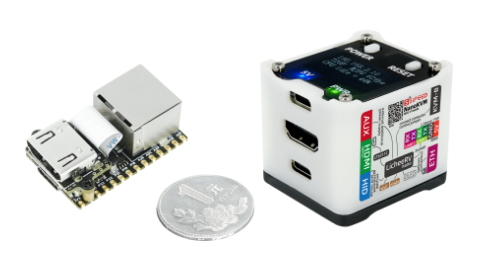
🌟 What is NanoKVM?
NanoKVM is a series of compact, open-source IP-KVM devices based on the LicheeRV Nano (RISC-V). It lets you remotely access and control computers as if you were sitting in front of them, making it useful for servers, embedded systems, and other headless machines.
📦 Product Family
Choose the NanoKVM model that best fits your deployment:
- NanoKVM-Cube Lite: A barebones kit for DIY users and bulk deployments.
- NanoKVM-Cube Full: A ready-to-use kit with a case, accessories, and a pre-flashed system SD card.
- NanoKVM-PCIe: A PCIe-bracket form factor for internal chassis mounting. It draws power from the PCIe slot and supports optional Wi-Fi and PoE.
- NanoKVM-Pro: A higher-performance version with major upgrades:
- Resolution: Up to 4K@30fps / 2K@60fps.
- Network: 1Gbps Ethernet + PoE + Wi-Fi 6, upgraded from 100Mbps Ethernet.
- Latency: Hardware-accelerated encoding reduces latency from 100-150ms to 50-100ms.
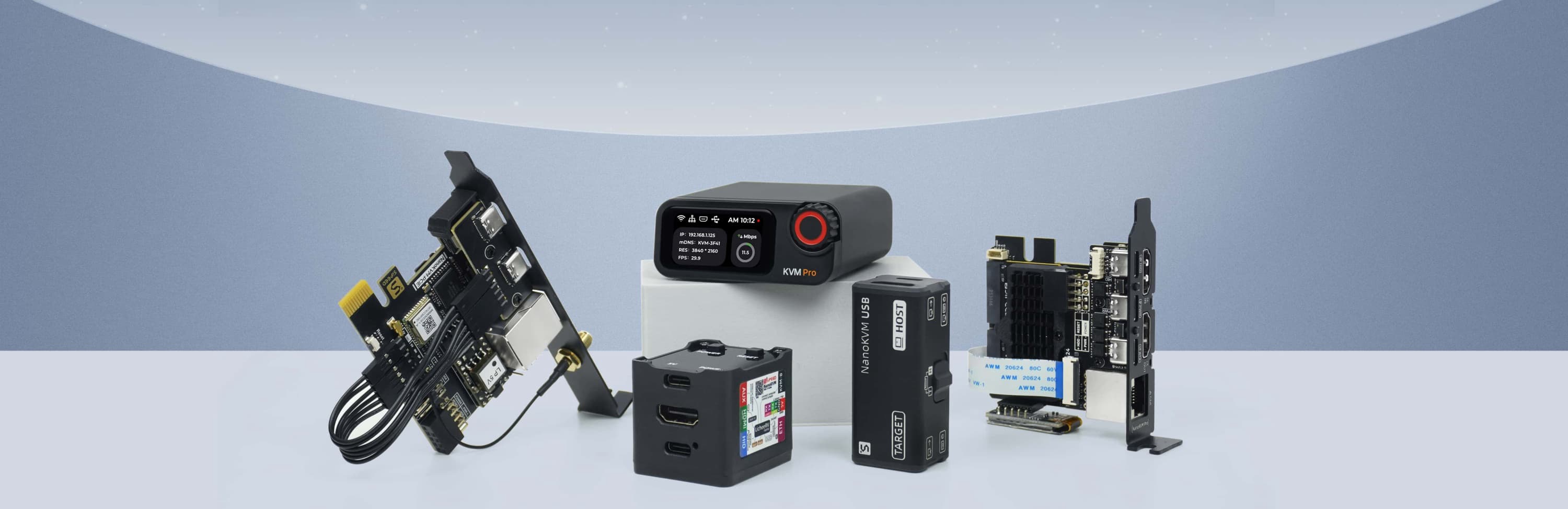
If you are looking for a USB-based KVM solution, check out NanoKVM-USB.
🛠️ Technical Specifications
| Feature | NanoKVM-Pro | NanoKVM (Cube/PCIe) | GxxKVM | JxxKVM |
|---|---|---|---|---|
| Core | AX630C 2xA53 1.2G | SG2002 1xC906 1.0G | RV1126 4xA7 1.5G | RV1106 1xA7 1.2G |
| Memory & Storage | 1G LPDDR4X + 32G eMMC | 256M DDR3 + 32G microSD | 1G DDR3 + 8G eMMC | 256M DDR3 + 16G eMMC |
| System | NanoKVM / PiKVM | NanoKVM | GxxKVM | JxxKVM |
| Resolution | 4K@30fps / 2K@60fps | 1080P@60fps | 4K@30fps / 2K@60fps | 1080P@60fps |
| HDMI Loopout | 4K loopout | — | — | — |
| Video Encoding | MJPEG / H.264 / H.265 | MJPEG / H.264 | MJPEG / H.264 | MJPEG / H.264 |
| Audio Transmit | ✓ | — | ✓ | — |
| UEFI / BIOS | ✓ | ✓ | ✓ | ✓ |
| Emulated USB Keyboard & Mouse | ✓ | ✓ | ✓ | ✓ |
| Emulated USB ISO | ✓ | ✓ | ✓ | ✓ |
| IPMI | ✓ | ✓ | ✓ | — |
| Wake-on-LAN | ✓ | ✓ | ✓ | ✓ |
| Web Terminal | ✓ | ✓ | ✓ | ✓ |
| Serial Terminal | 2 channels | 2 channels | — | 1 channel |
| Custom Scripts | ✓ | ✓ | — | — |
| Storage | 32G eMMC 300MB/s | 32G MicroSD 12MB/s | 8G eMMC 120MB/s | 8G eMMC 60MB/s |
| Ethernet | 1000M | 100M | 1000M | 100M |
| PoE | Optional | Optional | — | — |
| Wi-Fi | Optional Wi-Fi 6 | Optional Wi-Fi 6 | — | — |
| ATX Power Control | ✓ | ✓ | Extra $15 | Extra $10 |
| Display | 1.47" 320x172 LCD / 0.96" 128x64 OLED | 0.96" 128x64 OLED | — | 1.68" 280x240 |
| More Features | Sync LED Strip / Smart Assistant | — | — | — |
| Power Consumption | 0.6A@5V | 0.2A@5V | 0.4A@5V | 0.2A@5V |
| Power Input | USB-C or PoE | USB-C | USB-C | USB-C |
| Dimensions | 65x65x26mm | 40x36x36mm | 80x60x17.5mm | 60x43x(24~31)mm |
📂 Project Structure
├── kvmapp          # APP update package
│   ├── jpg_stream  # Legacy support for direct updates from older versions
│   ├── kvm_new_app # Triggers components for kvm_system updates
│   ├── kvm_system  # Core KVM application
│   ├── server      # Front-end and back-end integration
│   └── system      # Essential system components
├── web             # NanoKVM Front-end (UI)
├── server          # NanoKVM Back-end (Service)
├── support         # Auxiliary modules (Image subsystem, status, updates, OLED, HID, etc.)
├── ...
💻 Development
Start with the guide that matches the part of NanoKVM you want to work on:
- System support modules: Build and update the low-level hardware support components in support/sg2002/README.md.
- Backend service: Set up, build, and understand the Go service in server/README.md.
- Frontend UI: Develop, lint, and build the React interface in web/README.md.
- Release packaging: Assemble the
nanokvm_<version>.tar.gzupdate package in scripts/README.md.
Backend compilation and runtime validation require the target toolchain or a NanoKVM device. See the module-specific guides above for the latest development workflow.
Dev container (optional)
The repository ships a Dev Container setup (.devcontainer/) that layers the frontend toolchain (Node 22, pnpm 11) on top of the release builder image (RISC-V cross toolchain, Go, MaixCDK), so one container covers Go, C support-layer and web development. It is a convenience for IDE users; the make targets in the repository root remain the canonical CLI workflow.
- Requirements: Docker plus an editor or CLI with dev container support (e.g. the VS Code "Dev Containers" extension, or
devcontainer up). - On creation the container prepares itself automatically:
support/sg2002/build update_lib(resyncs MaixCDK components with the checkout) andpnpm installfor the frontend. - Backend: run
server/build.shfor a release-equivalent binary (BoringCrypto +dl_libRPATH).make appbuilds a plain development binary without those, so preferserver/build.shwhenever the result should match a release. - Support layer:
cd support/sg2002 && ./build kvm_system(the MaixCDK virtualenv is part of the container environment). - Frontend:
cd web && pnpm dev(VS Code forwards port 3001 automatically; other clients may need to map it themselves); see web/README.md for pointing it at a device. - The base image
ghcr.io/sipeed/nanokvm-builder:latestis x86-64 only; on Apple Silicon it runs under emulation (works, but C builds are slow). You can also build the image locally first (make builder-image) and point theBASE_IMAGEbuild arg at it (e.g. viabuild.argsindevcontainer.json). On Linux hosts the first container creation also takes a while: the container user is remapped to your uid, which re-chowns its home directory once. - Hardware-dependent verification still requires a real NanoKVM device; the container covers compiling, linting and mock-mode web development only.
🔩 Hardware Platform (NanoKVM Cube/PCIe)
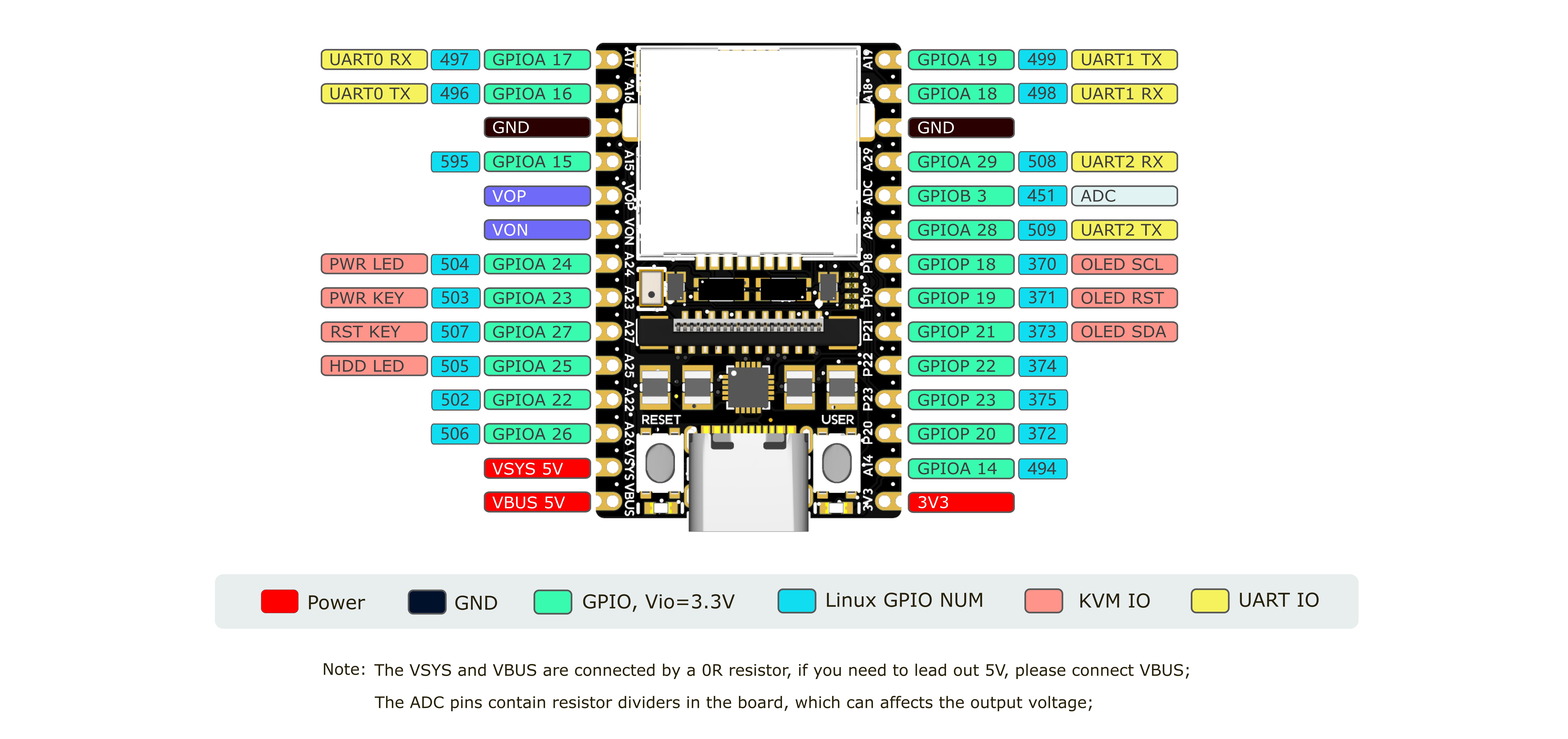
NanoKVM is based on Sipeed LicheeRV Nano. You can find specifications, schematics, and dimensional drawings in the download station.
The NanoKVM Cube/PCIe hardware is built from these components:
- NanoKVM Lite: LicheeRV Nano plus the HDMI-to-CSI board.
- NanoKVM Full: NanoKVM Lite plus the NanoKVM-A/B boards and enclosure.
- HDMI-to-CSI board: Converts the HDMI input signal.
- NanoKVM-A board: Provides OLED, ATX control output through USB-C, auxiliary power, and physical ATX power/reset buttons.
- NanoKVM-B board: Connects NanoKVM-A to the host computer's ATX pins for remote power control.
The NanoKVM image is built with the LicheeRV Nano SDK and MaixCDK. It is intended for NanoKVM hardware and is not a general-purpose KVM software package for other LicheeRV Nano or SG2002 products. If you want to build an HDMI input application on LicheeRV Nano or MaixCam, please contact us for technical support.
Note: Of the 256MB memory on SG2002, 158MB is currently allocated to the multimedia subsystem for video capture and processing.
🤝 Contributing
We welcome contributions. To get started:
- Fork the repository.
- Create a feature branch.
- Commit your changes.
- Push to the branch.
- Open a Pull Request.
Please keep your pull requests small and focused to facilitate easier review and merging.
🎁 Contributors who submit high-quality Pull Requests may receive a NanoKVM Cube, PCIe, or Pro as a token of our appreciation!
🛒 Where to Buy
💬 Community & Support
- Discord
- QQ group: 703230713
- Email: support@sipeed.com
- FAQ
📜 License
This project is licensed under the GPL-3.0 License. See LICENSE for details.